Ask an ALEKS Implementation Manager: Josef Torres on How to Duplicate a Course and What is Evergreen?
Duplicating an existing ALEKS course for a new term is a quick and easy process!
- Higher Education
- Blog
- ALEKS
“Is there an easy way to duplicate a course I’ve already set up in ALEKS? I’ve heard something about Evergreen—how does that factor in?”
Yes! Duplicating an existing ALEKS course for a new term is a quick and easy process!
- In your ALEKS account, select the class you would like to duplicate from the drop-down menu (note: the class might be archived).
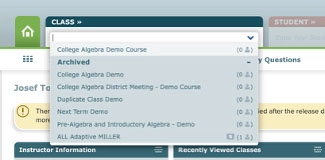
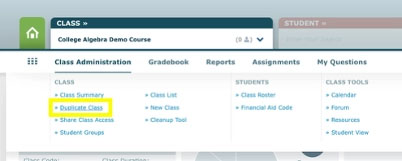
- Once the class is selected, hover over the Class Administration menu option and select Duplicate Class
.
- Complete the Class Information section of your new course (Class Name, Section, and Class Dates) and click the blue Copy Class button on the bottom of the page.
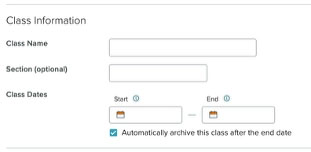
- That’s it! Now that you have duplicated your course, you can begin to edit assignment start/due dates and pair your course with your LMS. Here are a few resources to help with those steps:
ALEKS New User Training Resources
ALEKS Returning User Training Resources
“What is Evergreen? And is it related to the yellow banner in my course seen below?”
Great question! Evergreen is a new delivery model that provides updated and relevant content, tools, and accessibility without requiring you to switch editions. These updates will engage students and freshen up assignments with up-to-date coverage of select concepts and new questions.
If you see the following banners displayed across your instructor or class dashboard in ALEKS, that means there is a new release available for your ALEKS course.

For more information and details about the new release, click on the New Releases link in the banner. On the New Releases page, you will find release notes, FAQs, and even an eBook preview of the new release.
To upgrade to the newest release, all you need to do is duplicate your existing ALEKS course (follow the steps outlined above).
When you get to the Class Information page, you will see the option to update the textbook to the latest release. Leave the box checked if you would like to update the textbook and uncheck the box if you would like to stick with your current edition.
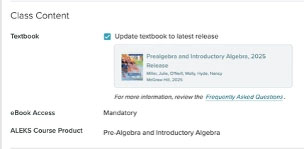
Also, moving to the new release will NOT impact any of the assignments in the ALEKS course that you are duplicating. For more information about the process, check out this video: