Ask an ALEKS Implementation Manager: Josef Torres on Extensions and Exceptions
Josef Torres explains how ALEKS gives instructors easy control over extensions and exceptions—ensuring flexibility without losing course momentum.
- Higher Education
- Article
- Blog
- ALEKS

“I need to give some students extra time or different due dates. What’s the best way to handle extensions and exceptions in ALEKS? Anything else I should know about these features?”
Answer:
Yes! We have a feature in ALEKS that does just that!
The Exceptions tool in ALEKS gives instructors the flexibility to adjust the start and/or due date of an assignment for one or more students, or the entire class. The Exceptions tool has a few other options that come in handy especially for a test or quiz (e.g., changing the number of assignment attempts, time limit, and password).
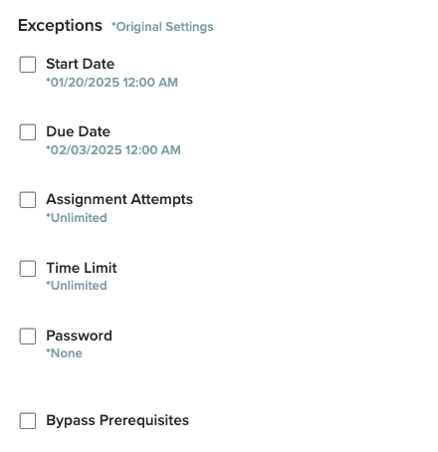
There are a few different ways to access this feature in your ALEKS course. Outlined below is the simplest way to provide assignment extensions for your students:
Via the Assignment List page in your ALEKS course:
- Select the appropriate course in your ALEKS account.
- Go to the Assignment List page by hovering over the Assignments menu option and then select Assignments.
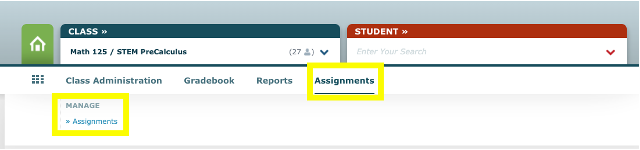
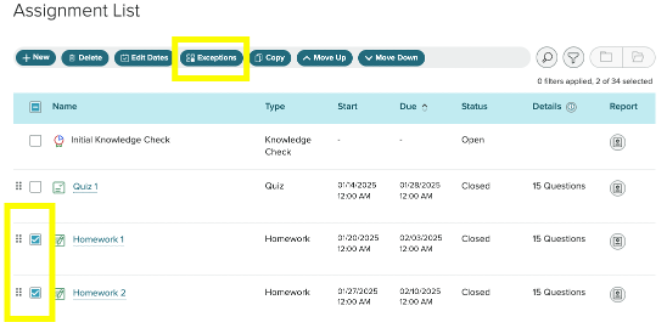
- Select the assignment(s) that you would like to extend and click on the blue Exceptions button on the top of the page.
- Select the student(s) from the drop-down menu who need an extension and click on the Due Date box.
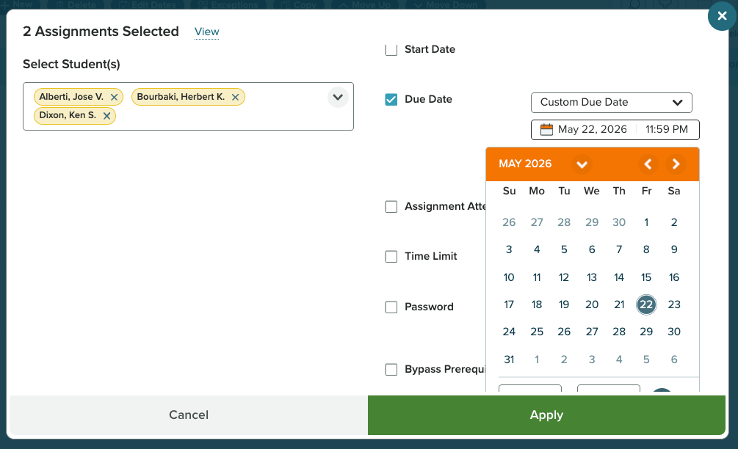
- You can shift the due dates forward by multiple days or choose a Custom Due Date (as seen above) and then click the green Apply button. That’s it!
Check out this video for a detailed walkthrough of how to use the Exceptions tool in ALEKS.