Ask an ALEKS Implementation Manager: Susan Piroth on Helping Students Use Review Mode
Unlock the full potential of ALEKS Review Mode! Find out how students can revisit learned topics and practice assignments with helpful tips and resources.
- Higher Education
- Blog
- ALEKS

“My students want to go back and review material they’ve already worked on in ALEKS. What’s the best way to guide them to use Review Mode, and are there any settings I should check?”
Hi, Susan Piroth here! I’m the Implementation Manager for the West and South Florida region, and I’m happy to answer your question today.
Students can easily review previously learned material, whether you’re using adaptive modules, non-adaptive assignments, or a combination of the two. Regardless of the assignment types you’re using, ALEKS provides extensive practice opportunities for your students.
Adaptive Modules
Review Mode for ALEKS adaptive assignments is available automatically, and there’s nothing you need to do to set it up for your course. Students can review topics they have previously learned or mastered by opening their ALEKS menu and clicking on Review.
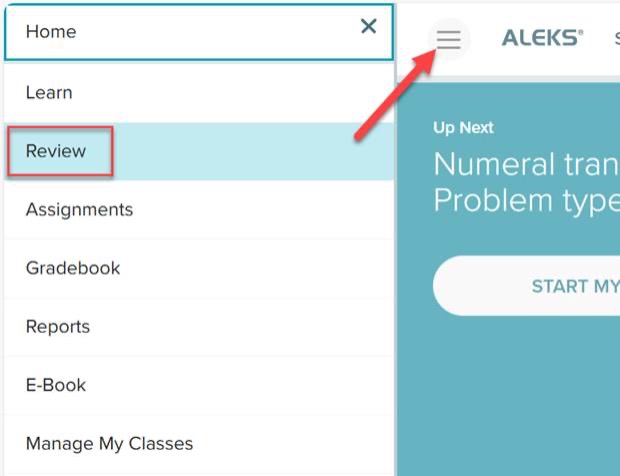
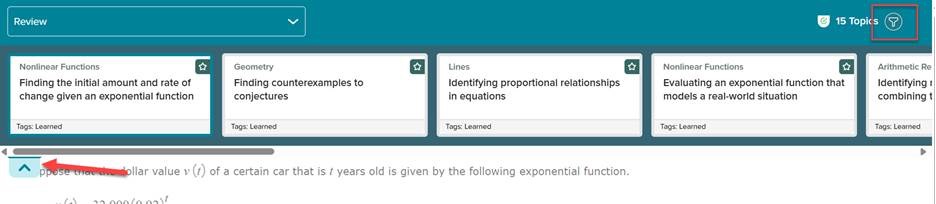
Once in Review Mode, students can click the arrow in the top-left corner to open the topic carousel. From there, they can select an available topic or use the funnel icon to filter or search for a specific topic.
You can share this video with your students to help them navigate Review Mode for adaptive assignments: ALEKS Student View- How to Use Review Mode
Non-Adaptive Assignments
When setting up non-adaptive homework assignments, quizzes, and tests, you’ll see the Review Mode option in the assignment settings:
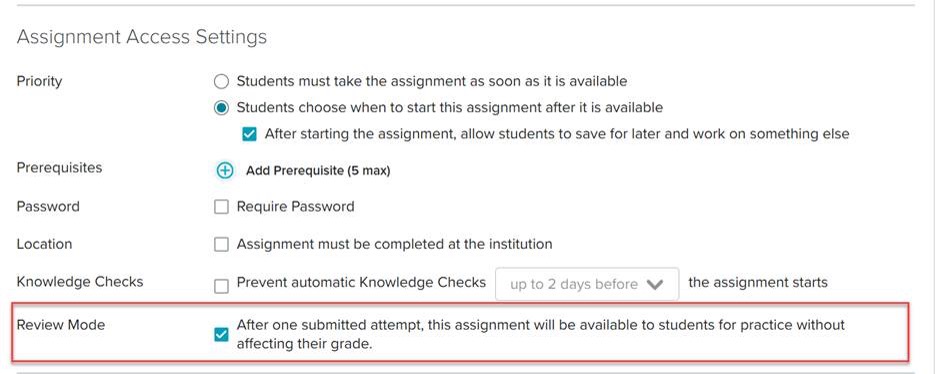
If this setting is enabled, students will be able to click the Review Assignment link on the ALEKS Assignments page once they complete an attempt and the assignment report becomes available. This option will allow students access to additional versions of the assignment questions for practice without affecting their assignment grade or using an additional attempt on the assignment.

You can share this video with your students to help them navigate the ALEKS Assignments page, including non-adaptive Review Mode: ALEKS Student View- How to Use the Assignments Page/Report