
ConnectED - My Files
Manage instructional files using My Files to upload, organize, and share resources with students.
Tags
- Networks 2014 (K-5)
- ConnectEd
- SSO & Manual-Rostering
- Customer Support
- iScience 2017
- Middle School
- Tools & Resources
- Direct Login & Manual-Rostering
- Glencoe Algebra 1 2014
- High School
- Glencoe Algebra 1 2018
- Classroom Teacher
- Building Blocks 2015
- SSO & Auto-Rostering
- Glencoe Science 2017
- PreK-12
- Elementary School
- World Languages
- Visual & Performing Arts
- Inspire Science 2017
- Math
- Asi se Dice 2016
- Health
- Getting Started & Orientation
- Glenoce Algebra 2 2018
- Intervention
- Social Studies
- Glencoe Math Course 1
- Direct Login & Auto-Rostering
- McGraw Hill Health 2014
- Glencoe Math Course 2
- Glencoe Math Course 3
- Glencoe Science
- Core
- Core Plus Math 2015
- Glencoe Health 2014
- My Math 2013 & 2016
- My Math 2018
- Glencoe Algebra 2 2014
- Glencoe Math
- Science
- Preschool


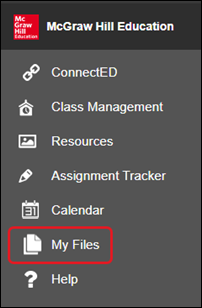
My Files contains files you upload to the program from your computer.
- All files you have uploaded are listed by title.
- Click the Resource Title to see more information about the file.
- Click the magnifying glass icon to open the specific file in a new window.
- You can filter the files to view them by title, type, or modification date.
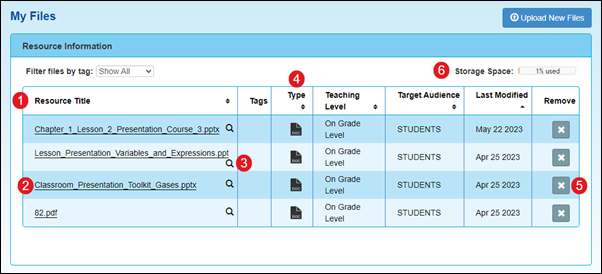
- Click the Remove (X) button to remove any of the files from your My Files page.
- The Storage Space bar indicates how much storage space you are currently using.
Upload Files
- To add additional files to My Files, click the Upload New Files button.

- On the Upload to My Files pop-up, select the files to upload.
- Drag and drop the selected files into the window.
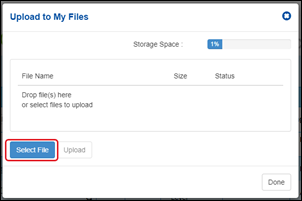
- Or click the Select Files button on the File Upload pop-up Window
- All the listed files will be uploaded at once.
- The Storage Space bar indicates how much storage space you are currently using.
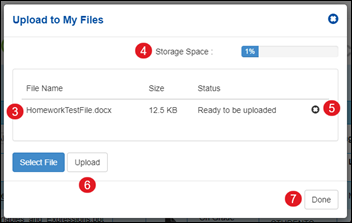
- Remove any of the files by selecting it and clicking the X next to the file name.
- Click the Upload button to upload and register the selected files to the program.
- When the files are uploaded, click the Done button.
Supported Files
The following file types are supported for upload:
- Audio – mp3, wav
- Video – flv, m4v, mp4
- Docs – doc, docx, pdf, ppt, pptx, pps, ppsx, xls, xlsx, rft, txt, htm, html
- Other – zip, sit, sitx, der, tns, 8xv, kmz, kml, gsp, ftm, tp