Navigating the Number Worlds/Building Blocks 2015 Dashboard
Learn how teachers use the Number Worlds dashboard to access lessons, reports, and class data.
Tags
- Math
- Getting Started & Orientation
- Dashboard & Navigation Overview
- Intervention
- SSO & Manual-Rostering
- Customer Support
- Direct Login & Auto-Rostering
- Number Worlds 2015
- Direct Login & Manual-Rostering
- Classroom Teacher
- Building Blocks 2015
- SSO & Auto-Rostering
- PreK-12
- Elementary School


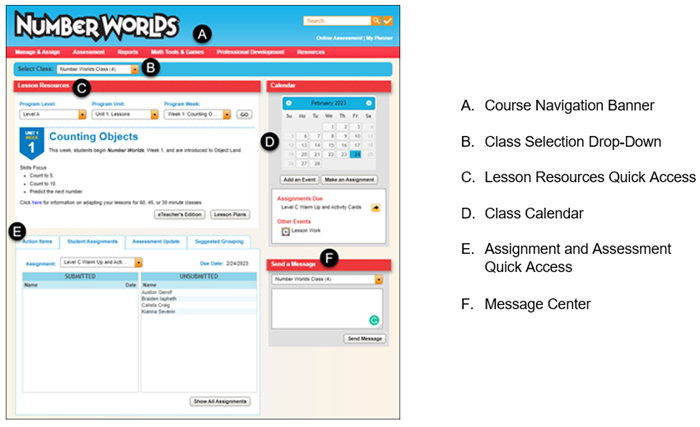
1. Click the program title in the upper left corner of the page to return to the Teacher Center Dashboard.
2. Use the Search field to search the course for specific resources in the Resource Library.
3. Use the Standards Search button to open the Search by Standards pop-up.
4. Click on Manage & Assign to access all the class management pages, including information about your classes and students, the Planner, Assignment Tracker, Lesson Plans, and Building Blocks Learning Paths.
5. Click on Assessment to access the Informal, Formal, and Online Assessment centers.
6. Click on Reports to access the Class, Student, and Admin reports.
Note: You will only have access to the Admin Reports if you have access as an Organization Admin.
7. Click on Math Tools & Games to access the eToolkit.
8. Click on Professional Development to access Learning Environment resources that will give provide you with support resources to assist with using the Number Worlds program.
9. Click on Resources to access the resource library.
10. Click on Online Assessment to quickly access the online eAssessment center.
11. Click on My Planner to quickly access the class weekly calendar.
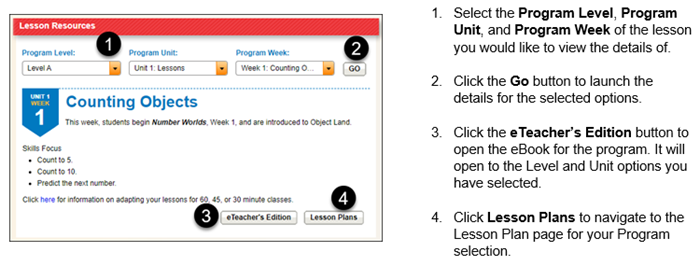
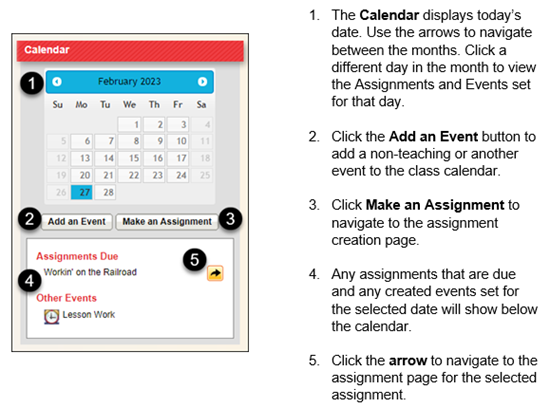
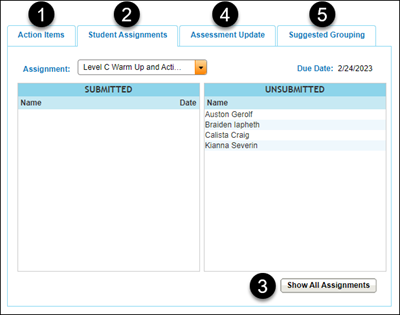
1. The Action Items tab shows a list of students that the program has noted when a student has struggled with Building Blocks activities, and had to be put back on an earlier activity.
2. The Student Assignments tab shows which students have submitted the assignment, and which students have yet to submit the assignment. It also provides the Due Date of the assignment. Use the Assignment drop-down to select a different assigned assignment.
3. Click the Show All Assignments button to navigate to the Assignment Tracker.
4. The Assessment Update tab will show you the most recent Formal Assessment scores.
5. The Suggested Grouping tab is based on the most recent Formal Assessment scores, with a cutoff of 85%. Any students who have scored above 85% on their latest Formal Assessment are placed in the Independent Group for Interactive Differentiation work. Any students who have scored below 85% on their latest Formal Assessment are placed in the Supported Group and should get assistance during the Interactive Differentiation work.