
Review ConnectED Assignments
Review completed assignments submitted by students.
Tags
- Customer Support
- PreK-12
- Classroom Teacher
- Elementary School
- Middle School
- High School
- Direct Login & Auto-Rostering
- Direct Login & Manual-Rostering
- SSO & Auto-Rostering
- SSO & Manual-Rostering
- Core
- Intervention
- Supplemental
- AP, Honors & Electives
- Literacy
- Math
- Science
- Social Studies
- Health
- Visual & Performing Arts
- World Languages
- Glencoe Health 2014
- McGraw Hill Health 2014
- Glencoe Algebra 1 2014
- Glencoe Algebra 1 2018
- Glencoe Algebra 2 2014
- Glenoce Algebra 2 2018
- Glencoe Math
- Glencoe Geometry 2014
- Glencoe Geometry 2018
- Glencoe Math Course 1
- Glencoe Math Course 2
- Glencoe Math Course 3
- Glencoe Math Accelerated
- McGraw Hill My Math
- McGraw Hill My Math 2018
- McGraw Hill My Math 2013 & 2016
- Glencoe Science 2017
- Glencoe Science
- Inspire Science 2017
- iScience 2017
- Asi se Dice 2016
- Networks 2014 (K-5)
- Grades & Assignments


For steps on creating ConnectED assignments, see the Create and Manage ConnectED Assignments article. For steps on reviewing assigned eBook pages, see the Review Student ConnectED eBook Work article.
There is not an option to enter grades for ConnectED assignments within the program; there is only an option to review completed work. The only resources that will provide graded content for certain ConnectED programs are assessments. For steps on creating and managing assessments, see the McGraw Hill Assessment and Gradebook Navigation or the Assign eAssessment Tests article, depending on the program you are using.
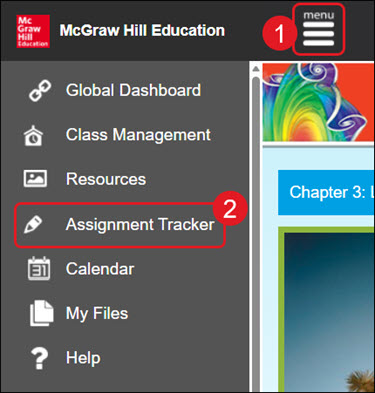
- Click Menu at the top left.
- Click Assignment Tracker from the menu.
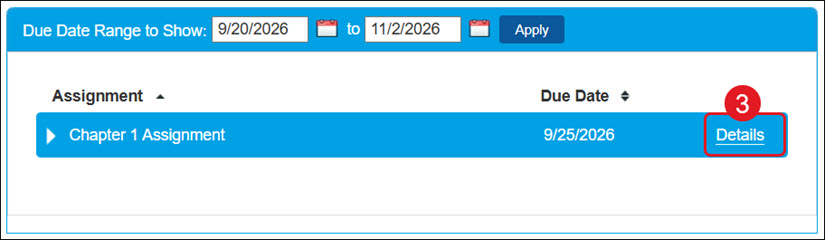
- Click the Details link to the right of the assignment.
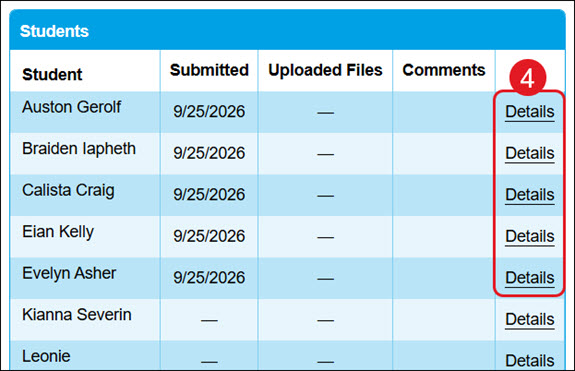
- Click the Details link to the right of a student.
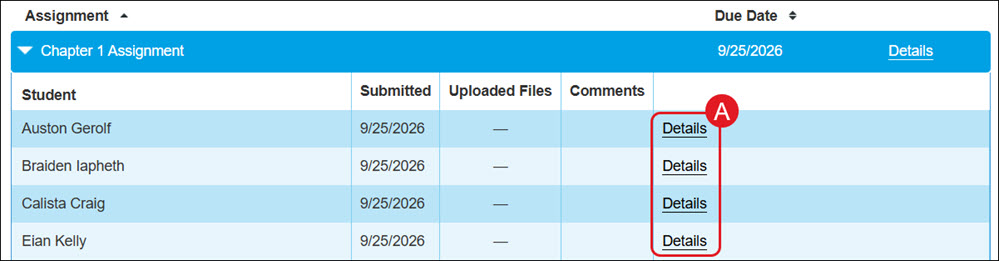
- Another option is to click on the assignment blade and click the Details link to the right of a student's name to view that student's completed assignment.
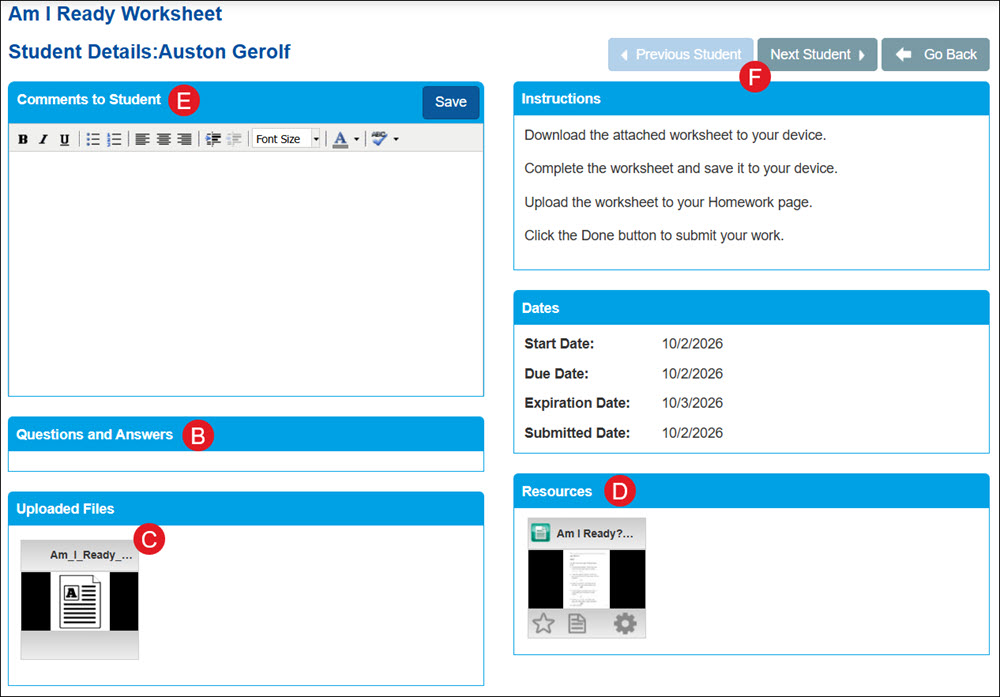
- The Questions and Answers box will show any questions students submitted answers for when assigned to eBook work or certain resources.
- Click on any Uploaded Files to view work completed by students.
- Click on any Resources files to view the original resources attached to the assignment.
- Enter any Comments to Student for them to review.
- Click the Previous Student or Next Student buttons to easily navigate through student work.
- Another option is to click on the assignment blade and click the Details link to the right of a student's name to view that student's completed assignment.
