
Implementing Data Integration with Renaissance Star or iReady with McGraw Hill Personalized Learning
Implement data integration with Renaissance Star or i-Ready using McGraw Hill Plus.
- Customer Support
- PreK-12
- School Administrator
- Preschool
- Elementary School
- Middle School
- High School
- Direct Login & Auto-Rostering
- Direct Login & Manual-Rostering
- SSO & Auto-Rostering
- SSO & Manual-Rostering
- Core
- Literacy
- Math
- CA Reveal Math (K-12)
- Reveal Math (K-12)
- McGraw Hill Literacy Emerge!
- McGraw Hill Literacy Summit!
- McGraw Hill Literacy Soar!
- Reports & Analytics
- Personalized Learning Reports


View a PDF copy of the article.
Renaissance Star/iReady and McGraw Hill Plus Implementation Process
- Integrating Renaissance Star or iReady data allows districts to view Grade Level and Domain-Level performance in the McGraw Hill Personalized Learning Standards and Skills graph. Additionally, this data supports pre- and post-requisite instructional recommendations for students based on their Star or iReady performance.
- This process applies to districts using McGraw Hill Personalized Learning-enabled Reveal Math editions.
- Districts must have both digital Reveal Math Teacher and Student Editions assigned.
- Both Star or iReady and McGraw Hill Student IDs must match. This is how the data is pulled and associated from one platform to the other and associated with specific students.
- Districts must upload data at the completion of each test administration.
Sharing Renaissance Star or iReady Data with McGraw Hill
- Contact Integration Support (integrationsupport@mheducation.com) and complete the Customer Data Sharing agreement via DocuSign.
- Within 1-3 business days after submitting data sharing consent, the District Assessment Coordinator will receive a secure upload link from an email address in the mheducation.com domain.
- Upload your Star or iReady data extract via the secure upload link.
- Star or iReady data will be viewable in McGraw Hill Personalized Learning within 5-7 business days once it has been received and validated.
- For subsequent administrations, contact Integration Support (integrationsupport@mheducation.com) for a new secure upload link.
- If Star or iReady data is shared with McGraw Hill, but the district has not met the product integration requirements, McGraw Hill may deny the request. Further explanation of why the pairing was unsuccessful will be provided to the District Assessment Coordinator who made the request.
Personalized Learning Resources
Teacher Resources:
Personalized Learning Teacher Report
Create Personalized Practice Assignments
Personalized Learning Teacher-Led Mini Lessons
Administrator Resources:
Personalized Learning Administrator Report
Renaissance Star or iReady Data Not Generating
Star or iReady and McGraw Hill Student IDs must match to ensure a successful product integration. McGraw Hill's system uses this identifier to match with the student in the data file, so that the correct student’s data can be pulled for McGraw Hill Personalized Learning.
Districts Using Manual Rostering
This includes districts that are Direct Login and Manual Rostering and Single Sign-On and Manual Rostering.
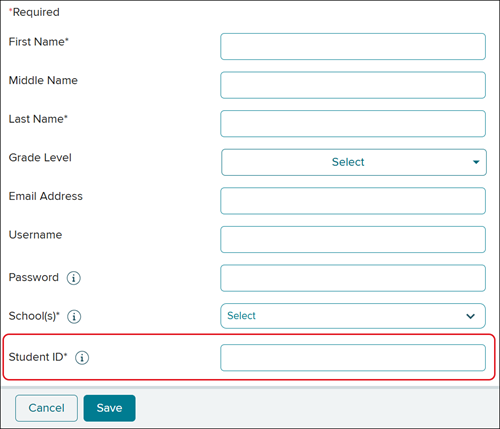
If a student does not have an assigned Student ID in the McGraw Hill system, this will need to be added for existing users. Organization Administrators can manage existing users with the Import Users/Rosters tool in their administrator tools.
You can also modify users by editing the Student ID in Manage Users in administrator tools.
If preferred, teachers can also edit student information to include the Student ID from Roster in the Reveal Math course.
Districts Using Auto-Rostering
This includes districts that are Single Sign-On and Auto-Rostering and Direct Login and Auto-Rostering.
These districts are unable to edit the Student ID from Manage Users , as this identifier can only be modified by the Automated Rostering Process. Depending on which type of rostering the district uses, the data may be received directly from the district’s Student Information System (SIS) or Learning Management System (LMS).
For OneRoster® districts, the "UserSourcedID” field received in the roster data is set as the Student ID.
Clever® District Users
Clever Rostering is supported by both McGraw Hill and NWEA.
To sign up to use Clever with McGraw Hill, submit our McGraw Hill Integration Intake Form.
Note: Clever Rostering does not have to be configured by both platforms for a successful pairing. However, Student IDs must still match between platforms. If Clever is used by both McGraw Hill and Star or iReady, but the Student IDs do not match, contact your assessment provider’s partner support.
Additional Support
Integration Support
Phone: 855-315-6417
Email: integrationsupport@mheducation.com
McGraw Hill Integration Intake Form
McGraw Hill K-12 Technical Support
Phone: 800-437-3715
Email: epgtech@mheducation.com
OneRoster® is a trademark of the IMS Global Learning Consortium, Inc.
Clever® is a trademark of Clever, Inc.