
Error When Manually Adding Students to Open Learning Class Roster
Troubleshoot errors that occur when manually adding students to a roster for Open Learning classes.
- Customer Support
- PreK-12
- Classroom Teacher
- Preschool
- Elementary School
- Middle School
- High School
- Direct Login & Auto-Rostering
- Direct Login & Manual-Rostering
- SSO & Auto-Rostering
- SSO & Manual-Rostering
- Core
- Intervention
- Supplemental
- AP, Honors & Electives
- Career & Technical Education
- Literacy
- Math
- Science
- Social Studies
- Health
- Visual & Performing Arts
- World Languages
- AP Biology
- AP Chemistry
- AP History & Geography
- AP Psychology
- AP Economics
- AP African American Studies
- AP Precalculus
- AP Statistics
- AP Computer Science
- AP Language and Composition
- AP Public Speaking
- AP Music Theory
- 5 Steps to a 5 - AP Test Prep
- Glencoe Health 2022
- Teen Health 2021
- Arrive Math
- Building Blocks 2024
- Building Blocks PreK 2025
- Number Worlds 2024
- SRA Reading Laboratory 2025
- SRA Reading Mastery Transformations
- Achieve3000 Literacy
- Actively Learn
- McGraw Hill Literacy Emerge!
- McGraw Hill Literacy Summit!
- McGraw Hill Literacy Soar!
- Open Court Reading 2025
- Redbird
- StudySync 2021
- ALEKS
- ALEKS Adventure
- CA Reveal Math (K-12)
- Illustrative Math
- Redbird Math
- Reveal Math (K-12)
- Texas Math
- CA Inspire Science 2020
- FL Science 2025 (K-12)
- Inspire Science 2020
- TN Science (K-12)
- TX Science 2025 (K-12)
- CA Impact 2019
- FL Social Studies 2024 (K-12)
- Impact Social Studies
- McGraw Hill Social Studies
- Asi se Dice 2024
- CTE - Business, Marketing, and Finance
- CTE - Health Science
- CTE - Computing and Technology
- CTE - Agriculture
- CTE - Culinary Arts
- CTE - Early Childhood Education
- CTE - Criminal Justice
- Level Up K–5
- Level Up 6–8
- Level Up 9–12
- Class Management
- Troubleshooting
- Error Messages


If you are trying to roster students to your Open Learning course and are receiving a "We were unable to process your request, please try again." error, this could be because of a few reasons.
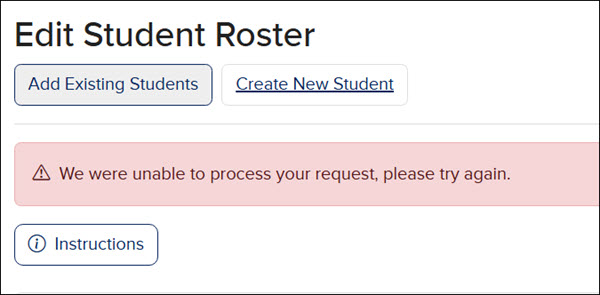
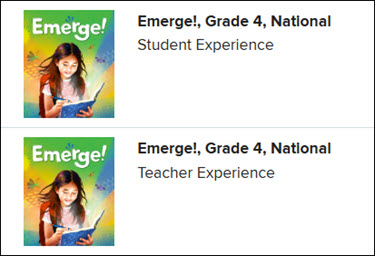
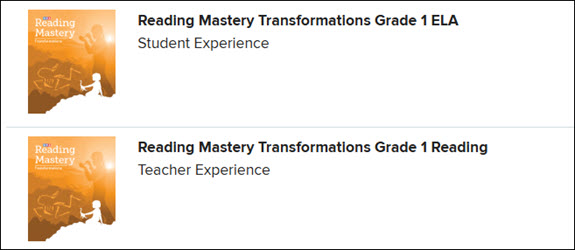
The first step you want to take if you are receiving the error message is to contact your Organization Administrator and verify that there are available Student Edition licenses. Not only do they want to verify that Student Edition licenses are available, but they also need to confirm that the Student Edition product name shows the exact same as the Teacher Edition product name.
Same: Both titles show Emerge!, Grade 4, National.
Different: The Student Edition shows as Reading Mastery Transformations Grade 1 ELA, while the title for the Teacher Edition is Reading Mastery Transformations Grade 1 Reading.
If the Student Edition licenses are on a different purchasing account from the Teacher Edition licenses, your Organization Administrator or purchasing agent will need to reach out to our Digital Licensing team to have the licenses moved to the correct account. Digital Licensing can be contacted via phone at 800-437-3715 or by email at subscriptionmanagement@mhedcuation.com.
If Student Edition licenses were not purchased to go along with the Teacher Edition, your Organization Administrator or purchasing agent will need to reach out to our Customer Service team or the district's Sales Representative.
If you are an Organization Administrator, you can view the account's licenses on the Manage Products page.
Need further support?
If it has been confirmed that there are available Student Edition licenses, that they have the same product name, and that they are on the same purchasing account, but you are still receiving the error message noted above, please reach out to our PreK-12 DTS Support team.
