How to Access PreK-12 Administrator Reports
Learn how to access PreK–12 administrator reports for usage and performance data.
- SSO & Manual-Rostering
- Customer Support
- Direct Login & Auto-Rostering
- Reports & Analytics
- Middle School
- Direct Login & Manual-Rostering
- High School
- SSO & Auto-Rostering
- PreK-12
- School Administrator
- Preschool
- Elementary School
- Core
- Intervention
- Supplemental
- AP, Honors & Electives
- Literacy
- Math
- Science
- Social Studies
- Health
- Visual & Performing Arts
- World Languages
- AP Biology
- AP Chemistry
- AP History & Geography
- AP Psychology
- AP Economics
- AP African American Studies
- AP Precalculus
- AP Statistics
- AP Computer Science
- AP Language and Composition
- AP Public Speaking
- AP Music Theory
- 5 Steps to a 5 - AP Test Prep
- Glencoe Health 2022
- Teen Health 2021
- Arrive Math
- Building Blocks 2024
- Building Blocks PreK 2025
- Number Worlds 2024
- SRA Reading Laboratory 2025
- SRA Reading Mastery Transformations
- Achieve3000 Literacy
- Actively Learn
- McGraw Hill Literacy Emerge!
- McGraw Hill Literacy Summit!
- McGraw Hill Literacy Soar!
- Open Court Reading 2025
- Redbird
- StudySync 2021
- ALEKS
- ALEKS Adventure
- CA Reveal Math (K-12)
- Illustrative Math
- Redbird Math
- Reveal Math (K-12)
- Texas Math
- CA Inspire Science 2020
- FL Science 2025 (K-12)
- Inspire Science 2020
- TN Science (K-12)
- TX Science 2025 (K-12)
- CA Impact 2019
- FL Social Studies 2024 (K-12)
- Impact Social Studies
- McGraw Hill Social Studies
- All Sorts 2026 (K-5)
- Asi se Dice 2024
- CTE - Health Science
- CTE - Agriculture
- CTE - Computing and Technology
- CTE - Culinary Arts
- CTE - Early Childhood Education
- CTE - Business, Marketing, and Finance
- CTE - Criminal Justice
- Glencoe Health 2014
- McGraw Hill Health 2014
- 2Inform
- Building Blocks 2015
- Connecting Math Concepts
- Number Worlds 2015
- Corrective Reading
- Early Interventions in Reading
- Spelling Mastery
- WonderWorks 2022 & 2014
- Maravillas 2020 & 2017
- OCR Foundational Skills Kit
- OCR Word Analysis Kit
- Open Court Reading 2016, 2018, 2023
- StudySync 2015 & 2017
- Wonders
- Wonders 2014
- Wonders 2023 2020 2017
- Wonders Balanced Literacy 2016
- Wonders EL 2016
- World of Wonders 2017
- Core Plus Math 2015
- Everyday Mathematics 4 (K-6)
- Glencoe Algebra 1 2014
- Glencoe Algebra 2 2014
- Glencoe Algebra 1 2018
- Glenoce Algebra 2 2018
- Glencoe Math
- Glencoe Geometry 2014
- Glencoe Geometry 2018
- Glencoe Math Course 1
- Glencoe Math Course 2
- Glencoe Math Course 3
- Glencoe Math Accelerated
- McGraw Hill My Math
- McGraw Hill My Math 2013 & 2016
- McGraw Hill My Math 2018
- Pre-Algebra 2012
- Glencoe Science
- Glencoe Science 2017
- Inspire Science 2017
- iScience 2017
- Networks
- Networks 2014 (K-5)
- Networks 2018
- Networks 2014 & 2016
- Music! Its Role
- Spotlight on Music
- Asi se Dice 2016


To access PreK-12 performance and usage reports, you need an Administrator account with the Reporting Administrator role type enabled.
Obtain an Administrator Account
If you need access to reports at the district level, you need to contact an Organization Administrator at your school or district for them to create an account for you or enable the Reporting Administrator role type for your existing account. Only Organization Administrators can create and modify existing administrator and teacher accounts. Organization Administrators with school-level access can only create administrator accounts for the schools affiliated with their account.
Contact our K-12 Technical Support if you are unable to locate an Organization Administrator in your district with the right level of access.
Access the Administrator Reports
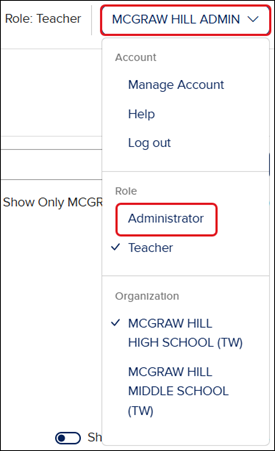
SSO or log into your McGraw Hill account, depending on how your admin account was created. If you only have the administrator role, you will land in your Admin Tools.
If you have both the Administrator and Teacher role enabled on your account, you'll land in your Teacher role first.
To access the Admin Tools, click on the Profile button at the top-right of the My Programs page. Click on Administrator from the menu.
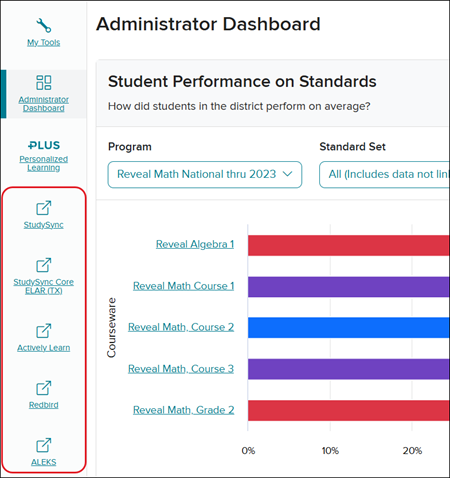
The items on the navigation menu vary based on which administrator role types enabled for your account. As a Reporting Administrator, you will have access to the Administrator Dashboard and McGraw Hill Plus reports (if enabled).
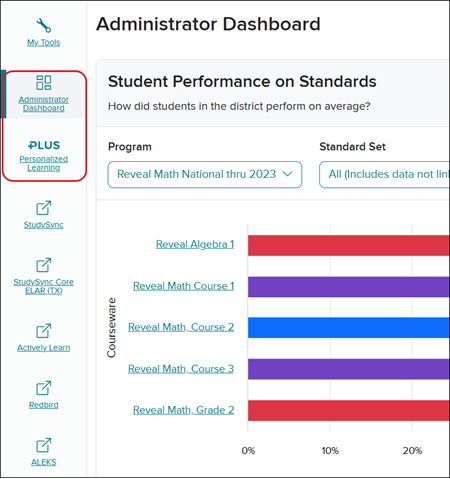
For more information on each of the reports available, refer to the following articles:
- Admin Tools - Administrator Dashboard
- McGraw Hill Plus Admin Reports
- Reporting Administrator User Guide
Administrators will also have access to product-specific reports within the Admin Tools depending on what was purchased by the district:
- ALEKS - Admin Report Resources
- ALEKS Adventure - Admin Report Resources
- Actively Learn - Administrator Features and Reports Overview
- StudySync - Types of Admin Reports