
Activate the Actively Learn Writing Assistant
Instructions on how to turn on/off the Writing Assistant and review student chat history.
- Customer Support
- PreK-12
- Classroom Teacher
- Elementary School
- Middle School
- High School
- Direct Login & Auto-Rostering
- Direct Login & Manual-Rostering
- SSO & Auto-Rostering
- SSO & Manual-Rostering
- Supplemental
- Literacy
- Science
- Social Studies
- Actively Learn
- Tools & Resources
- Grades & Assignments
- Online Assessments


Article Contents
Turn Writing Assistant Feature On/Off
Turn Writing Assistant Feature On/Off
Teachers have the ability to turn the Writing Assistant on and off at the student level, question level, and the assignment level.
1. Click Menu at the top-left.
2. Click on the class from the Classes section.
3. Click on Roster on the navigation menu.
4. In the Writing Assistant column, click the drop-down for each student to turn the feature on/off.

When making customizations to questions for text or video assignments, you can also turn the feature on/off for Short Answer questions.

When creating assignments, you can turn on/off the Writing Assistant feature. This is also where you can select to Automatically send feedback or Review feedback first.

Teacher Notifications
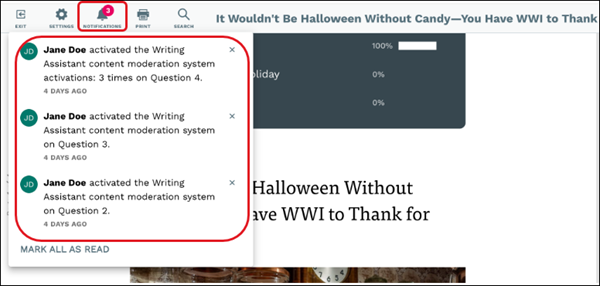
If a student sends a message to the Writing Assistant that activates the content moderation system. This sends a notification to the teacher in their Actively Learn account and via email.

Review Student Chat History
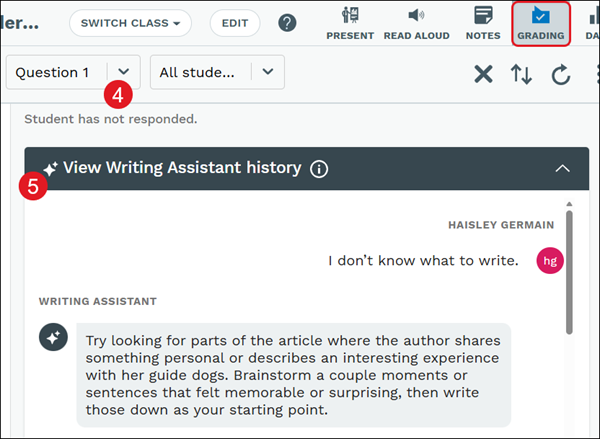
Teachers can review every interaction their students have with the Writing Assistant. Students will have an individual chat history for each question they work on with the Writing Assistant. Within the Grading panel, teachers can sort and review these chat histories by student or by question. If the Writing Assistant is disabled at any point, teachers will retain access to all past student chat histories for reference.
1. Click Menu at the top-left.
2. Click on the class under the Classes section.
3. Click on the assignment tile.
The Grading panel should open automatically.
4. Select the Question to view.
5. Click the View Writing Assistant History blade to view the student's chat history.
Writing Assistant FAQ
What support does the Writing Assistant provide to teachers and students using Actively Learn?
The Writing Assistant is an AI-powered feature that empowers teachers by giving students instant, on-demand support in the writing process. It engages students, fosters creativity, and helps refine writing skills by providing continuous feedback and revision in a simple, user-friendly interface. It optimizes instructional time for teachers by helping streamline feedback, reduce administrative workload, and enhance overall classroom efficiency.
What parameters is McGraw Hill implementing to ensure the Writing Assistant is safe for our students?
The Writing Assistant has been developed in close collaboration with MH’s Data Ethics Department and in alignment with our industry-leading cybersecurity practices. It is designed to operate within the customized guidelines and restrictions, or “guardrails,” we have established to promote safe, ethical, legal, and effective operation while upholding MH’s core principles of prioritizing the security and privacy of all information we collect and process. Our safety requirements are closely aligned with the NIST Artificial Intelligence Risk Management Framework. Here is a link to our Nutrition label.
Does the Writing Assistant comply with student data privacy laws?
Yes, like all MH institutional products, Writing Assistant complies with federal and state student data privacy laws, including FERPA. The customer owns all of their student data processed through the Writing Assistant.
Who is monitoring how the Writing Assistant interacts with students?
In addition to the well-defined controls of the feature, the teacher plays a central role in monitoring how the Writing Assistant interacts with students. Once a student submits their assignment, the teacher can review each Writing Assistant interaction in detail. This includes examining how the tool guided the student, the suggestions provided, and how the student applied them, so the teacher may ensure the Writing Assistant supports the student’s learning objectives effectively. The teacher remains in control and can reject any suggestions provided in the final feedback by the Writing Assistant. In addition, the teacher will receive a notification if a guardrail is triggered to alert the teacher to the possible need for additional chat history review.
Will the Writing Assistant work only in Actively Learn ELA?
It's available in all Actively Learn products, but only for grades 6-12.
Will the Writing Assistant work on teacher-imported content and teacher-created questions?
Yes, the Writing Assistant works for teacher-imported and teacher-created content.
Does changing or customizing embedded questions have any impact on the Writing Assistant?
Yes, because the Writing Assistant will know the context of the assignment and the question prompt as it provides feedback to students, customizing questions will lead to feedback that is different, but more appropriate for that question.
Will the Writing Assistant be available on all assignments?
It will be available on all reading (text-based) assignments (e.g., articles, poems, short stories, etc.). It will NOT be available on video assignments, PhET simulations, TUVA Interactive Data Sets, or slide-deck assignments.
Will the Writing Assistant be available for every short answer question or just the last one that typically requires more writing?
It can be made available for every short-answer question, but the AL Content Team will determine which questions are appropriate for the Writing Assistant for our catalog content. Teachers can also turn it on/off at the question level themselves.
Does the Writing Assistant follow a specific writing rubric? Can it be customized?
Yes, the Writing Assistant follows the program rubric to evaluate student writing. No customizations to the rubric can be made at this time.
At what levels can the Writing Assistant be turned on or off?
The Writing Assistant is automatically enabled. If needed, it can be turned off at the student, assignment, and question level. by the district administrator at the district, school, or class level.
Is the Writing Assistant accessible for all students?
Yes, the Writing Assistant was built in alignment with our accessibility standards. If audio is enabled for students due to accessibility, students will have access to the read-aloud capabilities.
What kind of feedback and reporting does the Writing Assistant offer teachers?
Once a student submits their assignment, the teacher can review each Writing Assistant interaction in detail. This includes examining how the tool guided the student, the suggestions provided, and how the student applied them. Further, the tool will provide teachers with final feedback related to the scoring rubric. The Writing Assistant does not determine student grades and is not intended to be used as a grading tool.
Is professional development available to help teachers effectively use the Writing Assistant in Actively Learn?
Training for the Writing Assistant is part of Actively Learn’s professional learning offerings. Additional support and guidance can also be found in the Help Center.
