Locating the Class Code
Find your class code to share with students for registration and access.
- Networks 2014 (K-5)
- McGraw Hill Social Studies
- ALEKS Adventure
- Asi se Dice 2024
- Arrive Math
- ConnectEd
- Actively Learn
- Customer Support
- Inspire Science 2020
- StudySync 2015 & 2017
- Middle School
- ALEKS
- Glencoe Algebra 1 2014
- High School
- Open Court Reading
- Glencoe Health 2022
- CA Impact 2019
- Glencoe Algebra 1 2018
- Building Blocks 2015
- Wonders 2023 2020 2017
- Networks 2018
- CA Inspire Science 2020
- SSO & Auto-Rostering
- Pre-Algebra 2012
- PreK-12
- Everyday Mathematics 4 (K-6)
- All Sorts 2026 (K-5)
- Redbird
- Wonders EL 2016
- Supplemental
- Visual & Performing Arts
- Inspire Science 2017
- Open Learning Platform
- Health
- Literacy
- Social Studies
- Glencoe Math Course 1
- Wonders 2014
- WonderWorks 2022 & 2014
- Glencoe Math Course 2
- Glencoe Math Course 3
- Number Worlds 2015
- Glencoe Science
- Core
- Class Management
- Core Plus Math 2015
- AP, Honors & Electives
- CA Reveal Math (K-12)
- Teen Health 2021
- FL Social Studies 2024 (K-12)
- Building Blocks PreK 2025
- Achieve Math
- My Math 2013 & 2016
- Glencoe Algebra 2 2014
- Networks 2014 2016
- McGraw Hill Literacy
- Illustrative Math 2020
- OCR Foundational Skills Kit
- TX Science 2025 (K-12)
- StudySync 2021
- SSO & Manual-Rostering
- World of Wonders 2017
- iScience 2017
- Number Worlds 2024
- Maravillas 2020 & 2017
- Spotlight on Music
- Direct Login & Manual-Rostering
- Impact 2020
- Classroom Teacher
- Glencoe Science 2017
- Elementary School
- FL Science 2025 (K-12)
- World Languages
- Math
- Asi se Dice 2016
- Direct Instruction
- Glenoce Algebra 2 2018
- Intervention
- Reveal Math (K-12)
- OCR Word Analysis Kit
- Direct Login & Auto-Rostering
- McGraw Hill Health 2014
- Glencoe Health 2014
- Building Blocks 2024
- Wonders Balanced Literacy 2016
- My Math 2018
- Glencoe Math
- Science
- Preschool
- Achieve3000 Literacy
- Music! Its Role


For a full page view of the demo, click here.
For a Spanish version of the demo, click here.
Students will need the 8-character class code if they are creating their own student accounts. For steps on how they would create their own accounts, refer to the Create a Student Account article. They only need to have one student account created, as they can access all classes through one account.
If you would like students to roster themselves to a class using their existing student account, they will need the 8-character Class Code to do so. For steps on how they would redeem the Class Code to their existing student account, refer to the How To Join a McGraw Hill Class and Redeem Content article.
Note: If you're associated with a managed account, Class Codes are only available for classes that have been manually created by you. If the class was created for you by the district, you will not have access to the Class Code.
Article Contents
Open Learning Classes
1. SSO or sign in at my.mheducation.com.
2. Create an Open Learning class.
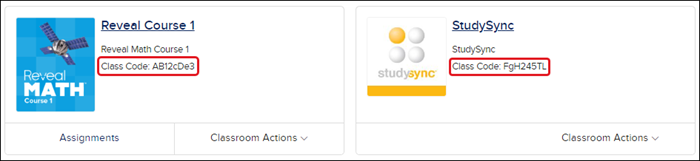
3. From the My Programs page, locate the 8-character Class Code on the class card.
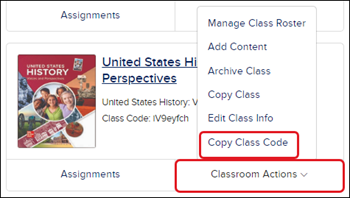
The code can also be found and copied from the Classroom Actions menu for each class.
ConnectED Classes
1. SSO or sign in at my.mheducation.com.
2. Redeem your ConnectED content.
3. Create a class.
4. Click on your Teacher Edition.
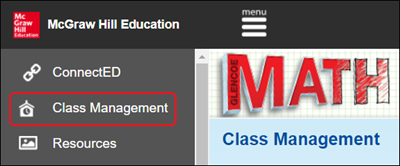
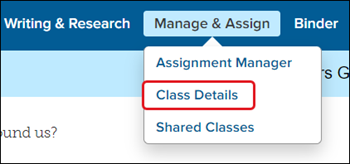
5. Click on Class Management or Manage & Assign on the Navigation Menu. Options will vary based on the program being used.
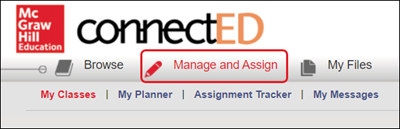
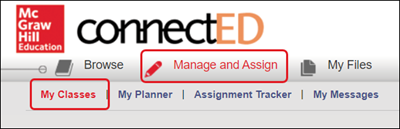
For classes that have Manage & Assign as an option, click on My Classes or Class Details next.
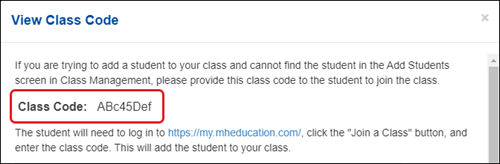
6. Click the View Class Code button.
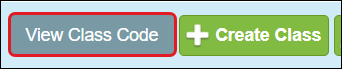
7. From the View Class Code pop-up, provide the unique 8-character Class Code to your students.