How To Join a McGraw Hill Class and Redeem Content
Join a class on my.mheducation.com using a teacher-provided class code.
- Networks 2014 (K-5)
- McGraw Hill Social Studies
- ALEKS Adventure
- Asi se Dice 2024
- Arrive Math
- Actively Learn
- Customer Support
- Inspire Science 2020
- StudySync 2015 & 2017
- Middle School
- ALEKS
- Glencoe Algebra 1 2014
- High School
- Open Court Reading
- Glencoe Health 2022
- CA Impact 2019
- Glencoe Algebra 1 2018
- Building Blocks 2015
- Wonders 2023 2020 2017
- Networks 2018
- CA Inspire Science 2020
- Pre-Algebra 2012
- Impact Social Studies
- PreK-12
- Everyday Mathematics 4 (K-6)
- Redbird
- Wonders EL 2016
- Supplemental
- Visual & Performing Arts
- Inspire Science 2017
- Health
- Literacy
- Social Studies
- Glencoe Math Course 1
- Wonders 2014
- WonderWorks 2022 & 2014
- Glencoe Math Course 2
- Glencoe Math Course 3
- Number Worlds 2015
- School Student
- Glencoe Science
- Core
- Core Plus Math 2015
- AP, Honors & Electives
- CA Reveal Math (K-12)
- Teen Health 2021
- FL Social Studies 2024 (K-12)
- Building Blocks PreK 2025
- McGraw Hill My Math 2013 & 2016
- Glencoe Algebra 2 2014
- Networks 2014 & 2016
- McGraw Hill Literacy
- OCR Foundational Skills Kit
- TX Science 2025 (K-12)
- StudySync 2021
- SSO & Manual-Rostering
- World of Wonders 2017
- iScience 2017
- Number Worlds 2024
- Maravillas 2020 & 2017
- Spotlight on Music
- Direct Login & Manual-Rostering
- School Parent
- Glencoe Science 2017
- Elementary School
- FL Science 2025 (K-12)
- World Languages
- Math
- Asi se Dice 2016
- Direct Instruction
- Glenoce Algebra 2 2018
- Intervention
- OCR Word Analysis Kit
- McGraw Hill Health 2014
- StudySync
- Glencoe Health 2014
- Building Blocks 2024
- Wonders Balanced Literacy 2016
- McGraw Hill My Math 2018
- Glencoe Math
- Science
- Preschool
- Achieve3000 Literacy
- Music! Its Role
- AP Biology
- AP Chemistry
- AP History & Geography
- AP Psychology
- AP Economics
- AP African American Studies
- AP Precalculus
- AP Statistics
- AP Computer Science
- AP Language and Composition
- AP Public Speaking
- AP Music Theory
- 5 Steps to a 5 - AP Test Prep
- SRA Reading Laboratory 2025
- SRA Reading Mastery Transformations
- McGraw Hill Literacy Emerge!
- McGraw Hill Literacy Summit!
- McGraw Hill Literacy Soar!
- Open Court Reading 2025
- Illustrative Math
- Redbird Math
- Reveal Math (K-12)
- Texas Math
- TN Science (K-12)
- All Sorts 2026 (K-5)
- CTE - Health Science
- CTE - Agriculture
- CTE - Computing and Technology
- CTE - Culinary Arts
- CTE - Early Childhood Education
- CTE - Business, Marketing, and Finance
- CTE - Criminal Justice
- 2Inform
- Connecting Math Concepts
- Corrective Reading
- Early Interventions in Reading
- Spelling Mastery
- Open Court Reading 2016, 2018, 2023
- Wonders
- Glencoe Geometry 2014
- Glencoe Geometry 2018
- Glencoe Math Accelerated
- McGraw Hill My Math
- Networks
- Getting Started & Orientation
- Log-In & Passwords
- Account Management


Your teacher may provide you with an 8-digit class code to join a class, and/or a 12-digit redemption code that provides access to the content.
If you do not yet have a student account and were advised by your school or teacher to create one, follow the steps in the Create a Student Account article.
For a full page view of the demo, click here.
For a Spanish version of the demo, click here.
For a video walkthrough, click here.
Article Content
Join a Class
1. SSO or log in at my.mheducation.com.
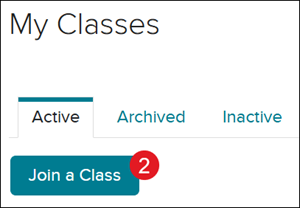
2. Click Join a Class.
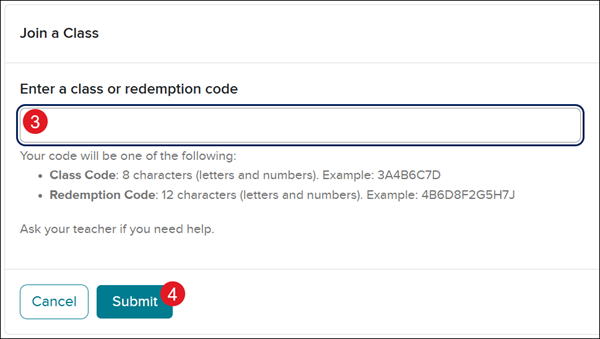
3. Enter the teacher-provided 8-character class code.
4. Click Submit.
Redeem Content
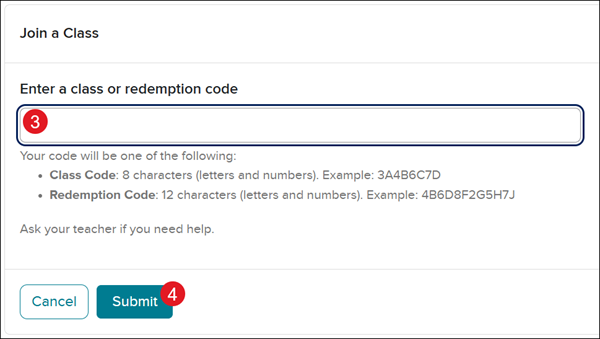
For some programs, you will also need to redeem a secondary code - a 12-character Redemption Code - to obtain access to the program content.
1. SSO or log in at my.mheducation.com.
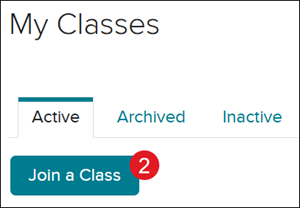
2. Click Join a Class.
3. Enter the teacher-provided 12-character redemption code.
4. Click Submit.