Copying assignments to another class can also be done during the assignment creation process. Teachers want to keep in mind that they can only copy assignments to their own classes. If they want to share the assignments with other teachers, they would need to share the class.
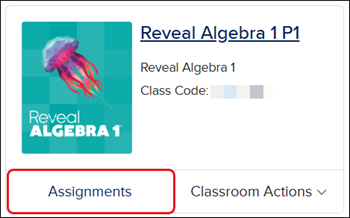
2. Click the Assignments button on the course tile,
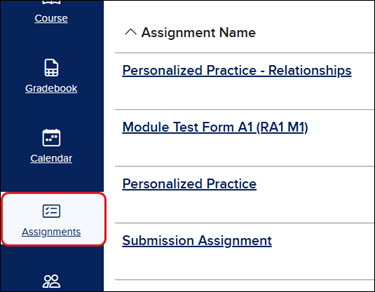
or launch the class and click on Assignments from the navigation menu.
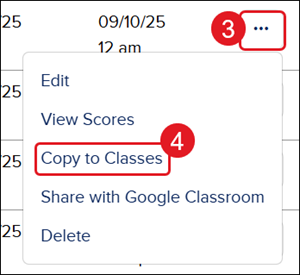
3. Click the Options button in the Actions column to the right of the assignment.
4. Click Copy to Classes from the menu.
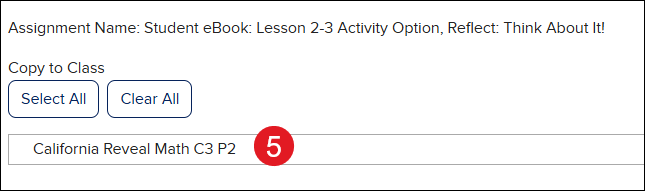
5. On the Copy to Classes pop-up, select the class(es) to share the assignment with.
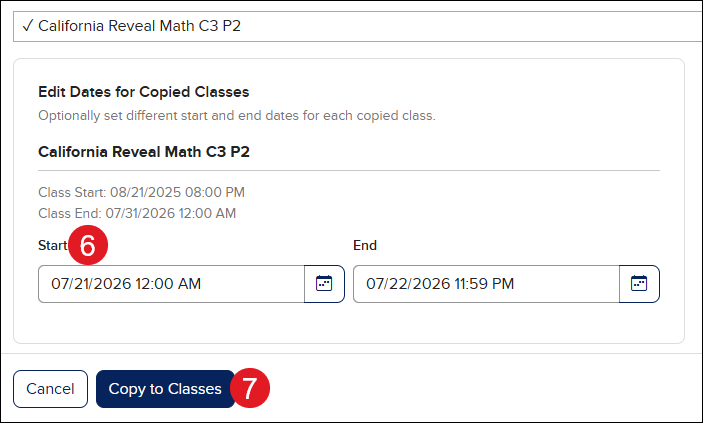
6. Set the Start and End Dates for the new assignment.
7. Click the Copy to Classes button.
ap-edition
5-steps-to-a-5-test-prep
glencoe-health
teen-health
arrive-math
building-blocks
number-worlds
reading-laboratory
reading-mastery
mcgraw-hill-literacy
open-court-reading
reveal-math
illustrative-math
mcgraw-hill-math
inspire-science
mcgraw-hill-science
impact
mh-social-studies
all-sorts
asi-se-dice
mcgraw-hill-cte
instructor
prek-12
Customer Support, PreK-12, Classroom Teacher, Preschool, Elementary School, Middle School, High School, Direct Login & Auto-Rostering, Direct Login & Manual-Rostering, SSO & Auto-Rostering, SSO & Manual-Rostering, Core, Intervention, Supplemental, AP, Honors & Electives, Career & Technical Education, Literacy, Math, Science, Social Studies, Health, Visual & Performing Arts, World Languages, AP Biology, AP Chemistry, AP History & Geography, AP Psychology, AP Economics, AP African American Studies, AP Precalculus, AP Statistics, AP Computer Science, AP Language and Composition, AP Public Speaking, AP Music Theory, 5 Steps to a 5 - AP Test Prep, Glencoe Health 2022, Teen Health 2021, Arrive Math, Building Blocks 2024, Building Blocks PreK 2025, Number Worlds 2024, SRA Reading Laboratory 2025, SRA Reading Mastery Transformations, McGraw Hill Literacy Emerge!, McGraw Hill Literacy Summit!, McGraw Hill Literacy Soar!, Open Court Reading 2025, CA Reveal Math (K-12), Illustrative Math, Reveal Math (K-12), Texas Math, CA Inspire Science 2020, FL Science 2025 (K-12), Inspire Science 2020, TN Science (K-12), TX Science 2025 (K-12), CA Impact 2019, FL Social Studies 2024 (K-12), Impact Social Studies, McGraw Hill Social Studies, All Sorts 2026 (K-5), Asi se Dice 2024, CTE - Health Science, CTE - Computing and Technology, CTE - Agriculture, CTE - Culinary Arts, CTE - Early Childhood Education, CTE - Criminal Justice, Grades & Assignments
dts
2026-03-24T19:16:37.688-03:00
View the demo in a separate tab. View the Spanish version of the demo. Copying assignments to another class can also be done during the assignment creation process. Teachers want to keep in mind that they can only copy assignments to their own classes. If they want to share the assignments with other teachers, they would need to share the class. 1. SSO or log in at my.mheducation.com. 2. Click the Assignments button on the course tile, or launch the class and click on Assignments from the navigation menu. 3. Click the Options button in the Actions column to the right of the assignment. 4. Click Copy to Classes from the menu. 5. On the Copy to Classes pop-up, select the class(es) to share the assignment with. 6. Set the Start and End Dates for the new assignment. 7. Click the Copy to Classes button.
Help us improve!
Let us know how we can improve our support information by providing feedback in this short survey.
Top
Regional Page Available
It looks like you're outside the United States. Do you want to see your regional version of this page?