McGraw Hill Literacy Must-Do Missions and Bonus Missions
Learn about Missions and Bonus Missions and how to assign them for students to complete.
- Customer Support
- PreK-12
- Classroom Teacher
- Elementary School
- Direct Login & Auto-Rostering
- Direct Login & Manual-Rostering
- SSO & Auto-Rostering
- SSO & Manual-Rostering
- Core
- Literacy
- McGraw Hill Literacy Emerge!
- Grades & Assignments


Overview
Must-Do Activities, also known as Missions, are core required activities that students are expected to prioritize and complete. These include foundational skills practice, comprehension tasks, independent reading, and prior knowledge activities aligned directly with grade-level standards and unit scope and sequence. These are proposed based on curriculum pacing, prior knowledge surveys, and observational checklists.
The program typically displays three missions at a time to keep cognitive load manageable. Completing missions earns recognition and gems to redeem in the Student Store.
Bonus Missions, also known as May-Do activities, are optional activities that students can complete if they finish their must-do Missions early or have extra time. These focus mainly on targeted remediation, concept extension, enrichment, or skill reinforcement based on student performance. These are recommended based on proficiency, performance data, and observational checklist signals to propose the most suitable practice for each student.
The program filters out any activities the student(s) have already completed so activities are not repeated unintentionally. Whole Group Lesson Presentations, Focus Group lessons, and Study Group activities are also excluded from Bonus Mission recommendations. If there is no proficiency, observational, or performance data for a student on the targeted facets, no speculative recommendations are generated.
The program recommends one of six Lexile-leveled versions based on the student’s recorded Lexile. If no Lexile is on record, it defaults to the on-grade level option. The activities are proposed to all students to build background and conceptual knowledge for the unit topic. Only students who are flagged as needing reinforcement or remediation for those facets are recommended the activity.
Assign Activities
1. Launch your Emerge! course.
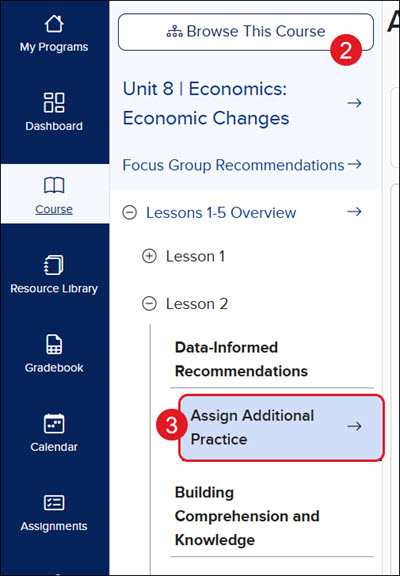
2. Click the Browse This Course button and navigate to the lesson.
3. Click on Assign Additional Practice from the course navigation panel.
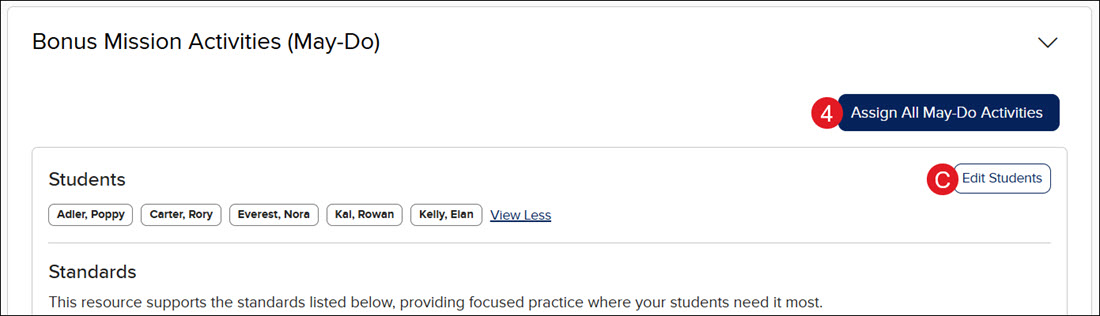
4. Click the Assign All Must-Do Activities button and/or the Assign All May-Do Activities button to quickly assign the resources to all recommended students.
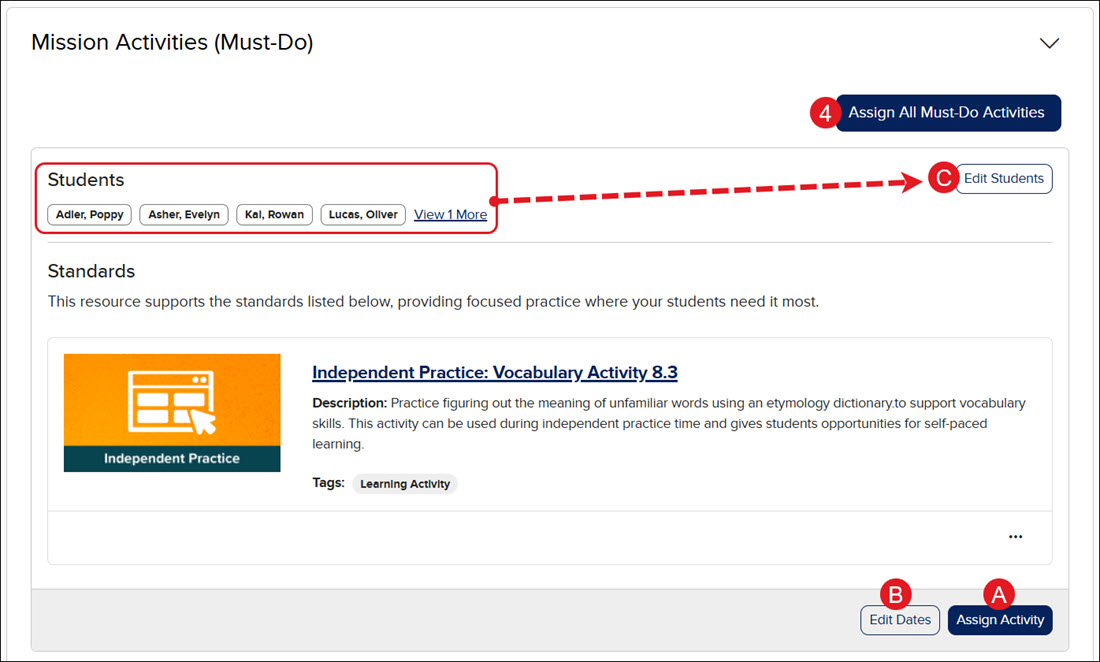
A. You can also click the Assign Activity button on an individual activity to assign selected resources to the recommended list of students.
B. Click the Edit Dates button to change the Assign and Due Date and Time for the resource by selecting a date on the calendar and entering a time, then clicking the Apply button at the bottom.
C. Click the Edit Students button to select which students should receive the activity by checking or unchecking the student on the list and clicking the Confirm button at the bottom.
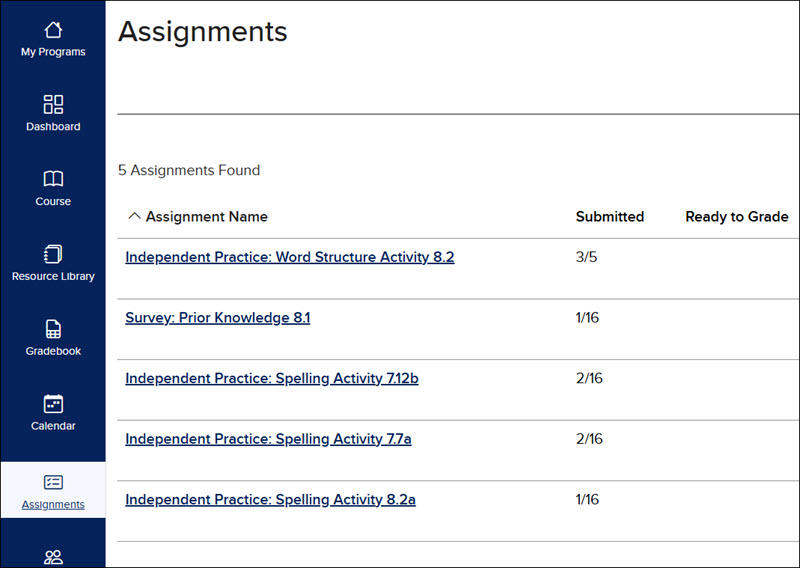
All assigned activities can be found on the Assignments page.
For details on viewing the Performance Insights for activities, see the Review McGraw Hill Literacy Interactive Activities article.