StudySync 2021 Administrator Reports
Learn how to access administrator reports in StudySync for the 2021 version.
- Direct Login & Manual-Rostering
- High School
- SSO & Auto-Rostering
- SSO & Manual-Rostering
- PreK-12
- Customer Support
- School Administrator
- Direct Login & Auto-Rostering
- Reports & Analytics
- Middle School
- Supplemental
- Literacy


This article explains how to access and run administrator reports in StudySync ©2021. In order to access admin reports, you will need the Reporting Administrator role enabled for your account. If you are a teacher or a Curriculum Administrator, you will need to contact an Organization Administrator as only they will be able to make this change for you. If you are an Organization Administrator, you can enable the Reporting role for your own account. For instructions on this process, click here.
Note: StudySync ©2021 is accessed through the Open Learning Platform. If you access StudySync through ConnectED, click here.
1. Log in to your account at my.mheducation.com.
If you land in your teacher role when you log in, navigate to your Admin Tools. Refer to the How to Access Roles, Organizations, and Profile Settings to learn how to toggle between different roles.
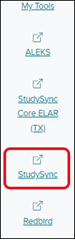
2. Select StudySync from the left side menu. StudySync will launch in a new browser window or tab.
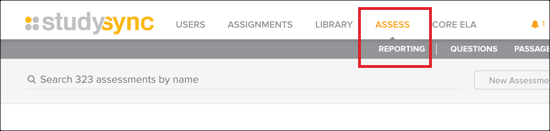
3. Click Assess and then select Reporting.
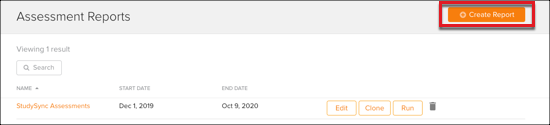
4. On your main Reports page, you can access previously saved assessment reports. To build a new report, select Create Report at the top right.
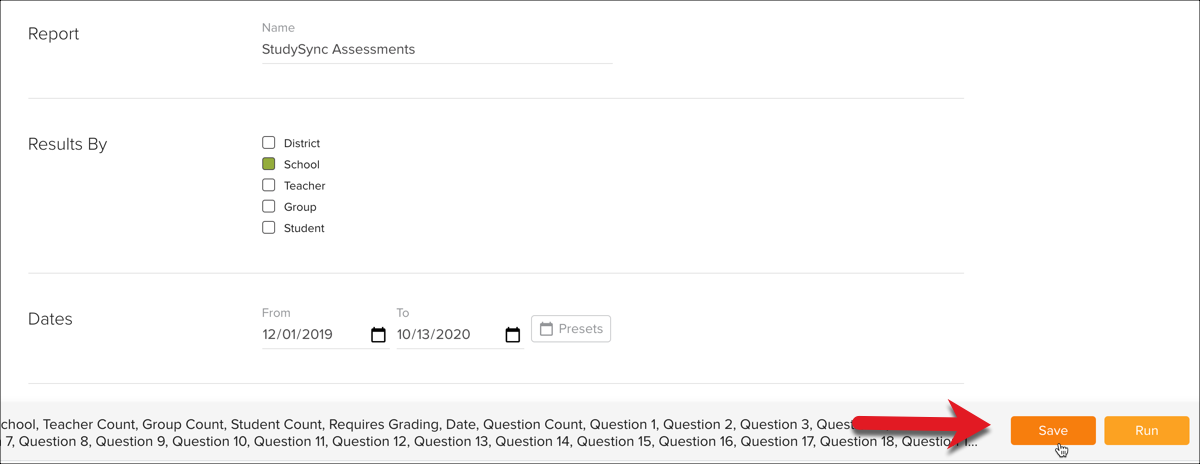
5. Select the following parameters for your report:
- Name: Enter a name for your report.
- Results By: Select how you would like results organized in your report.
- Date Range: Select a date range for the assessment data.
- Assessment(s): Select a specific assessment.
- Scores By: Select the type of score you wish to view in the report.
6. Select one of the available filters for your report, if desired.
- Organization Filter: You can choose to filter assessment data by specific schools.
- Question Filter: You can filter questions by tag and/or select a specific question to view data for.
7. Click Run to view your report in browser. From here you can export the report as a .xslx or .csv file.

Alternatively, you can click Save to save the report to your reports list. Saved reports can be accessed and modified at any time.