Learn about the available Data Sharing feature for Personalized Learning reports and how to enable it for the district.
Tags
Customer Support
PreK-12
School Administrator
Preschool
Elementary School
Middle School
High School
Direct Login & Auto-Rostering
Direct Login & Manual-Rostering
SSO & Auto-Rostering
SSO & Manual-Rostering
Core
Intervention
Supplemental
Literacy
Math
CA Reveal Math (K-12)
Reveal Math (K-12)
ALEKS
Redbird Math
Number Worlds 2024
Texas Math
McGraw Hill Literacy Emerge!
McGraw Hill Literacy Summit!
McGraw Hill Literacy Soar!
Reports & Analytics
Share:
Personalized Learning Cross-Org Proficiency Data Sharing is a feature that allows a student's Standards & Skills proficiency to be calculated from all assignments across every school in a district, rather than just their current school. This ensures that proficiency data follows the student as they move between schools (e.g., from elementary to middle school) within the same district.
Before the feature is enabled, a student's proficiency in the Standards & Skills Graph is calculated only from assignments submitted within a single school. When a student moves to another school inside the same district, their proficiency effectively starts from the beginning at the new school. Once a district opts in to the data sharing feature, the student's proficiency is calculated from the student's full district journey. This data is viewable by Reporting Administrators and teachers with access to the Standards & Skills Graph.
Note: This feature is configured at the organization level. When enabled, it applies universally to all schools and cannot be restricted to a subset.
This feature can only be enabled by a user with a district-level Reporting Administrator role. To have this role added to a user's account, an Organization Administrator can activate it by following the steps in the Manage User Accounts article.
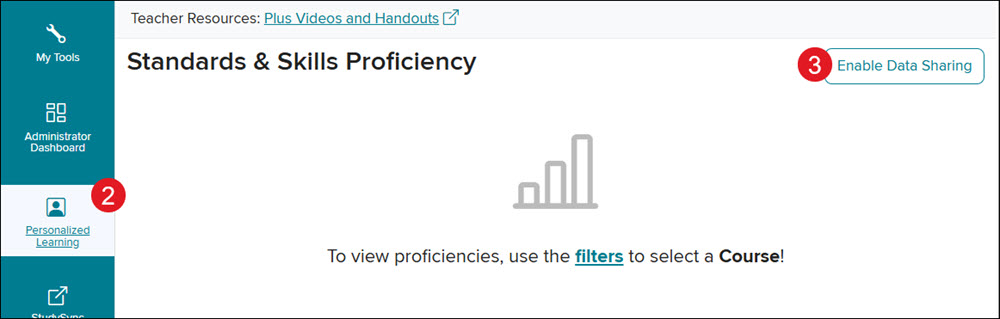
2. Click on Personalized Learning from the navigation menu.
3. Click the Enable Data Sharing button at the top right of the page.
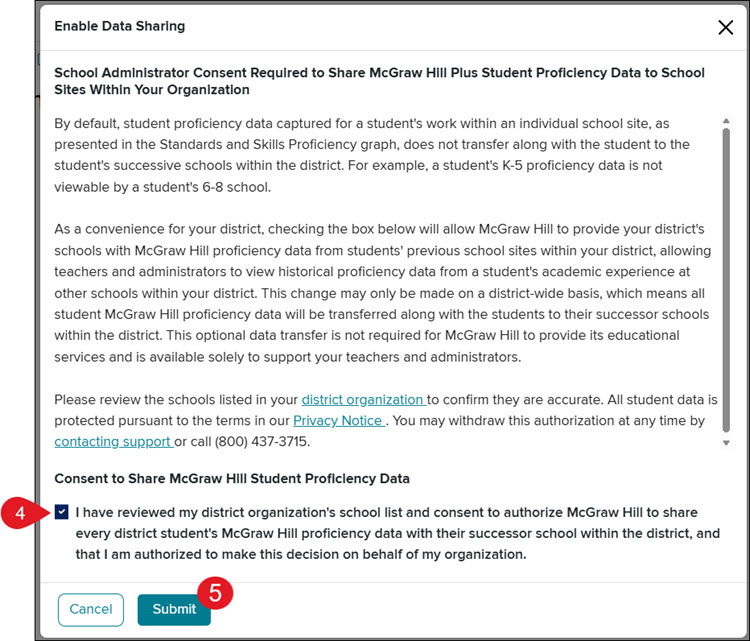
4. On the Enable Data Sharing pop-up, check the box to Consent to Share McGraw Hill Student Proficiency Data.
5. Click the Submit button.
Consent to Share McGraw Hill Student Proficiency Data
School Administrator Consent Required to Share McGraw Hill Plus Student Proficiency Data to School Sites Within Your Organization
By default, student proficiency data captured for a student's work within an individual school site, as presented in the Standards and Skills Proficiency graph, does not transfer along with the student to the student's successive schools within the district. For example, a student's K-5 proficiency data is not viewable by a student's 6-8 school.
As a convenience for your district, checking the box below will allow McGraw Hill to provide your district's schools with McGraw Hill proficiency data from students' previous school sites within your district, allowing teachers and administrators to view historical proficiency data from a student's academic experience at other schools within your district. This change may only be made on a district-wide basis, which means all student McGraw Hill proficiency data will be transferred along with the students to their successor schools within the district. This optional data transfer is not required for McGraw Hill to provide its educational services and is available solely to support your teachers and administrators.
Please review the schools listed in your district organization to confirm they are accurate. All student data is protected pursuant to the terms in our Privacy Notice. You may withdraw this authorization at any time by contacting support or call (800) 437-3715.
Consent to Share McGraw Hill Student Proficiency Data
I have reviewed my district organization's school list and consent to authorize McGraw Hill to share every district student's McGraw Hill proficiency data with their successor school within the district, and that I am authorized to make this decision on behalf of my organization.
Disable Data Sharing
If a district has enabled the feature and would like to turn it off, they will need to contact our PreK-12 support team. Data sharing will be disabled within 24 hours of the request.
Once the feature is disabled, the district returns to the previous behavior, and the student's proficiency data is calculated from a single school's assignments. If a district disables and later re-enables, the full-district calculation returns complete, including everything accrued in between.
reveal-math
aleks
redbird-math
number-worlds
mcgraw-hill-math
mcgraw-hill-literacy
instructor
prek-12
Customer Support, PreK-12, School Administrator, Preschool, Elementary School, Middle School, High School, Direct Login & Auto-Rostering, Direct Login & Manual-Rostering, SSO & Auto-Rostering, SSO & Manual-Rostering, Core, Intervention, Supplemental, Literacy, Math, CA Reveal Math (K-12), Reveal Math (K-12), ALEKS, Redbird Math, Number Worlds 2024, Texas Math, McGraw Hill Literacy Emerge!, McGraw Hill Literacy Summit!, McGraw Hill Literacy Soar!, Reports & Analytics
dts
2026-08-14T10:34:09.353-04:00
Personalized Learning Cross-Org Proficiency Data Sharing is a feature that allows a student's Standards & Skills proficiency to be calculated from all assignments across every school in a district, rather than just their current school. This ensures that proficiency data follows the student as they move between schools (e.g., from elementary to middle school) within the same district. Before the feature is enabled, a student's proficiency in the Standards & Skills Graph is calculated only from assignments submitted within a single school. When a student moves to another school inside the same district, their proficiency effectively starts from the beginning at the new school. Once a district opts in to the data sharing feature, the student's proficiency is calculated from the student's full district journey. This data is viewable by Reporting Administrators and teachers with access to the Standards & Skills Graph. Note: This feature is configured at the organization level. When enabled, it applies universally to all schools and cannot be restricted to a subset. Article Contents Enable Data Sharing Consent to Share McGraw Hill Student Proficiency Data Disable Data Sharing Enable Data Sharing This feature can only be enabled by a user with a district-level Reporting Administrator role. To have this role added to a user's account, an Organization Administrator can activate it by following the steps in the Manage User Accounts article. 1. SSO or sign in at my.mheducation.com. 2. Click on Personalized Learning from the navigation menu. 3. Click the Enable Data Sharing button at the top right of the page. 4. On the Enable Data Sharing pop-up, check the box to Consent to Share McGraw Hill Student Proficiency Data. 5. Click the Submit button. Consent to Share McGraw Hill Student Proficiency Data School Administrator Consent Required to Share McGraw Hill Plus Student Proficiency Data to School Sites Within Your Organization By default, student proficiency data captured for a student's work within an individual school site, as presented in the Standards and Skills Proficiency graph, does not transfer along with the student to the student's successive schools within the district. For example, a student's K-5 proficiency data is not viewable by a student's 6-8 school. As a convenience for your district, checking the box below will allow McGraw Hill to provide your district's schools with McGraw Hill proficiency data from students' previous school sites within your district, allowing teachers and administrators to view historical proficiency data from a student's academic experience at other schools within your district. This change may only be made on a district-wide basis, which means all student McGraw Hill proficiency data will be transferred along with the students to their successor schools within the district. This optional data transfer is not required for McGraw Hill to provide its educational services and is available solely to support your teachers and administrators. Please review the schools listed in your district organization to confirm they are accurate. All student data is protected pursuant to the terms in our Privacy Notice. You may withdraw this authorization at any time by contacting support or call (800) 437-3715. Consent to Share McGraw Hill Student Proficiency Data I have reviewed my district organization's school list and consent to authorize McGraw Hill to share every district student's McGraw Hill proficiency data with their successor school within the district, and that I am authorized to make this decision on behalf of my organization. Disable Data Sharing If a district has enabled the feature and would like to turn it off, they will need to contact our PreK-12 support team. Data sharing will be disabled within 24 hours of the request. Once the feature is disabled, the district returns to the previous behavior, and the student's proficiency data is calculated from a single school's assignments. If a district disables and later re-enables, the full-district calculation returns complete, including everything accrued in between.
Help us improve!
Let us know how we can improve our support information by providing feedback in this short survey.
Top
Regional Page Available
It looks like you're outside the United States. Do you want to see your regional version of this page?