You will need to assigned the Curriculum Administrator role to have access to the assessment banks. If you do not yet have an existing account, or if you have an account but not the proper role, reach out to an Organization Administrator in your district. District Organization Administrators can create new accounts and add roles to existing accounts at the district and school levels. School Organization Administrators can only create accounts and add roles for teachers and administrators for the school(s) they are associated with.
To add assessments to a District Bank, you will first need to create a new District Bank as you will not be able to add assessments to a McGraw Hill created bank. For steps on creating District Banks, refer to the Create, Rename, or Delete District Banks article.
Note: You can move McGraw Hill assessments into a custom District Bank, however, you will not be able to move assessments into a McGraw Hill bank.
For users that have a teacher and administrator role, you will land on your teacher profile.
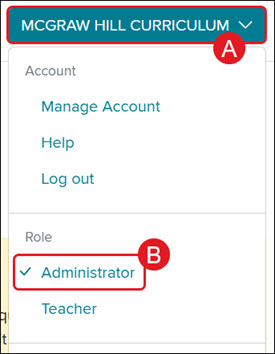
To access the administrator tools, click on the Profile button (A) and select Administrator (B)from the menu.
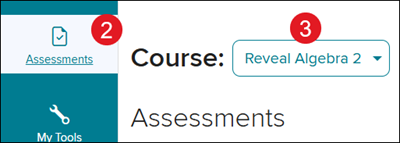
2. Click on Assessments from the navigation menu.
3. Select the program from the Course drop-down.
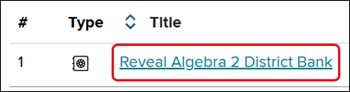
4. Click on the Title of the Bank you want to access.
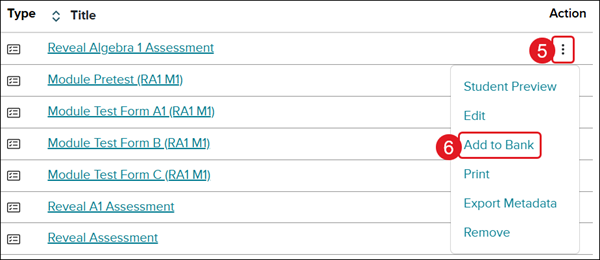
5. Click on the Options menu icon in the Actions column for the assessment you want to move.
6. Click Add to Bank from the menu.
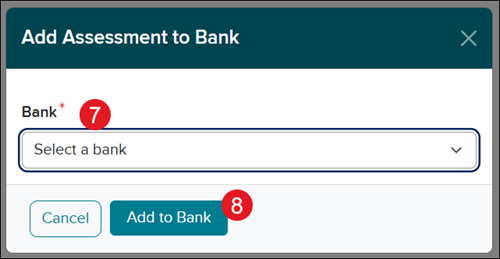
7. On the Add Assessment to Bank pop-up, select the bank you want to move the assessment to.
8. Click the Add to Bank button.
ap-edition
5-steps-to-a-5-test-prep
glencoe-health
teen-health
arrive-math
building-blocks
number-worlds
reading-laboratory
reading-mastery
mcgraw-hill-literacy
open-court-reading
reveal-math
illustrative-math
inspire-science
mcgraw-hill-science
impact
mh-social-studies
asi-se-dice
wonders
maravillas
music-its-role
my-math
networks
ocr-foundational-skills-kit
spotlight-on-music
mcgraw-hill-cte
mcgraw-hill-math
instructor
prek-12
PreK-12, Customer Support, School Administrator, Preschool, Elementary School, Middle School, High School, Direct Login & Auto-Rostering, Direct Login & Manual-Rostering, SSO & Auto-Rostering, SSO & Manual-Rostering, Core, Intervention, Supplemental, AP, Honors & Electives, Career & Technical Education, Literacy, Math, Science, Social Studies, Health, Visual & Performing Arts, World Languages, AP Biology, AP Chemistry, AP History & Geography, AP Psychology, AP Economics, AP African American Studies, AP Precalculus, AP Statistics, AP Computer Science, AP Language and Composition, AP Public Speaking, AP Music Theory, 5 Steps to a 5 - AP Test Prep, Glencoe Health 2022, Teen Health 2021, Arrive Math, Building Blocks 2024, Building Blocks PreK 2025, Number Worlds 2024, SRA Reading Laboratory 2025, SRA Reading Mastery Transformations, McGraw Hill Literacy Emerge!, McGraw Hill Literacy Summit!, McGraw Hill Literacy Soar!, Open Court Reading, Open Court Reading 2016, 2018, 2023, Open Court Reading 2025, CA Reveal Math (K-12), Illustrative Math, Reveal Math (K-12), CA Inspire Science 2020, FL Science 2025 (K-12), Inspire Science 2020, TN Science (K-12), TX Science 2025 (K-12), CA Impact 2019, FL Social Studies 2024 (K-12), Impact Social Studies, McGraw Hill Social Studies, Asi se Dice 2024, Wonders Balanced Literacy 2016, Maravillas 2020 & 2017, Music! Its Role, McGraw Hill My Math 2018, Networks 2018, OCR Foundational Skills Kit, OCR Word Analysis Kit, Spotlight on Music, Wonders 2023 2020 2017, CTE - Business, Marketing, and Finance, CTE - Health Science, CTE - Computing and Technology, CTE - Agriculture, CTE - Culinary Arts, CTE - Early Childhood Education, CTE - Criminal Justice, Texas Math, Online Assessments
dts
2026-03-24T19:11:42.380-03:00
View the demo in a separate tab. View the Spanish version of the demo. You will need to assigned the Curriculum Administrator role to have access to the assessment banks. If you do not yet have an existing account, or if you have an account but not the proper role, reach out to an Organization Administrator in your district. District Organization Administrators can create new accounts and add roles to existing accounts at the district and school levels. School Organization Administrators can only create accounts and add roles for teachers and administrators for the school(s) they are associated with. To add assessments to a District Bank, you will first need to create a new District Bank as you will not be able to add assessments to a McGraw Hill created bank. For steps on creating District Banks, refer to the Create, Rename, or Delete District Banks article. Note: You can move McGraw Hill assessments into a custom District Bank, however, you will not be able to move assessments into a McGraw Hill bank. 1. SSO or sign into your Administrator account at my.mheducation.com. For users that have a teacher and administrator role, you will land on your teacher profile. To access the administrator tools, click on the Profile button (A) and select Administrator (B) from the menu. 2. Click on Assessments from the navigation menu. 3. Select the program from the Course drop-down. 4. Click on the Title of the Bank you want to access. 5. Click on the Options menu icon in the Actions column for the assessment you want to move. 6. Click Add to Bank from the menu. 7. On the Add Assessment to Bank pop-up, select the bank you want to move the assessment to. 8. Click the Add to Bank button.
Top
Regional Page Available
It looks like you're outside the United States. Do you want to see your regional version of this page?