Co-Teaching with Assignment Sync & Grade Passback
Support co-teaching workflows when using Assignment Sync & Grade Passback.
- PreK-12
- Customer Support
- Classroom Teacher
- Preschool
- Elementary School
- Middle School
- High School
- SSO & Auto-Rostering
- Core
- Intervention
- Supplemental
- AP, Honors & Electives
- Career & Technical Education
- Literacy
- Math
- Science
- Social Studies
- Health
- Visual & Performing Arts
- World Languages
- AP Biology
- AP Chemistry
- AP History & Geography
- AP Psychology
- AP Economics
- AP African American Studies
- AP Precalculus
- AP Statistics
- AP Computer Science
- AP Language and Composition
- AP Public Speaking
- AP Music Theory
- 5 Steps to a 5 - AP Test Prep
- Glencoe Health 2022
- Teen Health 2021
- Arrive Math
- Building Blocks 2024
- Building Blocks PreK 2025
- Number Worlds 2024
- SRA Reading Laboratory 2025
- SRA Reading Mastery Transformations
- Actively Learn
- McGraw Hill Literacy Emerge!
- McGraw Hill Literacy Summit!
- McGraw Hill Literacy Soar!
- Open Court Reading 2025
- StudySync 2021
- CA Reveal Math (K-12)
- Illustrative Math
- Reveal Math (K-12)
- CA Inspire Science 2020
- FL Science 2025 (K-12)
- Inspire Science 2020
- TN Science (K-12)
- TX Science 2025 (K-12)
- CA Impact 2019
- FL Social Studies 2024 (K-12)
- Impact Social Studies
- McGraw Hill Social Studies
- All Sorts 2026 (K-5)
- Asi se Dice 2024
- CTE - Business, Marketing, and Finance
- CTE - Health Science
- CTE - Computing and Technology
- CTE - Agriculture
- CTE - Culinary Arts
- CTE - Early Childhood Education
- CTE - Criminal Justice
- Open Court Reading 2016, 2018, 2023
- Wonders Balanced Literacy 2016
- Maravillas 2020 & 2017
- Music! Its Role
- McGraw Hill My Math 2018
- Networks 2018
- OCR Foundational Skills Kit
- OCR Word Analysis Kit
- Spotlight on Music
- Wonders 2023 2020 2017
- Assignment Sync & Grade Passback
- Canvas
- Google Classroom™
- Schoology®
- D2L Brightspace


Single Sign-On (SSO) and Auto-Rostering
This article applies to districts that use the SSO and Auto-Rostering Access Service. SSO applies to districts that use an SSO portal, district website, or Learning Management System (LMS) to access McGraw Hill digital programs. Auto-Rostering means that account creation, class setup, and roster management are automated through a process handled by your district.
Not sure which Access Service your district uses? Click here to learn more about the four Access Services that we support.
View a PDF copy of the article.
McGraw Hill’s Assignment Sync and Grade Passback (ASGPB) integration supports the use of co-teaching for all ASGPB compatible programs hosted on the McGraw Hill platform. Co-teaching allows multiple teachers to be assigned to the same class so that all assigned teachers have full access to students, assignments, grades, reports, etc.
This article will review what to expect and how to properly utilize the integration in a co-teaching environment. This information is the same for all Learning Management Systems (LMS), including Canvas, Schoology, and Google Classroom.
For steps on how to set up and use Assignment Sync and Grade Passback, refer to the article that corresponds with the LMS your district uses:
Co-Teaching Requirements
- Primary and Secondary Teachers are rostered via district nightly sync with McGraw Hill and assigned to the same class within the McGraw Hill platform and not a copy or duplicate of the class.
- Primary and Secondary Teachers are rostered and assigned to the same class and course within the districts Learning Management System and not a copy or duplicate of the class.
Note: If the requirements are not met and/or teachers are assigned to copies or duplicates of the same class (two different classes with an identical roster and name), co-teaching will not function.
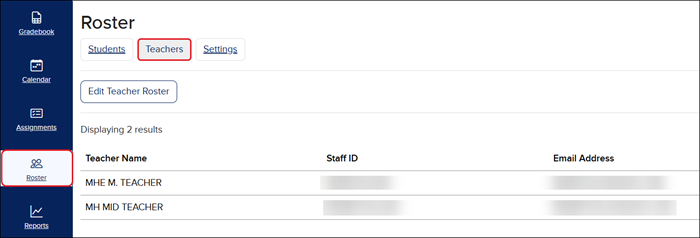
It can be confirmed that teachers are enrolled properly on the McGraw Hill platform by navigating to the Teachers tab on the Roster page of the class.
How Co-Teaching Works
Once it has been confirmed that both the primary and secondary teachers have been properly enrolled within the McGraw Hill platform and the district’s LMS, the process of pairing classes and creating assignments can be completed.
Note: Only one teacher, either the primary or secondary, needs to go through the class pairing process that are located within the Assignment Sync and Grade Passback instructions. This process will pair the class for both teachers.
If both teachers have the tool page open at the same time, one teacher will need to close the page while the other completes the class pairing process. Once the classes have been successfully paired, both teachers can launch the tool to complete assignment creation.
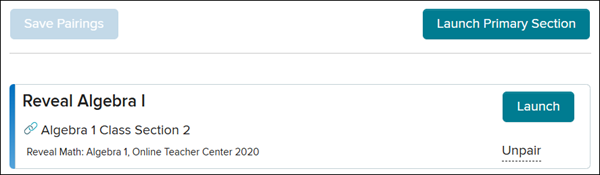
If the page has the Launch button, this means that the classes have been successfully paired.
Any assignments created by either the primary or secondary teacher will be available for both teachers when they launch the course, both within the McGraw Hill platform and the LMS. This also includes grading, syncing, and viewing grades and assignments.
If using StudySync:
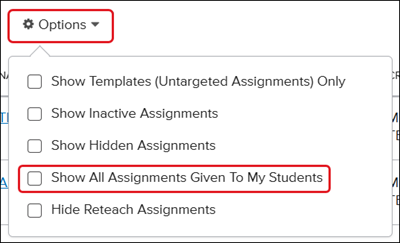
To view any assignments created by each other, teachers will need to enable the Show All Assignments Given To My Students under the Options filter.