
Building Blocks Adaptive PreK-8 Trajectory Report
Use the Building Blocks PreK–8 trajectory report to track long-term student growth.
- Math
- Intervention
- SSO & Manual-Rostering
- Customer Support
- Number Worlds 2024
- Direct Login & Auto-Rostering
- Reports & Analytics
- Direct Login & Manual-Rostering
- Building Blocks 2024
- Classroom Teacher
- SSO & Auto-Rostering
- PreK-12
- Preschool
- Elementary School


Teachers who use Number Worlds/ Building Blocks 2024 and Building Blocks PreK 2025 have access to an additional dashboard that provides student progress details, placement tests, and reporting.
Refer to the Student Progress and Placement Tests articles to learn more about those pages.
Additional Resource: Building Blocks Adaptive PK-8 - Adaptive Learning User Guide
The Trajectory Report page breaks down the student's progress for each Trajectory Topic within the program.
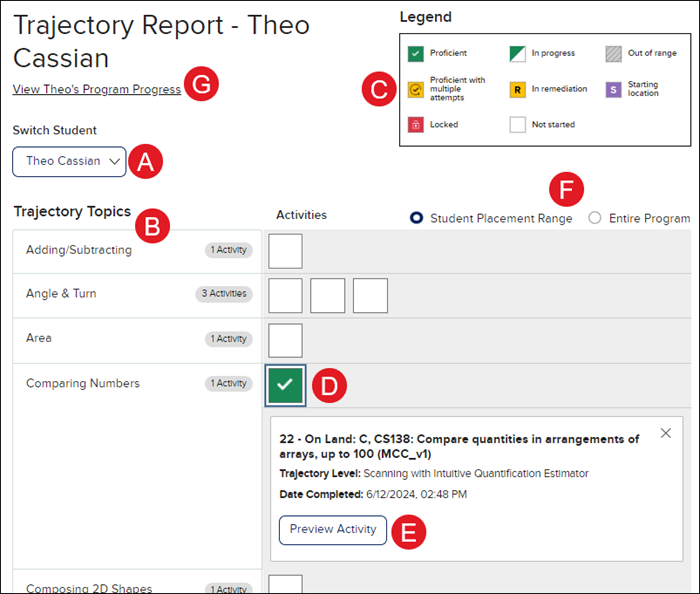
A. Switch between students by selecting a different student from the Switch Student drop-down.
B. The Topic and activity progress section shows the number of activities the student has completed or is in the process of completing.
C. The Legend describes each symbol's meaning in the Topic and activity progress section.
D. Click on Activity to open the details box for the selected activity.
The box includes information on the activity, the Trajectory Level, and the date the activity was completed - if applicable.
E. Click the Preview Activity button to view the activity as a student would see it.
F. Toggle between viewing the Student Placement Range for the program and the student's progress compared to the Entire Program.
G. Click the Program Progress link to navigate to the selected student's Student Progress page.
