Assign Spanish Translation for PRoPL
Instructions on setting the Spanish language IEP for students for PRoPL.
- Customer Support
- PreK-12
- Classroom Teacher
- Elementary School
- Middle School
- High School
- Direct Login & Auto-Rostering
- Direct Login & Manual-Rostering
- SSO & Auto-Rostering
- SSO & Manual-Rostering
- Core
- Supplemental
- Literacy
- Math
- CA Reveal Math (K-12)
- Reveal Math (K-12)
- McGraw Hill Literacy Emerge!
- McGraw Hill Literacy Summit!
- McGraw Hill Literacy Soar!
- ALEKS
- Online Assessments
- User Management
- Account Management


View the demo in a separate tab.
View the Spanish version of the demo.
If a student is needing to have the Pearson Review of Progress & Learning (PRoPL) assessment in Spanish, this can be set in the IEP section of their student profile for the class. This option needs to be selected before they begin their PRoPL assessment.
Note: This option is only available for PRoPL.
1. SSO or sign in at my.mheducation.com.
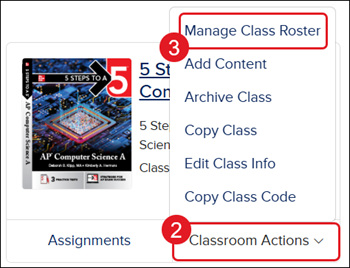
2. Click on Classroom Actions.
3. Click on Manage Class Roster from the menu.
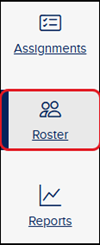
You can also click on the class and then click on Roster from the navigation menu.
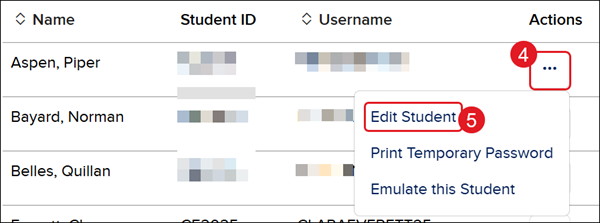
4. Click the Options button in the Actions column for the student.
5. Click Edit Student from the menu.
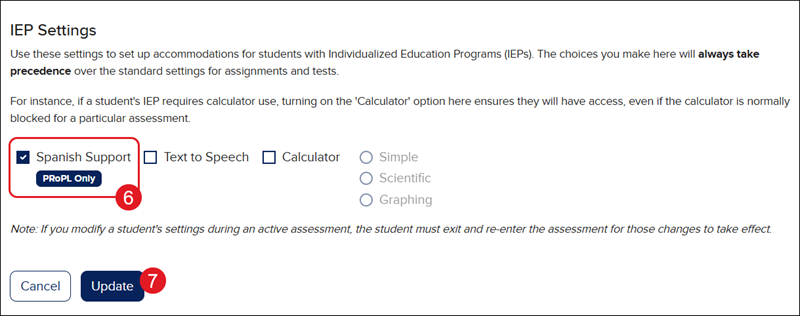
6. In the IEP Settings section, checkmark the Spanish Support box.
7. Click the Update button.