Explore We the People content in Actively Learn to support civics and government instruction.
Tags
Customer Support
PreK-12
Classroom Teacher
Elementary School
Middle School
High School
Direct Login & Auto-Rostering
Direct Login & Manual-Rostering
SSO & Auto-Rostering
SSO & Manual-Rostering
Supplemental
Social Studies
Actively Learn
Products & Licenses
Plan & Present
Tools & Resources
Grades & Assignments
Share:
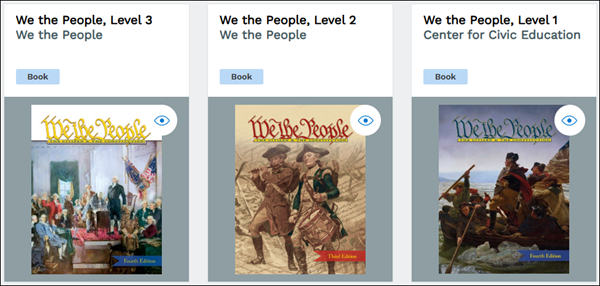
We the People is a complete civics curriculum for elementary, middle, and high school, published by the Center for Civic Education. There are three parts to the text: Level 1, Level 2, or Level 3. All three levels, along with detailed embedded instruction, are available for rental within Actively Learn Social Studies.
To access this text, each student and teacher will need their own license.A license is allocated to a student or teacher when they open the text. Unused licenses will not expire (e.g. if a teacher purchases an extra license, they can either ask for a refund, or that license will remain available in their account until it is accessed by a student or teacher). We the People licenses last for one year, that year begins when a license is allocated to a user upon entering the text. Used licenses cannot be reused or recycled.
Notice: Beginning January 1, 2026, the Center for Civic Education will increase the annual rental price of We the People books from $9.99 to $19.99 per user.
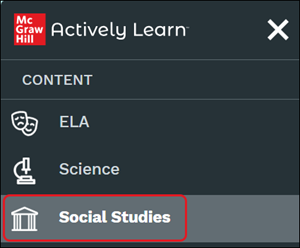
To rent We the People, users must have an active Social Studies account. That means, you can open your Actively Learn account, expand your left hand menu, and access the Social Studies catalog.
Purchase In-App: There are two ways to purchase a license in-app. Paying via credit card or sending an invoice to your admin. For more information on renting a text in-app, refer to the Manage Actively Learn Teacher Book Credits and Text Rentals article.
Purchase using Content Credits: Content Credits are a set amount of funds that can be added to a school or teacher account and can be purchased via a Purchase Order. Once Content Credits have been processed, any purchases will subtract from that set amount of funds. If you would like to purchase content credits, please contact your school's Sales Rep, Customer Advocacy Rep, or message the Actively Learn Support Team through the in-app chat.
Get the most out of the platform as you teach We the People by reviewing these quick tips!
Tip 1: Connect with the Center for Civic Education
We the People is a complete civics curriculum for elementary, middle, and high school published by the Center for Civic Education. There is much more to We the People than the textbooks, including state and national simulated congressional hearing competitions, lesson plans, and teacher trainings. The Center for Civic Education has state coordinators in all 50 states to support teachers in their area.
When you assign the We the People Level 1, Level 2, or Level 3 books to your class, you will be prompted to assign the entire text or to choose specific sections. We suggest that you choose the specific sections you want to assign. This will make the large textbook more manageable for both you and your students. For steps on assigning the text and customizing the assignment, refer to the Create, Duplicate, Merge, and Import Actively Learn Assignments and Customize Actively Learn Text Assignments articles.
Note:If you have already assigned the entire book, you will need to unassign the book from the class. Then, you will be able to reassign it using this new “section-assign” feature.
Tip 3: Help students focus on the questions that matter most to you
Center for Civic Education (CCE) created all of the questions in the We the People textbooks. The curriculum designers at CCE suggest that students focus on just a few questions rather than trying to answer them all.
Here are two quick steps to get the most out of the questions provided by CCE:
Prior to assigning a section of the textbook to your students, delete the questions you want students to skip. For steps on question management within an assignment, refer to the Customize Actively Learn Text Assignments article.
Change the settings in your class so that questions do not require a response. If you do not do this, students will be required to answer each question before moving on.
Tip 4: Create other assignments to complement what you’re studying in We the People
Explore the articles within Actively Learn we have curated to compliment the We the People textbooks.
You can add your own videos, Google docs, and articles from around the web by going to My Imports.
Tip 5: Give immediate feedback to students
From your Gradebook, you can see student responses, assign grades, leave comments, and allow revisions.
Tip 6: Show students how to use the tools available to them on Actively Learn
Students tell us that they love to hear passages of the text read aloud to them. They also tell us that they love seeing other students’ responses to questions. Some students find it particularly useful to be able to define words, translate passages, view the article in dyslexic mode, and reply to their teacher’s comments.
The problem is, some students don’t know that you can do all of this on Actively Learn!
Customer Support, PreK-12, Classroom Teacher, Elementary School, Middle School, High School, Direct Login & Auto-Rostering, Direct Login & Manual-Rostering, SSO & Auto-Rostering, SSO & Manual-Rostering, Supplemental, Social Studies, Actively Learn, Products & Licenses, Plan & Present, Tools & Resources, Grades & Assignments
dts
2026-05-28T12:01:27.771-04:00
We the People is a complete civics curriculum for elementary, middle, and high school, published by the Center for Civic Education. There are three parts to the text: Level 1, Level 2, or Level 3. All three levels, along with detailed embedded instruction, are available for rental within Actively Learn Social Studies. To access this text, each student and teacher will need their own license. A license is allocated to a student or teacher when they open the text. Unused licenses will not expire (e.g. if a teacher purchases an extra license, they can either ask for a refund, or that license will remain available in their account until it is accessed by a student or teacher). We the People licenses last for one year, that year begins when a license is allocated to a user upon entering the text. Used licenses cannot be reused or recycled. Notice: Beginning January 1, 2026, the Center for Civic Education will increase the annual rental price of We the People books from $9.99 to $19.99 per user. Article Contents How to Rent We the People Tips on Teaching the Text How to Rent We the People To rent We the People, users must have an active Social Studies account. That means, you can open your Actively Learn account, expand your left hand menu, and access the Social Studies catalog. Purchase In-App: There are two ways to purchase a license in-app. Paying via credit card or sending an invoice to your admin. For more information on renting a text in-app, refer to the Manage Actively Learn Teacher Book Credits and Text Rentals article. Purchase using Content Credits: Content Credits are a set amount of funds that can be added to a school or teacher account and can be purchased via a Purchase Order. Once Content Credits have been processed, any purchases will subtract from that set amount of funds. If you would like to purchase content credits, please contact your school's Sales Rep, Customer Advocacy Rep, or message the Actively Learn Support Team through the in-app chat. Get the most out of the platform as you teach We the People by reviewing these quick tips! Tip 1: Connect with the Center for Civic Education We the People is a complete civics curriculum for elementary, middle, and high school published by the Center for Civic Education. There is much more to We the People than the textbooks, including state and national simulated congressional hearing competitions, lesson plans, and teacher trainings. The Center for Civic Education has state coordinators in all 50 states to support teachers in their area. Can someone from the Center for Civic Education get in touch with me about their additional resources? Complete this form to have someone reach out. Tip 2: Assign one section of the book at a time When you assign the We the People Level 1, Level 2, or Level 3 books to your class, you will be prompted to assign the entire text or to choose specific sections. We suggest that you choose the specific sections you want to assign. This will make the large textbook more manageable for both you and your students. For steps on assigning the text and customizing the assignment, refer to the Create, Duplicate, Merge, and Import Actively Learn Assignments and Customize Actively Learn Text Assignments articles. Note: If you have already assigned the entire book, you will need to unassign the book from the class. Then, you will be able to reassign it using this new “section-assign” feature. Tip 3: Help students focus on the questions that matter most to you Center for Civic Education (CCE) created all of the questions in the We the People textbooks. The curriculum designers at CCE suggest that students focus on just a few questions rather than trying to answer them all. Here are two quick steps to get the most out of the questions provided by CCE: Prior to assigning a section of the textbook to your students, delete the questions you want students to skip. For steps on question management within an assignment, refer to the Customize Actively Learn Text Assignments article. Change the settings in your class so that questions do not require a response. If you do not do this, students will be required to answer each question before moving on. Tip 4: Create other assignments to complement what you’re studying in We the People Explore the articles within Actively Learn we have curated to compliment the We the People textbooks. You can add your own videos, Google docs, and articles from around the web by going to My Imports. Tip 5: Give immediate feedback to students From your Gradebook, you can see student responses, assign grades, leave comments, and allow revisions. Tip 6: Show students how to use the tools available to them on Actively Learn Students tell us that they love to hear passages of the text read aloud to them. They also tell us that they love seeing other students’ responses to questions. Some students find it particularly useful to be able to define words, translate passages, view the article in dyslexic mode, and reply to their teacher’s comments. The problem is, some students don’t know that you can do all of this on Actively Learn! Annotate Texts as a Student Student Reading Aids Student Text Settings
Help us improve!
Let us know how we can improve our support information by providing feedback in this short survey.
Top
Regional Page Available
It looks like you're outside the United States. Do you want to see your regional version of this page?