
Achieve3000 Literacy LevelSet Teacher Guide
Instructions for teachers on how to administer the LevelSet assessment to students.
- PreK-12
- Customer Support
- Classroom Teacher
- Elementary School
- Middle School
- High School
- Direct Login & Auto-Rostering
- Direct Login & Manual-Rostering
- SSO & Auto-Rostering
- SSO & Manual-Rostering
- Supplemental
- Literacy
- Achieve3000 Literacy
- Online Assessments


Article Contents
How LevelSet Ensures Accurate Results
Interim, Post-Test, and Subsequent Pre-Tests Version Placement
Communications After a Setting Change
Viewing Interim or Post-Test Assessment Date History
Tips to Prepare Students for LevelSet
- Understanding Lexiles and the Lexile® Framework
- LevelSet Assessment Specifications
- Administration in School and Remotely
- Interpreting LevelSet Scores
Overview
Achieve3000® Literacy's LevelSet™, an online assessment that utilizes the Lexile® Framework for Reading, offers a scientific means of matching students to text. Developed by Achieve3000 in conjunction of MetaMetrics®, this assessment provides a measure of student ability to read and comprehend fiction and non-fiction texts. Available in English and Spanish, LevelSet enables students to experience content that is tailored to their individual levels without extensive, time-consuming tests.
LevelSet can be administered up to three times a year to enhance the validity of students' Lexile reading scores and allows for greater precision in measuring reading gains and tracking progress toward College and Career Readiness targets and/or state proficiency targets.
The LevelSet Pre-Test is administered at the beginning of the school year. For the Pre-Test, the assessment displays automatically. Students cannot enter the Achieve3000 Literacy program until it's completed.
The Interim LevelSet assessment is available as an optional mid-year assessment. By default, this assessment is turned off. It can be turned on for all students or just sub-groups of students.
The LevelSet Post-Test is taken at the end of the school year to capture the reading gains made by students throughout the year.
How LevelSet Ensures Accurate Results
The LevelSet assessment contains 11 unique grade-level versions, ranging from grades 2-12, with three alternate forms at each level. It's available in both English and Spanish.
With three alternate forms at each level, students taking the test in English and/or Spanish will respond to different items from one testing occasion to the next, thereby reducing any practice effects.
Interim, Post-Test, and Subsequent Pre-Tests Version Placement
For the Pretest, Interim-Test, and Post-Tests, the version of assessment will be determined by students' current Lexile level, not their grade in school or program placement. To enable an additional Interim assessment an administrator will need to enable the feature through the LevelSet Scheduler in Achieve3000 Literacy via the Admin Tools.
Locked Options
If your screen or permissions are locked, then your ability to edit the settings has been enabled by your district administrator, as the ability to change settings is only available if the district administrator permits it. If permission has been deactivated, the screen will appear static, without drop-down menus or editable fields. Please contact your district administrator if you feel the settings were locked in error or if you wish to make a change.
Default Dates
The LevelSet Pre-Test is automatically delivered to students when they first log into Achieve3000 Literacy. The test is only available to students during the time range that has been set within the program.
The Interim LevelSet, if opted for, should be scheduled at least eight weeks from the completion of the Pre-Test to allow students time to make progress.
The LevelSet Post-Test is scheduled to be administered on the first Monday in May, unless it has been scheduled with an alternate date. If scheduling an alternate date, the LevelSet Post-Test should be scheduled at least eight weeks after the Interim LevelSet if administered, or close to the end of the school year to get an accurate measure of growth for the entire school year.
For steps on scheduling the LevelSet assessments, refer to the Achieve3000 Literacy - Schedule and Reset LevelSet Assessments article.
Changing Lexiles
Teachers have the ability to change a student's Lexiles for three weeks following completion of a LevelSet assessment by adjusting the student's Lexile setting on the Student Settings page. Lexiles should only be adjusted with good reason. For example, it was discovered that the student did not wear their glasses the day of the test and could not see the items.
Please Note: The only way a LevelSet score can be changed is by resetting the assessment for the student to complete it again. For any assessment confirmed as invalid, teachers may reset or re-administer the assessment. Assessments may be re-administered once per student per testing occasion.
After the three week window, changes to Lexiles are strongly discouraged and must be completed by contacting our K-12 Digital Technical Support team. Students' Lexiles cannot be changed after they have completed the LevelSet Post-Test.
Communications After a Setting Change
For Interim LevelSet Only: When a District Administrator changes a date or participants, school administrators and teachers receive an email. When a School Administrator changes a date or participants, only teachers receive an email.
For Interim LevelSet and Post-Tests: When a teacher logs in within two weeks of a scheduled Interim or Post-Test, they will see a pop-up message notifying them of the approaching test, with instructions on how to check the date.
Students do not receive communications about assessment date changes or upcoming assessments. They will be directed to take the LevelSet assessment by the system when they log into Achieve3000 Literacy on the assessment date that is set.
There are no communications sent for changes to students' Lexile measures.
Viewing Interim or Post-Test Assessment Date History
To view history regarding changes to the assessment date or participants, refer to the Achieve3000 Literacy - Schedule and Reset LevelSet Assessments article.
Tips to Prepare Students for LevelSet
The goal of the LevelSet assessment is to measure student reading ability and to place each student at his just-right reading level. Here are some practical tips teachers can employ to ensure reliable LevelSet scores that reflect student reading abilities.
Tip 1: Before LevelSet
- Reserve a 40-minute uninterrupted class period to administer the test. Make sure that you have the computer resources to test each student.
- Show students the LevelSet tutorial (English or Spanish) so they know what to expect on the test and how their scores will be used.
- Have an assignment prepared for students who finish the test early.
Tip 2: During LevelSet
- Walk around the room to ensure that students are taking their time with the test questions. The test will deliver the most accurate results when students take their time with the questions and give their best effort on the test.
- Review results as students complete the test. These can be viewed by navigating to the Data Center.
- It may take up to 24 hours for LevelSet results to generate.
- Determine each student's level of college and career readiness.
Tip 3: After LevelSet
- Use the Data Center to review Lexile scores and to look for any students who have not yet completed the assessment.
- Identify emerging readers by sorting the Pre LevelSet column in the Data Center.
- Discuss LevelSet results individually with your students and set their monthly Lexile growth goals. Consider using the student goal-setting documents to connect Lexile results to career goals.
LevelSet and Lexiles FAQ
Understanding Lexiles and the Lexile® Framework
What is the Lexile Framework for Reading?
The Lexile Framework for Reading is a scientific approach to reading and text measurement that has become the most widely adopted reading measure in use today. Developed by MetaMetrics, beginning with a grant from the National Institute of Child Health and Human Development in 1984, Lexile measures are the result of more than 40 years of ongoing research.
The Lexile Framework for Reading is unique because it measures text difficulty and reader ability on the same scale. This makes for an exceptionally effective matching of readers to appropriate texts. The Lexile Framework has been aligned to many national and state norm-referenced assessments, including the NWEA MAP Growth Assessment, the PSAT/SAT, ACT, and various state assessments. In 2003, the National Center for Education Statistics (NCES) chose the Lexile Framework as its own measure of text difficulty. For more information, visit The Lexile & Quantile Hub site.
Lexile measures are based on the relationship between two well-established predictors of how difficult a text is to comprehend: semantic difficulty and syntactic complexity. In the Lexile system, semantic difficulty is measured using the mean log word frequency, which is the logarithm of the number of times a word from the text appears in each five-million words of a corpus of nearly 600-million words. Syntactic difficulty is a measure of the length of the sentences in a passage. Long sentences are likely to contain more clauses and therefore communicate not only more information and ideas, but also an interrelationship between them. Researchers also speculate that longer sentences require the reader to retain more information in short-term memory. The Lexile equation takes into account both the measurement of word frequency and sentence length, resulting in a measure of reading difficulty expressed as a Lexile. For more information, visit the MetaMetrics® website.
Why did Achieve3000 Literacy choose the Lexile Framework for Reading?
Achieve3000 Literacy chose to use the Lexile Framework after an intensive study of many readability measures. A key advantage to using the Lexile scales, as opposed to other readability measures, is that the Lexile Framework evaluates both text difficulty and reader ability using the same scale. This means the ability to comprehend, and the material being read are evaluated using the same criteria, lending it greater effectiveness in terms of matching readers with appropriate texts. Since the Lexile Framework has been extensively validated by research— including a 15-year study funded by the National Institute of Health—Achieve3000 Literacy and the education community are confident in its superior ability to match readers to text.
How does Achieve3000 use students’ Lexile levels?
Achieve3000 Literacy uses Lexile levels to scientifically match students to an appropriately leveled passage. Students receive a Lexile measure initially from the LevelSet Pre-test assessment. From that point on, their Lexile levels are adjusted by the system on the 1st of each month as they work through the program.
In much the same way as Achieve3000 Literacy measures each student’s Lexile level, each reading passage is assigned a discrete Lexile measure, thereby placing students and text on the same Lexile scale.
Achieve3000 Literacy then uses this information to match readers to text. When a student logs in, the system automatically finds the content that most closely matches the student’s Lexile level. Students read about the same topics as their classmates, but the difficulty level of the passage is tailored to their individual Lexile levels. For example, in a 6th grade class, Frances has a Lexile level of 960L, while her classmate has a Lexile level of 770L. Their reading selections will be about the same grade- appropriate topic, but the level of the passage presented will be at different Lexile levels. Both students read a “tailor-made” article.
This method leads to an expected 75% comprehension rate—the content is not too difficult to be frustrating, but difficult enough to be challenging and to encourage reading progress. We encourage you to monitor student performance to ensure that students are scoring 75% and higher on activities.
LevelSet Assessment Specifications
What type of assessment is LevelSet?
LevelSet is a fixed-form, computer-assisted assessment.
How many versions are there of the test?
LevelSet is available in both English and Spanish. For each language, there are 11 versions, corresponding to grade levels 2-12.
Does LevelSet have alternate forms?
In both English and Spanish, LevelSet has three alternate forms at each grade level that are administered randomly to students.
How many questions are on the test?
The LevelSet assessment has 30 questions. New students could receive up to 40 items:
- For the English version of the assessment, the very first pre-test will include a 10-item Locator Test to determine which level of the LevelSet assessment each student will receive. New students complete these items before beginning the actual LevelSet assessment.
- For new students taking their very first pre-test using the Spanish version of the assessment, the number of items could vary from student to student. If a student answers incorrectly on each of the first 5 items, or answers incorrectly on 5 or more of the first 10 items, the test will move to an easier version.
What is the LevelSet Locator Test?
For students using the English version of Achieve3000 Literacy, the Locator Test is an initial gauge of a student’s reading ability. New users’ performance on the Locator Test will allow the Achieve3000 Literacy system to assign them to a level of the LevelSet pre-test that best matches their actual reading ability.
There are three forms of the Locator Test, one to measure reading ability at the elementary school level (grades 2-5), one for the middle school level (grades 6-8), and one for the high school level (grades 9- 12). New users will receive the Locator Test form that corresponds to their grade level.
How are students assigned the appropriate level?
New students who do not already have a Lexile measure in the Achieve3000 Literacy system will be required to complete the LevelSet pre-test the first time they log in.
- If taking the test in English, students will be presented with the Locator Test items, which will automatically assign students to the appropriate version of the LevelSet assessment.
- If taking the test in Spanish, students receive a level of the assessment that corresponds to their grade in school.
- If a teacher assigns Support scaffolds, students receive a version that is two grade levels below their class grade.
- If Enrichment scaffolds are assigned, students will receive a version that is one grade level above their class grade.
For all students, interim, post-test, and subsequent pre-test assessment placement will be determined by students’ current Lexile level.
How do I assign LevelSet in Spanish?
If you have a student who will take LevelSet in Spanish, you must assign that student to the Scaffolds: Support and select the Language: Full Spanish. The Spanish version of the assessment is then automatically delivered to the student.
For detailed steps on making these changes, refer to the Achieve3000 Literacy - Setting Student Scaffolds article.
How do dual language students take LevelSet?
If you have students who will use Achieve3000 Literacy in both English and Spanish, they will need to take the test once in English and once in Spanish. As you set up your class, be sure to mark the class “DUAL LANGUAGE.” When the student first logs in, a drop-down menu will appear for the class in English (default) and the class in Spanish.
Students will need to click the English Class to see LevelSet in English. Students should then click the Spanish Class to take the assessment in Spanish.
Administration in School and Remotely
When is LevelSet administered?
LevelSet can be administered up to three times a year. Typically, it is administered once at the beginning of the school year (or the first time students log in) and again at the end of the school year. For the Pre-Test, the assessment displays automatically, and students cannot use the Achieve3000 Literacy features until it is completed.
An Interim assessment is also available and is administered mid-year. By default, the interim assessment is set to off. It can be turned on for all or sub-groups of students and the administration dates can be modified. Remember when scheduling the interim LevelSet, it should be scheduled at least eight weeks from the completion of the pre-test to allow students time to make progress.
The LevelSet Post-Test is scheduled to be administered on the first Monday in May, unless you have scheduled an alternate date with your account management team. If scheduling an alternate date, the LevelSet post-test should be scheduled for at least 8 weeks after the interim LevelSet if administered or close to the end of your school year to get an accurate measure of growth for the entire school year.
How do I assign LevelSet to my students for the first time?
You do not need to assign the LevelSet Pre-Test. The assessment is automatically delivered to students when they first log into Achieve3000 Literacy. The test is only available to students during school hours or the time range you set in the Supervised Student Work Time field in the program.
How do I assign subsequent LevelSet Administrations?
Interim and Post-Test administrations of the LevelSet assessment are managed by the LevelSet Scheduler. It is available to district administrators, school administrators, and teachers by expanding the left menu from the home page. The ability to revise and edit assessment dates and participants is controlled at the district level, and administrators can provide editing permissions at the school and classroom levels if desired.
What can I do to prepare my students to take LevelSet?
It is very important for you to adequately prepare students and the testing environment for LevelSet. Students should be well-rested and motivated to try their best. The test environment should be quiet, and computers should be ready and working. These strategies will help ensure that test scores accurately reflect students’ reading levels. Refer to the How Do I Prepare My Students for LevelSet pdf.
After students have completed the assessment, how do I see the results?
As soon as the first students in your class complete the LevelSet assessment, you can access results in the Data Center > Class Overview tab or on the How Has Lexile Performance Changed Over Time? report. For more information about interpreting this report, refer to the Achieve3000 Literacy - View and Reset LevelSet Scores article.
After I click on the link about available LevelSet scores, I see a message about LevelSet scores that need my immediate review. What does this mean?
We inform teachers if a LevelSet test is completed in a potentially invalid way. There are three reasons a test can be flagged as invalid:
- if it is completed too quickly (in less than five minutes),
- too slowly (in more than 60 minutes), or
- with a patterned-response-type behavior (for example, the student answered A to every question, or alternated A and B).
You can see which students completed a LevelSet test in a potentially invalid way using the Data Center Class Overview report. Additionally, in the report How Has Lexile Performance Changed Over Time?, a footnote will appear next to any potentially invalid LevelSet assessment.
Using the Data Center Class Overview report report, teachers should confirm potentially invalid LevelSet assessments as valid or invalid. We advise teachers to have a conversation with these students to ensure an honest, good-faith effort was made on the test. Teachers should use their professional judgment and knowledge of the student to decide if the assessment was a valid administration or not.
For any assessment confirmed as invalid, teachers may reset or re-administer the assessment. Note that after teachers confirm an assessment as valid or invalid, the footnote will no longer appear on the How Has Lexile Performance Changed Over Time? report.
You can reduce the number of students with potentially invalid scores by preparing students and the test environment for LevelSet testing. Refer to How Do I Prepare My Students for LevelSet pdf for more information.
Can I re-administer LevelSet?
LevelSet may be re-administered once per student per testing occasion (e.g., Pre-test is one testing occasion).
May I change a student’s Lexile after completion of LevelSet?
Yes. You may change student Lexile level for three weeks following completion of LevelSet. Note that the LevelSet result itself cannot be changed unless the assessment is reset. Lexiles should only be changed with good reason; for example, it was discovered that the student did not wear his glasses the day of the test and could not see the items. After the three-week window, changes to Lexiles are strongly discouraged and must be completed by contacting Customer Support. As noted, preparing students and the test environment for the LevelSet assessment will reduce the number of reading-level changes teachers need to complete. Refer to How Do I Prepare My Students for LevelSet pdf for more information.
Can LevelSet be taken at home?
Yes, if necessary due to scheduling challenges related to the COVID-19 pandemic, natural disaster, or other situations that prevents students from attending school for long periods of time. The testing conditions should mirror those in place when the student is testing in school. Students should take the assessment without assistance from anyone, in a quiet environment with minimal distraction, using well-functioning computer equipment and a reliable internet connection. We strongly encourage sending a letter home to parents and encouraging students to watch the tutorial video (in English or Spanish).
Are LevelSet scores from assessments taken from home valid?
Yes, provided the test taker (student) did not receive any help from another person and took it in an environment with few distractions. To the extent that either of these conditions were not met, a student’s Lexile could be a less accurate estimate of a student’s ability.
How can I prevent students from taking LevelSet from home?
The simplest way is to ask students not to log in to Achieve3000 Literacy until they have completed the LevelSet pre-test in school. This request should be communicated to both students and parents. Another way is to set the pre-test date to the first day students will be in school and make sure students log in and take the LevelSet pre-test that day. The LevelSet pre-test date can be set at the district, school, or class level.
Finally, a school could set Supervised Student Work Time (SSWT) to a time when no students would log in – for example, 2-3 a.m. On the day students will be in school, change SSWT to the normal range (such as the school day) before asking students to log in and take LevelSet. SSWT can be set at the district, school, or class level.
Interpreting LevelSet Scores
Is the LevelSet assessment considered a norm-referenced test or a criterion-referenced test?
LevelSet is both a norm-referenced and criterion-referenced assessment. As a norm-referenced assessment, scores on the LevelSet can be compared to MetaMetrics’ National Lexile Norms to determine how a student performed compared to other students of the same grade. For more information, visit the Lexile Grade Level Charts site.
As a criterion-referenced assessment, scores on the LevelSet can inform on whether a student is at a certain level of reading proficiency. Specifically, LevelSet scores can be used to determine if a student is on track for College and Career Readiness. For more information, see below.
How should I interpret Lexile scores?
Achieve3000 Literacy follows MetaMetrics recommendations regarding interpretation of Lexile scores: Students’ Lexiles should be compared to the Lexile bands for being on track for College and Career for the students’ grade.
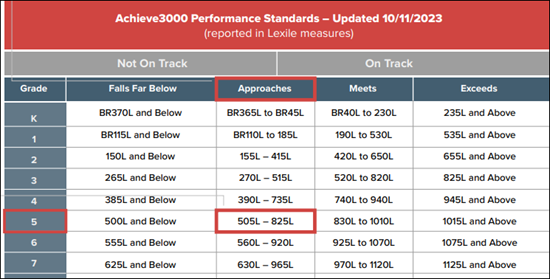
The chart shows the College and Career Readiness bands used within Achieve3000 Literacy. These bands were developed by MetaMetrics and are based on the current ‘stretch’ Lexile bands put forth by Common Core. To use the chart, look for the row corresponding to the grade level and find the column corresponding to the student’s current Lexile. This will tell you how the student is progressing toward the college and career readiness goal.
For example, Sonya is a 5th grade student and has a Lexile of 700L. Looking at the Lexile bands within the grade 5 row, we can see that Sonya is approaching being on track for college and career readiness.
What are the two numbers in parentheses after students’ LevelSet Lexile scores on the How has Lexile reading measure performance changed over time? report?
Achieve3000 Literacy provides two normative values to help interpret students’ LevelSet Lexile scores. These values are visible on the How has Lexile reading measure performance changed over time? report and include a Percentile Rank and a Normal Curve Equivalent. Both values provide information about how students are reading compared to their same-grade peers.
Percentile ranks range from 1 to 99. The percentile rank of a score indicates the percentage of scores below or equal to that score. Imagine 100 students standing in a line according to their test score with the student with the lowest score receiving a rank of 1 and the student with the highest score receiving a rank of 99. The 68th student in the line would have a percentile rank of 68 and be at the 68th percentile.
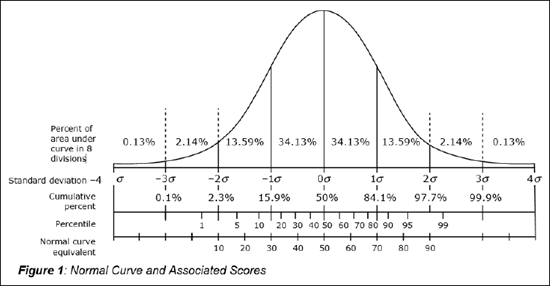
The Normal Curve Equivalent (NCE) is a way to express a student’s test score based on where it falls along the normal curve distribution. A distribution of scores is shown by a graph or mathematical function that summarizes how frequently individual scores occur in a large group of students (i.e., population). In a normal distribution, scores are assumed to follow a pattern of the curve shown in Figure 1, with a few students scoring in the very low range (left side of the curve) and a few students scoring in the very high range (right side of the curve). Most scores fall in the middle of the score range, which causes the hill shape of the curve. The mean score is associated with the highest point on the curve and falls in the middle of the range. NCE scores range from 1 to 99 with the middle score at 50.
In contrast to the Percentile Rank, the points along the NCE scale are equal interval, which means that the distance between two points along the scale is the same regardless of where the two points falls on the scale. For example, the distance between 10 and 20 is the same as the distance between 50 and 60. Because the NCE scale is an interval scale, it can be used for statistical work such as computing means, operations not possible with Percentile Ranks.
Some of my students’ Lexile scores have a BR in front of them. What does that mean?
Beginning Reader (BR) is a code given to readers and text that are below 0L on the Lexile scale. In some cases, a BR code is followed by a number and L (e.g., BR150L). A Lexile reader measure of BR150L indicates that the Lexile measure of the reader is 150 units below 0L. The smaller the number following the BR code, the more advanced the reader is. For example, a BR150L reader is more advanced than a BR200L reader.
One or more of my students has a yellow icon next to his or her name on reports. What does that mean?
This icon indicates that the student is an Emerging Reader. In Achieve3000 Literacy, Emerging Readers are identified based on their performance on LevelSet and on the multiple-choice questions in the Respond step. Students are identified as an Emerging Reader if their Lexile score from a LevelSet or a monthly auto-adjustment falls below 50L. Emerging Readers are assigned to the lowest level of content available (150L) and may need additional assistance when reading the content and completing the multiple-choice activities. They may get this assistance through the use of the audio support or through teacher intervention.
Sometimes, students categorized as Emerging Readers did not take the LevelSet assessment seriously and have a score much lower than their true reading abilities. If the system has identified test results as being potentially invalid, you will see a superscript next to their LevelSet score on the How Has Lexile Performance Changed Over Time? report. For more information, you should consult the Data Center Class Overview report.
My students’ Lexile scores from Achieve3000 Literacy aren’t the same as the Lexiles they have received on other assessments. How do I know which one is correct?
When comparing two tests that are designed to measure reading ability, the tests may result in different scores. There are a few reasons this occurs. Every test has a margin of error, known as measurement error. Error can result from many things, including factors related to the individual students, the testing situation, and many other sources. For example, sometimes students may know the answers, but they are tired, distracted, or nervous; or students may misunderstand the test instructions. Essentially, this means that no test can provide a perfectly accurate measure of student reading. Indeed, because of normal measurement error, it is highly unlikely for students to receive identical Lexile measures even if they take the same test twice.
You should review all scores from a student’s reading assessments, rather than focusing on only one measure. This will give a better understanding of a student’s reading ability and can help to make instructional decisions.
Reference
Yen, W.M. & Fitzpatrick, A.R. (2006). “Item Response Theory.” In R.L. Brennan (Ed.), Educational Measurement (Fourth Edition, pp. 111-154). Sponsored jointly by National Council on Measurement in Education and American Council on Education. Westport, CT: Praeger Publishers.