On ALEKS, administrators can view reports and complete general administration tasks. Users need an administrator account or a teacher account with the administrator role enabled to access ALEKS as an administrator. Organization Administrators can add the Administrator role to any Teacher account on the Admin Tools Manage Users page. See the Create Administrator Accounts and Add Roles to an Existing User articles for more information.
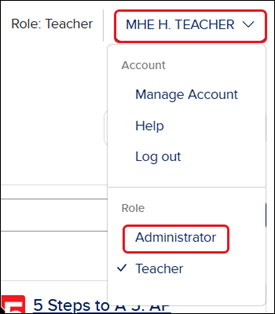
If you have a Teacher role and an Administrator role, you will need to click on your Profile button at the top-right and select Administrator from the menu.
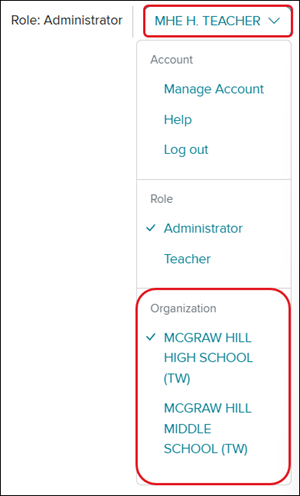
If you are an Administrator assigned at the school level instead of the district level, and are assigned to multiple schools, click on your Profile button and select the correct Organization before launching ALEKS.
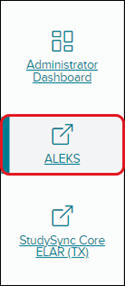
2. Click on ALEKS from the navigation menu.
You will only see this menu option if you are an Administrator and your organization has licenses for ALEKS.
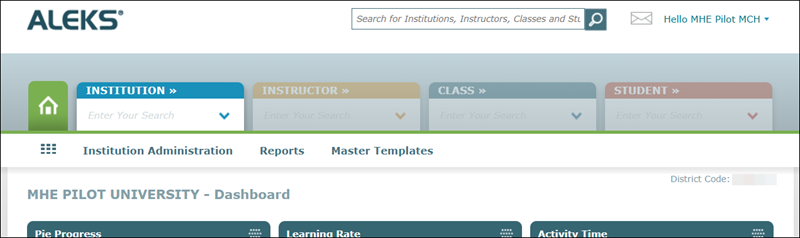
ALEKS will then open in a new tab. The Institution Administration, Reports, and Master Template links appear on the menu bar below the Main Navigation tabs.
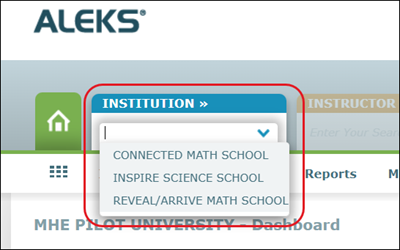
You can toggle between schools on the Institution tab if you have a district-level administrator account.
Help us improve!
Let us know how we can improve our support information by providing feedback in this short survey.
Top
Regional Page Available
It looks like you're outside the United States. Do you want to see your regional version of this page?
Support Topics/User Guides & Account Management/Log-In & Passwords
Context/Curriculum Type
Context/Curriculum Type/Supplemental
Asset Format Type
Asset Format Type/Customer Support
Context/Education Level/Middle School
Support Topics/User Guides & Account Management/Account Management
Context/Integration Type/SSO & Manual-Rostering
prek-12
2026-10-02T14:49:51.418-04:00
<p>For a full page view of the demo, <a href="https://hub.mheducation.com/share/cxoqyt39q5us" target="_blank">click here</a>.</p> <p>For a Spanish version of the demo, <a href="https://hub.mheducation.com/share/b4hmo53gfbk6" target="_blank">click here</a>.</p> <p> </p> <p>On ALEKS, administrators can view reports and complete general administration tasks. Users need an administrator account or a teacher account with the administrator role enabled to access ALEKS as an administrator.</p> <p>Organization Administrators can add the Administrator role to any Teacher account on the <strong>Admin Tools Manage Users</strong> page. Refer to the <a href="/content/mheducation/us/en/prek-12/support/knowledge/my-mheducation-com-create-administrator-accounts" target="_blank">Create Administrator Accounts</a> and <a href="/content/mheducation/us/en/prek-12/support/knowledge/open-learning-environment-how-to-add-roles-to-an-existing-user" target="_blank">Add Roles to an Existing User</a> for more information.</p> <p> </p> <p>1. SSO or log into your Administrator account at <a target="_blank" href="https://my.mheducation.com/login">my.mheducation.com</a>.</p> <p>If you have a <strong>Teacher </strong>role and an <strong>Administrator </strong>role, you will need to click on your <strong>Profile </strong>button at the top-right and select <strong>Administrator </strong>from the menu.</p> <p><img src="/content/dam/mhe/support/support-images/migrated/rtaImage-543920727.jpeg" data-assetref="rtaImage-543920727-1777902298262"></p> <p>If you are an <strong>Administrator </strong>assigned at the school level instead of the district level, and are assigned to multiple schools, click on your <strong>Profile </strong>button and select the correct <strong>Organization </strong>before launching ALEKS.</p> <p><img src="/content/dam/mhe/support/support-images/migrated/rtaImage-543938431.jpeg" data-assetref="rtaImage-543938431-1777902298263"><br> <br> 2. Click on <strong>ALEKS </strong>from the navigation menu.</p> <p>You will only see this menu option if you are an Administrator and your organization has licenses for ALEKS.<br> <br> <img src="/content/dam/mhe/support/support-images/migrated/rtaImage-527907670.jpeg" alt="image.png" data-assetref="rtaImage-527907670-1777902298263"></p> <p><strong>ALEKS </strong>will then open in a new tab. The <strong>Institution Administration</strong>, <strong>Reports</strong>, and <strong>Master Template</strong> links appear on the menu bar below the <strong>Main Navigation</strong> tabs.</p> <p><img src="/content/dam/mhe/support/support-images/migrated/rtaImage-543937338.jpeg" data-assetref="rtaImage-543937338-1777902298263"></p> <p>You can toggle between schools on the <strong>Intuitions </strong>tab if you have a district-level administrator account.</p> <p><img src="/content/dam/mhe/support/support-images/migrated/rtaImage-543937558.jpeg" data-assetref="rtaImage-543937558-1777902298263"></p> corp dts Access ALEKS As An Administrator: step-by-step guidance for ALEKS, including key requirements, tips, and troubleshooting where needed. 2026-05-04 Access ALEKS as an Administrator Access ALEKS As An Administrator: step-by-step guidance for ALEKS, including key requirements, tips, and troubleshooting where needed. Learn how administrators access ALEKS to manage courses, reports, users, and settings.
Learn how administrators access ALEKS to manage courses, reports, users, and settings.
For a full page view of the demo, click here. For a Spanish version of the demo, click here. On ALEKS, administrators can view reports and complete general administration tasks. Users need an administrator account or a teacher account with the administrator role enabled to access ALEKS as an administrator. Organization Administrators can add the Administrator role to any Teacher account on the Admin Tools Manage Users page. Refer to the Create Administrator Accounts and Add Roles to an Existing User for more information. 1. SSO or log into your Administrator account at my.mheducation.com. If you have a Teacher role and an Administrator role, you will need to click on your Profile button at the top-right and select Administrator from the menu. If you are an Administrator assigned at the school level instead of the district level, and are assigned to multiple schools, click on your Profile button and select the correct Organization before launching ALEKS. 2. Click on ALEKS from the navigation menu. You will only see this menu option if you are an Administrator and your organization has licenses for ALEKS. ALEKS will then open in a new tab. The Institution Administration, Reports, and Master Template links appear on the menu bar below the Main Navigation tabs. You can toggle between schools on the Intuitions tab if you have a district-level administrator account.
dts
Customer Support, PreK-12, School Administrator, Elementary School, Middle School, High School, Direct Login & Auto-Rostering, Direct Login & Manual-Rostering, SSO & Auto-Rostering, SSO & Manual-Rostering, Supplemental, Math, ALEKS, ALEKS Adventure, Log-In & Passwords, Account Management, Getting Started & Orientation