Connect - Answer Tolerance Settings: Language
Adjust language answer tolerance settings to control acceptable responses in Connect.
- Higher Education
- Customer Support
- Connect
- Instructor


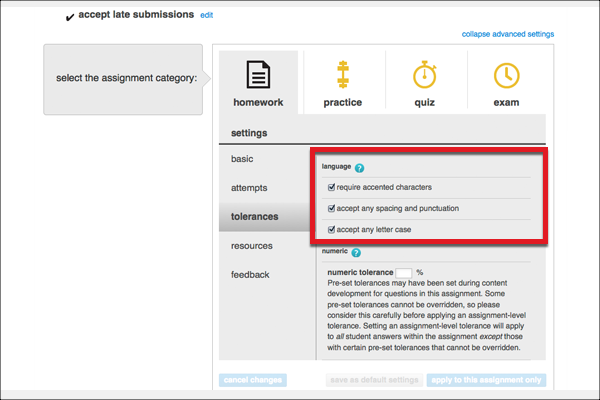
Answer tolerance settings dictate what types of characters, punctuation, and numeric entries are accepted in student assignment responses. There are 2 types of tolerance settings: language and numeric. This article walks through the language tolerance settings available in Connect. See Answer Tolerance Settings: Numeric for more information on numeric tolerance settings.
The purpose of the language tolerance settings is to accept a wider range of answers and grant students credit for their responses. Here’s a quick breakdown of each language tolerance setting and the scenarios when they are commonly used:
- Accept non-accented characters: Words that require accented characters will be accepted with or without the accented characters.
When to use: Use for assignments where the goal is to understand the words and use them correctly, such as foreign language practice assignments, and in situations where students may be unfamiliar with proper grammar.
- Accept any spacing and punctuation: Words and sentences will be accepted regardless of the letter spacing and correct punctuation.
When to use this: Use for timed assignments where the goal is to produce the correct answers quickly, or on a foreign language assignment where students may be unfamiliar with proper grammar.
- Accept any letter case: Words that should be upper case, like a proper noun, will be accepted in lower case. Likewise, words that should be lower case will be accepted in upper case.
When to use this: On an assignment for a course that does not focus on grammar, or an assignment for a course that has not yet learned these grammar rules.