Configure numeric answer tolerance settings for graded questions in Connect.
Tags
Higher Education
Customer Support
Connect
Instructor
Share:
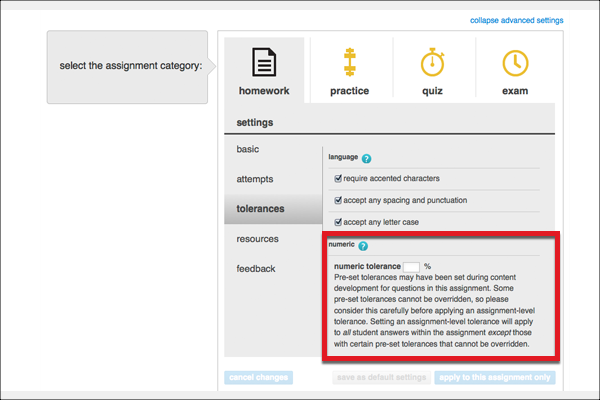
Answer tolerance settings dictate what types of characters, punctuation, and numeric entries are accepted in student assignment responses. There are 2 types of tolerance settings: language and numeric. This article walks through the numeric tolerance settings available in Connect. See Answer Tolerance Settings: Language for more information on language tolerance settings.
While you can set a percentage tolerance for your assignment, we don't recommend this option because most questions have individual tolerance settings. Any percentage tolerance you set for the overall assignment will override the individual settings for each question.
Scenarios
If you choose to set an answer tolerance for your assignment, there are 3 possible scenarios to consider.
Scenario 1: There are no absolute or percentage tolerances pre-set for any question answers. In this case, the percentage tolerance you enter will be applied as-is to every question answer in the assignment. Example: You set a +/- 50% tolerance. Therefore, a question with a correct answer of 100 would accept values from 50 to 150 as correct.
Scenario 2: There is a percentage tolerance value pre-set for some, or all, question answers. For these answers, any tolerance you enter will override the pre-set percentage tolerance
.Example: You set a percentage tolerance of +/- 35% for the assignment, but there is already a pre-set percentage tolerance of +/- 25% for a question with a correct answer of 100. Only your tolerance of +/-35% will apply to that question. So, answers ranging from 65 to 135 are correct.
Scenario 3: There is an absolute tolerance value pre-set for some, or all, question answers. For these answers, any percentage tolerance you enter will be added as a percentage OF the pre-set absolute tolerance TO that pre-set absolute tolerance value. Example: Let’s say a question has a correct answer of 100, but there is a pre-set absolute tolerance of +/- 6. Then you apply a +/- 50% tolerance on top of that pre-set absolute tolerance. The correct answer values for this question will range from 91 to 109
.This is because 50% of 6 (the pre-set absolute tolerance) is 3. This value (3), when added to the pre-set absolute tolerance (6) becomes 9. And 100 +/- 9 is 91 to 109.
Let us know how we can improve our support information by providing feedback in this short survey.
Top
Regional Page Available
It looks like you're outside the United States. Do you want to see your regional version of this page?
connect
instructor
Personas
Personas/Higher Ed Educator
Personas/Higher Ed Educator/Instructor
Asset Format Type
Asset Format Type/Customer Support
Business Unit
Business Unit/Higher Education
Programs & Solutions
Programs & Solutions/Connect
highered
2026-03-24T18:27:14.588-03:00
<p><span>Answer tolerance settings dictate what types of characters, punctuation, and numeric entries are accepted in student assignment responses. There are 2 types of tolerance settings:<strong> language</strong> and <strong>numeric</strong>. This article walks through the numeric tolerance settings available in Connect. See <a href="/content/mheducation/us/en/highered/support/knowledge/connect-answer-tolerance-settings-language" target="_blank">Answer Tolerance Settings: Language</a> for more information on language tolerance settings.</span></p> <p>While you can set a percentage tolerance for your assignment, we don't recommend this option because most questions have individual tolerance settings. Any percentage tolerance you set for the overall assignment will override the individual settings for each question. </p> <p><img alt="Connect-Numeric-Tolerance-Settings.png" src="/content/dam/mhe/support/support-images/migrated/rtaImage--547504210.jpeg" data-assetref="rtaImage--547504210-1790810460466"></p> <h2>Scenarios</h2> <div>If you choose to set an answer tolerance for your assignment, there are 3 possible scenarios to consider. </div> <ul> <li><span><strong>Scenario 1</strong>: There are no absolute or percentage tolerances pre-set for any question answers. In this case, the percentage tolerance you enter will be applied as-is to every question answer in the assignment. <br> </span><strong>Example</strong>: You set a +/- 50% tolerance. Therefore, a question with a correct answer of 100 would accept values from 50 to 150 as correct.</li> </ul> <ul> <li><span><strong>Scenario 2</strong>: There is a percentage tolerance value pre-set for some, or all, question answers. For these answers, any tolerance you enter will override the pre-set percentage tolerance<br> .</span><strong>Example:</strong> You set a percentage tolerance of +/- 35% for the assignment, but there is already a pre-set percentage tolerance of +/- 25% for a question with a correct answer of 100. Only your tolerance of +/-35% will apply to that question. So, answers ranging from 65 to 135 are correct.</li> </ul> <ul> <li><span><strong>Scenario 3</strong>: There is an absolute tolerance value pre-set for some, or all, question answers. For these answers, any percentage tolerance you enter will be added as a percentage OF the pre-set absolute tolerance TO that pre-set absolute tolerance value.<br> </span><strong>Example:</strong> Let’s say a question has a correct answer of 100, but there is a pre-set absolute tolerance of +/- 6. Then you apply a +/- 50% tolerance on top of that pre-set absolute tolerance. The correct answer values for this question will range from 91 to 109</li> </ul> <p>.This is because 50% of 6 (the pre-set absolute tolerance) is 3. This value (3), when added to the pre-set absolute tolerance (6) becomes 9. And 100 +/- 9 is 91 to 109.</p> <h2><strong>Related Topics </strong></h2> <ul> <li><span><a href="http://createwp.customer.mheducation.com/wordpress-mu/success-academy/assignment-policy-settings-best-practices/" target="_blank">Assignment Policy Settings and Best Practices</a></span></li> <li><span><span><a href="http://highered.mcgraw-hill.com/olc2/dl/866234/Assignment_Policy_Settings_Best_Practices.pdf" target="_blank">Download the Policy Settings Guide</a> <img alt="User-added image" src="/content/dam/mhe/support/support-images/migrated/rtaImage-1423739958.png" data-assetref="rtaImage-1423739958-1790810460467"></span></span></li> </ul> dts Configure numeric answer tolerance settings for graded questions in Connect. 2025-11-19 Connect - Answer Tolerance Settings: Numeric Configure numeric answer tolerance settings for graded questions in Connect. Configure numeric answer tolerance settings for graded questions in Connect.
Configure numeric answer tolerance settings for graded questions in Connect.
Answer tolerance settings dictate what types of characters, punctuation, and numeric entries are accepted in student assignment responses. There are 2 types of tolerance settings: language and numeric. This article walks through the numeric tolerance settings available in Connect. See Answer Tolerance Settings: Language for more information on language tolerance settings. While you can set a percentage tolerance for your assignment, we don't recommend this option because most questions have individual tolerance settings. Any percentage tolerance you set for the overall assignment will override the individual settings for each question. Scenarios If you choose to set an answer tolerance for your assignment, there are 3 possible scenarios to consider. Scenario 1: There are no absolute or percentage tolerances pre-set for any question answers. In this case, the percentage tolerance you enter will be applied as-is to every question answer in the assignment. Example: You set a +/- 50% tolerance. Therefore, a question with a correct answer of 100 would accept values from 50 to 150 as correct. Scenario 2: There is a percentage tolerance value pre-set for some, or all, question answers. For these answers, any tolerance you enter will override the pre-set percentage tolerance .Example: You set a percentage tolerance of +/- 35% for the assignment, but there is already a pre-set percentage tolerance of +/- 25% for a question with a correct answer of 100. Only your tolerance of +/-35% will apply to that question. So, answers ranging from 65 to 135 are correct. Scenario 3: There is an absolute tolerance value pre-set for some, or all, question answers. For these answers, any percentage tolerance you enter will be added as a percentage OF the pre-set absolute tolerance TO that pre-set absolute tolerance value. Example: Let’s say a question has a correct answer of 100, but there is a pre-set absolute tolerance of +/- 6. Then you apply a +/- 50% tolerance on top of that pre-set absolute tolerance. The correct answer values for this question will range from 91 to 109 .This is because 50% of 6 (the pre-set absolute tolerance) is 3. This value (3), when added to the pre-set absolute tolerance (6) becomes 9. And 100 +/- 9 is 91 to 109. Related Topics Assignment Policy Settings and Best Practices Download the Policy Settings Guide