mcgraw hill social studies
aleks
illustrative math
actively learn
redbird
networks
impact social studies
arrive math
mcgraw hill my math
music! its role
wonders
corrective reading
achieve3000 literacy
redbird math
glencoe math
ocr foundational skills kit
spotlight on music
5 steps to a 5 - ap test prep
aleks adventure
2inform
glencoe science
connecting math concepts
reveal math (k-12)
spelling mastery
early interventions in reading
reveal-math
ap-edition
5-steps-to-a-5-test-prep
glencoe-health
teen-health
arrive-math
building-blocks
number-worlds
reading-laboratory
reading-mastery
achieve3000-literacy
actively-learn
mcgraw-hill-literacy
open-court-reading
studysync
aleks-adventure
illustrative-math
redbird-math
inspire-science
mcgraw-hill-science
impact
mh-social-studies
all-sorts
asi-se-dice
mcgraw-hill-cte
mcgraw-hill-health
connecting-math-concepts
corrective-reading
early-interventions-in-reading
spelling-mastery
wonderworks
maravillas
ocr-foundational-skills-kit
wow
core-plus-math
everyday-math
glencoe-math
my-math
mcgraw-hill-pre-algebra
glencoe-science
iscience
music-its-role
spotlight-on-music
mcgraw-hill-math
instructor
Programs & Solutions
Programs & Solutions/McGraw Hill Social Studies
Context
Context/Education Level
Context/Education Level/High School
Programs & Solutions/StudySync
Programs & Solutions/StudySync/StudySync 2015 & 2017
Context/Subject
Context/Subject/Science
Programs & Solutions/AP Edition
Programs & Solutions/AP Edition/AP Music Theory
Context/Integration Type
Context/Integration Type/SSO & Auto-Rostering
Programs & Solutions/ALEKS
Programs & Solutions/Impact Social Studies
Programs & Solutions/Impact Social Studies/CA Impact 2019
Programs & Solutions/McGraw Hill Social Studies/FL Social Studies 2024 (K-12)
Context/Subject/World Languages
Programs & Solutions/Illustrative Math
Programs & Solutions/Actively Learn
Programs & Solutions/Networks
Programs & Solutions/Networks/Networks 2014 (K-5)
Programs & Solutions/Building Blocks
Programs & Solutions/Building Blocks/Building Blocks 2015
Programs & Solutions/World of Wonders
Programs & Solutions/World of Wonders/World of Wonders 2017
Programs & Solutions/AP Edition/AP Public Speaking
Programs & Solutions/Redbird
Programs & Solutions/All Sorts
Programs & Solutions/All Sorts/All Sorts 2026 (K-5)
Programs & Solutions/McGraw Hill Pre-Algebra
Programs & Solutions/McGraw Hill Pre-Algebra/Pre-Algebra 2012
Programs & Solutions/McGraw Hill Literacy
Programs & Solutions/McGraw Hill Literacy/McGraw Hill Literacy Soar!
Programs & Solutions/Wonders
Programs & Solutions/Wonders/Wonders 2014
Context/Subject/Math
Programs & Solutions/McGraw Hill Math
Programs & Solutions/McGraw Hill Math/Texas Math
Programs & Solutions/AP Edition/AP Chemistry
Programs & Solutions/Building Blocks/Building Blocks 2024
Programs & Solutions/Arrive Math
Context/Subject/Literacy
Programs & Solutions/McGraw Hill CTE
Programs & Solutions/McGraw Hill CTE/CTE - Health Science
Programs & Solutions/McGraw Hill My Math
Programs & Solutions/AP Edition/AP History & Geography
Programs & Solutions/Networks/Networks 2018
Programs & Solutions/Music! Its Role
Programs & Solutions/McGraw Hill My Math/McGraw Hill My Math 2018
Programs & Solutions/Reveal Math (K-12)
Programs & Solutions/Reveal Math (K-12)/CA Reveal Math (K-12)
Programs & Solutions/McGraw Hill Health
Programs & Solutions/McGraw Hill Health/McGraw Hill Health 2014
Programs & Solutions/McGraw Hill Literacy/McGraw Hill Literacy Emerge!
Programs & Solutions/Wonders/Wonders EL 2016
Support Topics
Support Topics/User Guides & Account Management
Support Topics/User Guides & Account Management/User Management
Context/Education Level/Preschool
Programs & Solutions/McGraw Hill Science
Programs & Solutions/McGraw Hill Science/FL Science 2025 (K-12)
Programs & Solutions/Corrective Reading
Programs & Solutions/Achieve3000 Literacy
Programs & Solutions/Number Worlds
Programs & Solutions/Number Worlds/Number Worlds 2024
Programs & Solutions/Redbird Math
Programs & Solutions/Reading Laboratory
Programs & Solutions/Reading Laboratory/SRA Reading Laboratory 2025
Programs & Solutions/AP Edition/AP Economics
Programs & Solutions/Building Blocks/Building Blocks PreK 2025
Programs & Solutions/Wonders/Wonders Balanced Literacy 2016
Programs & Solutions/McGraw Hill Science/TN Science (K-12)
Programs & Solutions/Glencoe Math
Programs & Solutions/Glencoe Math/Glencoe Math Course 1
Programs & Solutions/Teen Health
Programs & Solutions/Teen Health/Teen Health 2021
Programs & Solutions/McGraw Hill CTE/CTE - Criminal Justice
Programs & Solutions/Glencoe Math/Glencoe Math Course 2
Programs & Solutions/Core Plus Math
Programs & Solutions/Core Plus Math/Core Plus Math 2015
Programs & Solutions/Glencoe Math/Glencoe Math Course 3
Context/Integration Type/SSO & Manual-Rostering
Business Unit
Business Unit/PreK-12
Programs & Solutions/AP Edition/AP Precalculus
Programs & Solutions/OCR Foundational Skills Kit
Context/Integration Type/Direct Login & Auto-Rostering
Programs & Solutions/AP Edition/AP Biology
Programs & Solutions/Spotlight on Music
Programs & Solutions/Number Worlds/Number Worlds 2015
Programs & Solutions/Glencoe Health
Programs & Solutions/Glencoe Health/Glencoe Health 2022
Programs & Solutions/Open Court Reading
Programs & Solutions/Open Court Reading/Open Court Reading 2025
Programs & Solutions/McGraw Hill CTE/CTE - Culinary Arts
Asset Format Type
Asset Format Type/Customer Support
Context/Curriculum Type
Context/Curriculum Type/Supplemental
Programs & Solutions/AP Edition/AP Statistics
Programs & Solutions/McGraw Hill Science/TX Science 2025 (K-12)
Programs & Solutions/Wonders/Wonders 2023 2020 2017
Context/Subject/Health
Programs & Solutions/5 Steps to a 5 - AP Test Prep
Programs & Solutions/Asi Se Dice
Programs & Solutions/Asi Se Dice/Asi se Dice 2024
Programs & Solutions/ALEKS Adventure
Programs & Solutions/Glencoe Health/Glencoe Health 2014
Programs & Solutions/Open Court Reading/Open Court Reading 2016, 2018, 2023
Programs & Solutions/Networks/Networks 2014 & 2016
Programs & Solutions/McGraw Hill CTE/CTE - Agriculture
Programs & Solutions/Glencoe Math/Glencoe Algebra 2 2014
Programs & Solutions/2Inform
Programs & Solutions/Glencoe Math/Glencoe Algebra 2 2018
Context/Curriculum Type/AP, Honors & Electives
Programs & Solutions/WonderWorks
Programs & Solutions/WonderWorks/WonderWorks 2022 & 2014
Context/Curriculum Type/Intervention
Programs & Solutions/McGraw Hill CTE/CTE - Computing and Technology
Programs & Solutions/iScience
Programs & Solutions/iScience/iScience 2017
Programs & Solutions/Open Court Reading/OCR Word Analysis Kit
Programs & Solutions/Everyday Mathematics
Programs & Solutions/Everyday Mathematics/Everyday Mathematics 4 (K-6)
Programs & Solutions/Asi Se Dice/Asi se Dice 2016
Context/Integration Type/Direct Login & Manual-Rostering
Context/Curriculum Type/Core
Programs & Solutions/AP Edition/AP Language and Composition
Programs & Solutions/Glencoe Science
Programs & Solutions/Inspire Science
Programs & Solutions/Inspire Science/Inspire Science 2020
Context/Subject/Visual & Performing Arts
Programs & Solutions/AP Edition/AP Computer Science
Programs & Solutions/Inspire Science/Inspire Science 2017
Context/Subject/Social Studies
Programs & Solutions/Glencoe Math/Glencoe Algebra 1 2018
Programs & Solutions/Connecting Math Concepts
Context/Education Level/Middle School
Programs & Solutions/Glencoe Math/Glencoe Algebra 1 2014
Programs & Solutions/Glencoe Math/Glencoe Geometry 2014
Support Topics/User Guides & Account Management/Account Management
Programs & Solutions/McGraw Hill CTE/CTE - Early Childhood Education
Programs & Solutions/Maravillas
Programs & Solutions/Maravillas/Maravillas 2020 & 2017
Programs & Solutions/Glencoe Science/Glencoe Science 2017
Personas
Personas/School Educator
Personas/School Educator/School Administrator
Programs & Solutions/AP Edition/AP African American Studies
Programs & Solutions/Glencoe Math/Glencoe Math Accelerated
Programs & Solutions/Glencoe Math/Glencoe Geometry 2018
Programs & Solutions/McGraw Hill CTE/CTE - Business, Marketing, and Finance
Context/Education Level/Elementary School
Programs & Solutions/McGraw Hill Literacy/McGraw Hill Literacy Summit!
Programs & Solutions/McGraw Hill My Math/McGraw Hill My Math 2013 & 2016
Programs & Solutions/AP Edition/AP Psychology
Programs & Solutions/StudySync/StudySync 2021
Programs & Solutions/Spelling Mastery
Programs & Solutions/Inspire Science/CA Inspire Science 2020
Programs & Solutions/Reading Mastery
Programs & Solutions/Reading Mastery/SRA Reading Mastery Transformations
Programs & Solutions/Early Interventions in Reading
prek-12
2026-03-24T18:43:00.534-03:00
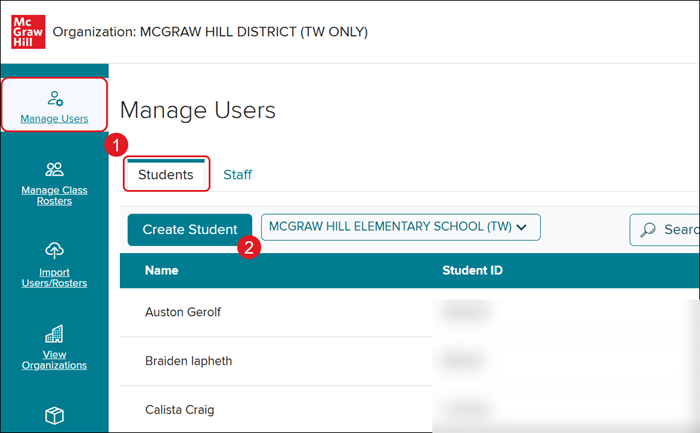
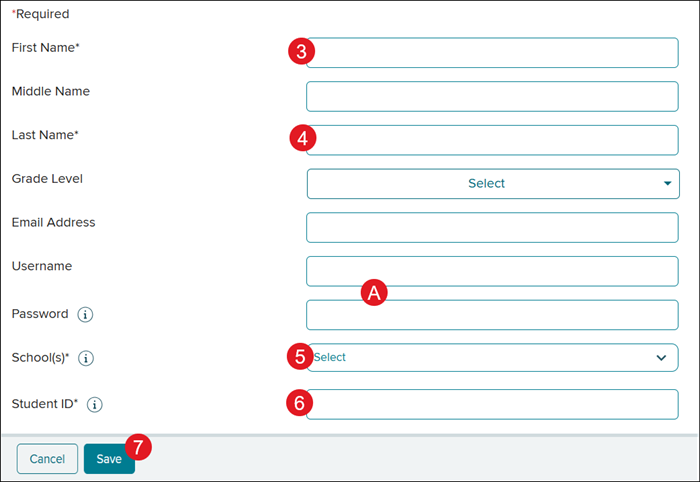
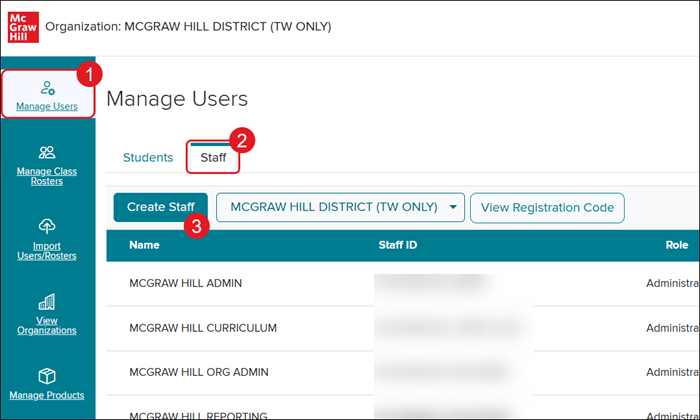
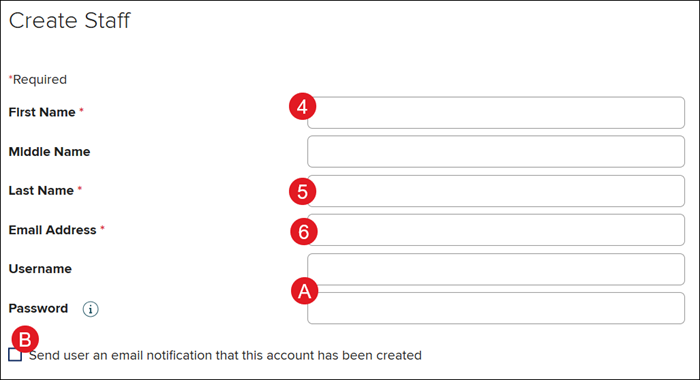
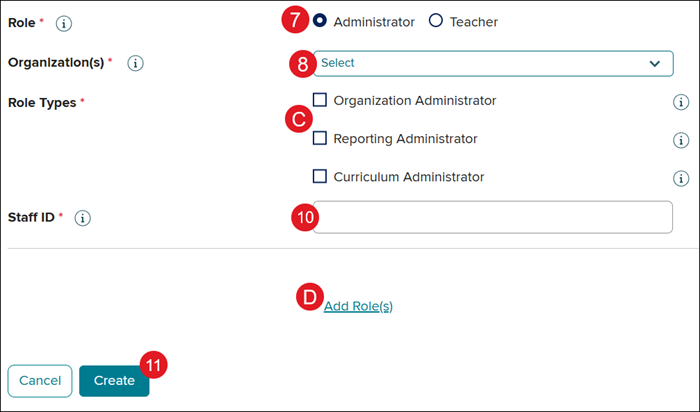
<p>For a full page view of the demo, <a target="_blank" href="https://hub.mheducation.com/share/dx21jmlandvu">click here</a>.</p> <p>For a Spanish version of the demo, <a target="_blank" href="https://hub.mheducation.com/share/luinfqv0w1js">click here</a>.</p> <p> </p> <p>For both Auto-Rostering and Manual Rostering districts, there may be times where Organization Administrators need to create individual teacher or student accounts via Admin Tools instead of using <a href="/content/mheducation/us/en/prek-12/support/knowledge/import-users-rosters-resources" target="_blank">Import Users/Rosters</a> or the district's automated roster data.</p> <p>If you're unsure which Access Service applies to your district, refer to the <a href="/content/mheducation/us/en/prek-12/support/knowledge/access-service-descriptions" target="_blank">Access Service Descriptions</a> article for more information.</p> <p> </p> <p><strong>Auto-Rostering Districts: </strong>Creating a user can cause errors if you plan to send the user in the roster data at any point. It is best practice to create users via the roster data when possible, but if there are circumstances that do not allow a specific user to be sent, this method is an alternative.</p> <p> </p> <p><span><strong>Article Contents</strong></span></p> <p><a href="#student_account" target="_self">Create an Individual Student Account</a></p> <p><a href="#teacher_account" target="_self">Create an Individual Teacher Account</a></p> <p> </p> <h3><a id="student_account"></a>Create an Individual Student Account</h3> <p>1. SSO or <a href="https://my.mheducation.com/login" target="_blank">log in</a> to your <strong>Organization Administrator</strong> account.</p> <p>If you serve dual roles as an administrator and a teacher, you will land in your teacher account upon logging in. <a href="/content/mheducation/us/en/prek-12/support/knowledge/how-to-toggle-between-roles-and-orgs" target="_blank">Switch to your administrator role</a> to access the <strong>Manage Users</strong> page.</p> <p>Once you’ve accessed your administrator role, you will land directly on the <strong>Students</strong> tab of the <strong>Manage Users</strong> page.</p> <p>2. Click the <strong>Create Student</strong> button.</p> <p><img src="/content/dam/mhe/support/support-images/migrated/rtaImage-1208576216.jpeg" data-assetref="rtaImage-1208576216-1779221634064"></p> <p>3. Enter a <strong>First Name</strong>.</p> <p>4. Enter a <strong>Last Name</strong>.</p> <p>5. Select the <strong>School(s)</strong>.</p> <p>6. Enter a <strong>Student ID</strong>. This must be unique to your school and/or district.</p> <p>All other fields can be completed, if desired. </p> <p>A. If you want the system to autogenerate a username and password, you can leave those fields blank. However, we recommend completing those fields so you can provide the student with their login.</p> <p>Refer to the <a href="/content/mheducation/us/en/prek-12/support/knowledge/password-policy-change" target="_blank">Password Policy</a> article for more information about password requirements.</p> <p>7. Click the <strong>Save </strong>button.</p> <p><img src="/content/dam/mhe/support/support-images/migrated/rtaImage-1208576806.jpeg" data-assetref="rtaImage-1208576806-1779221634065"></p> <p> </p> <h3><a id="teacher_account"></a>Create an Individual Teacher Account</h3> <p>1. SSO or <a href="https://my.mheducation.com/login" target="_blank">log in</a> to your <strong>Organization Administrator</strong> account.</p> <p>If you serve dual roles as an administrator and a teacher, you will land in your teacher account upon logging in. <a href="/content/mheducation/us/en/prek-12/support/knowledge/how-to-toggle-between-roles-and-orgs" target="_blank">Switch to your administrator role</a> to access the <strong>Manage Users</strong> page.</p> <p>2. Click the <strong>Staff </strong>tab.</p> <p>3. Click the <strong>Create Staff</strong> button.</p> <p><img src="/content/dam/mhe/support/support-images/migrated/rtaImage-1208585245.jpeg" data-assetref="rtaImage-1208585245-1779221634065"></p> <p>4. Enter a <strong>First Name</strong>.</p> <p>5. Enter a <strong>Last Name</strong>.</p> <p>6. Enter an <strong>Email Address</strong>. This must be an email address that is not associated with any other user account.</p> <p>A. If you do not input a username and password for the teacher’s account, one will be automatically generated for them.</p> <p>If entering a password, refer to the <a href="/content/mheducation/us/en/prek-12/support/knowledge/password-policy-change" target="_blank">Password Policy</a> article for more information about password requirements.</p> <p>B. We recommend checking the <strong>Send user an email notification that this account has been created</strong>.</p> <p><img src="/content/dam/mhe/support/support-images/migrated/rtaImage-1208609564.jpeg" data-assetref="rtaImage-1208609564-1779221634065"></p> <p>7. Select the <strong>Role</strong>.</p> <p>8. Select the <strong>Organization(s)</strong>.</p> <p>C. If you are creating an administrator account, you will be required to select at least one <strong>Role Type</strong> for the user. Refer to the <a href="/content/mheducation/us/en/prek-12/support/knowledge/my-mheducation-com-create-administrator-accounts" target="_blank">Create Administrator Accounts and Add Roles</a> article to learn more.</p> <p>10. Enter a <strong>Staff ID</strong>. This is an alphanumeric ID that must be unique to your school and/or district.</p> <p>D. Click the <strong>Add Role(s)</strong> link to add additional roles to the user account. Ex: If the user needs teacher and administrator access.</p> <p>11. Click the <strong>Create</strong> button.</p> <p><img src="/content/dam/mhe/support/support-images/migrated/rtaImage-1208586169.jpeg" data-assetref="rtaImage-1208586169-1779221634065"></p> <p>For more information on managing user accounts within Admin Tools, refer to the <a href="/content/mheducation/us/en/prek-12/support/knowledge/my-mheducation-com-manage-users" target="_blank">Manage User Accounts</a> article.<br> <br> Teachers and students are also able to create their own accounts using district and class codes:<br> <a href="/content/mheducation/us/en/prek-12/support/knowledge/my-mheducation-com-create-a-teacher-account" target="_blank">Create a Teacher Account</a><br> <a href="/content/mheducation/us/en/prek-12/support/knowledge/my-mheducation-com-create-a-student-account" target="_blank">Create a Student Account</a></p> dts Learn how to create individual user accounts for McGraw Hill platforms when rostering is not used. 2026-03-09 Create Individual Teacher and Student Accounts Learn how to create individual user accounts for McGraw Hill platforms when rostering is not used. Learn how to manually create individual user accounts for the McGraw Hill platform.
Learn how to manually create individual user accounts for the McGraw Hill platform.
For a full page view of the demo, click here. For a Spanish version of the demo, click here. For both Auto-Rostering and Manual Rostering districts, there may be times where Organization Administrators need to create individual teacher or student accounts via Admin Tools instead of using Import Users/Rosters or the district's automated roster data. If you're unsure which Access Service applies to your district, refer to the Access Service Descriptions article for more information. Auto-Rostering Districts: Creating a user can cause errors if you plan to send the user in the roster data at any point. It is best practice to create users via the roster data when possible, but if there are circumstances that do not allow a specific user to be sent, this method is an alternative. Article Contents Create an Individual Student Account Create an Individual Teacher Account Create an Individual Student Account 1. SSO or log in to your Organization Administrator account. If you serve dual roles as an administrator and a teacher, you will land in your teacher account upon logging in. Switch to your administrator role to access the Manage Users page. Once you’ve accessed your administrator role, you will land directly on the Students tab of the Manage Users page. 2. Click the Create Student button. 3. Enter a First Name. 4. Enter a Last Name. 5. Select the School(s). 6. Enter a Student ID. This must be unique to your school and/or district. All other fields can be completed, if desired. A. If you want the system to autogenerate a username and password, you can leave those fields blank. However, we recommend completing those fields so you can provide the student with their login. Refer to the Password Policy article for more information about password requirements. 7. Click the Save button. Create an Individual Teacher Account 1. SSO or log in to your Organization Administrator account. If you serve dual roles as an administrator and a teacher, you will land in your teacher account upon logging in. Switch to your administrator role to access the Manage Users page. 2. Click the Staff tab. 3. Click the Create Staff button. 4. Enter a First Name. 5. Enter a Last Name. 6. Enter an Email Address. This must be an email address that is not associated with any other user account. A. If you do not input a username and password for the teacher’s account, one will be automatically generated for them. If entering a password, refer to the Password Policy article for more information about password requirements. B. We recommend checking the Send user an email notification that this account has been created. 7. Select the Role. 8. Select the Organization(s). C. If you are creating an administrator account, you will be required to select at least one Role Type for the user. Refer to the Create Administrator Accounts and Add Roles article to learn more. 10. Enter a Staff ID. This is an alphanumeric ID that must be unique to your school and/or district. D. Click the Add Role(s) link to add additional roles to the user account. Ex: If the user needs teacher and administrator access. 11. Click the Create button. For more information on managing user accounts within Admin Tools, refer to the Manage User Accounts article. Teachers and students are also able to create their own accounts using district and class codes: Create a Teacher Account Create a Student Account
dts
Direct Login & Manual-Rostering, SSO & Auto-Rostering, SSO & Manual-Rostering, PreK-12, Customer Support, School Administrator, Direct Login & Auto-Rostering, Preschool, Elementary School, Middle School, High School, Core, Intervention, Supplemental, AP, Honors & Electives, Literacy, Math, Science, Social Studies, Health, Visual & Performing Arts, World Languages, Reveal Math (K-12), AP Biology, AP Chemistry, AP History & Geography, AP Psychology, AP Economics, AP African American Studies, AP Precalculus, AP Statistics, AP Computer Science, AP Language and Composition, AP Public Speaking, AP Music Theory, 5 Steps to a 5 - AP Test Prep, Glencoe Health 2022, Teen Health 2021, Arrive Math, Building Blocks 2024, Building Blocks PreK 2025, Number Worlds 2024, SRA Reading Laboratory 2025, SRA Reading Mastery Transformations, Achieve3000 Literacy, Actively Learn, McGraw Hill Literacy Emerge!, McGraw Hill Literacy Summit!, McGraw Hill Literacy Soar!, Open Court Reading 2025, Redbird, StudySync 2021, ALEKS, ALEKS Adventure, CA Reveal Math (K-12), Illustrative Math, Redbird Math, CA Inspire Science 2020, FL Science 2025 (K-12), Inspire Science 2020, TN Science (K-12), TX Science 2025 (K-12), CA Impact 2019, FL Social Studies 2024 (K-12), Impact Social Studies, McGraw Hill Social Studies, All Sorts 2026 (K-5), Asi se Dice 2024, CTE - Health Science, CTE - Agriculture, CTE - Computing and Technology, CTE - Culinary Arts, CTE - Early Childhood Education, CTE - Business, Marketing, and Finance, CTE - Criminal Justice, Glencoe Health 2014, McGraw Hill Health 2014, 2Inform, Building Blocks 2015, Connecting Math Concepts, Number Worlds 2015, Corrective Reading, Early Interventions in Reading, Spelling Mastery, WonderWorks 2022 & 2014, Maravillas 2020 & 2017, OCR Foundational Skills Kit, OCR Word Analysis Kit, Open Court Reading 2016, 2018, 2023, StudySync 2015 & 2017, Wonders, Wonders 2014, Wonders 2023 2020 2017, Wonders Balanced Literacy 2016, Wonders EL 2016, World of Wonders 2017, Core Plus Math 2015, Everyday Mathematics 4 (K-6), Glencoe Algebra 1 2014, Glencoe Algebra 2 2014, Glencoe Algebra 1 2018, Glencoe Algebra 2 2018, Glencoe Math, Glencoe Geometry 2014, Glencoe Geometry 2018, Glencoe Math Course 1, Glencoe Math Course 2, Glencoe Math Course 3, Glencoe Math Accelerated, McGraw Hill My Math, McGraw Hill My Math 2013 & 2016, McGraw Hill My Math 2018, Pre-Algebra 2012, Glencoe Science, Glencoe Science 2017, Inspire Science 2017, iScience 2017, Networks, Networks 2014 (K-5), Networks 2018, Networks 2014 & 2016, Music! Its Role, Spotlight on Music, Asi se Dice 2016, Texas Math, User Management, Account Management