McGraw Hill Resources: PowerPoint file not opening
Troubleshoot issues when McGraw Hill PowerPoint resource files do not open.
Tags
- Higher Education
- Customer Support
- ALEKS


Textbook-specific McGraw-Hill resources, such as workbooks and lecture notes, are available to Higher Ed instructors in ALEKS 360 classes from the Resources page.
How to Find it: Select a class in the CLASS tab | Select CLASS TOOLS to the right of the class code | Select Resources
If you're unable to open a PowerPoint file from the McGraw Hill Resources section, try the steps below to fix the issue:
- Open the folder after it has been unzipped
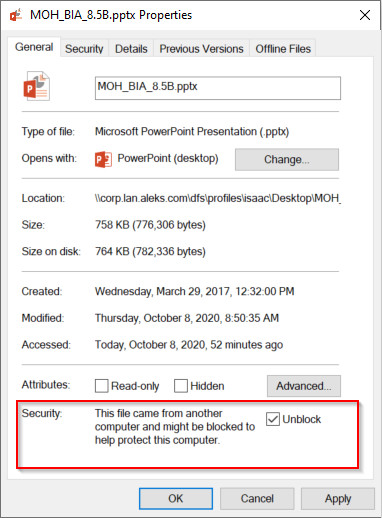
- Right click on the PowerPoint file
- Click on Properties
- Check the box next to Unblock and click Apply
- Click OK
- Double click the PowerPoint to open it