
How do I extend access to my Higher Ed ALEKS class?
Extend access for Higher Ed ALEKS students so they can continue working beyond the original course end date.
- Registration
- Training
- Higher Education
- Customer Support
- ALEKS
- Higher Ed Student


To extend access to your class, please follow the steps below:
Step 1: Log into your student account.
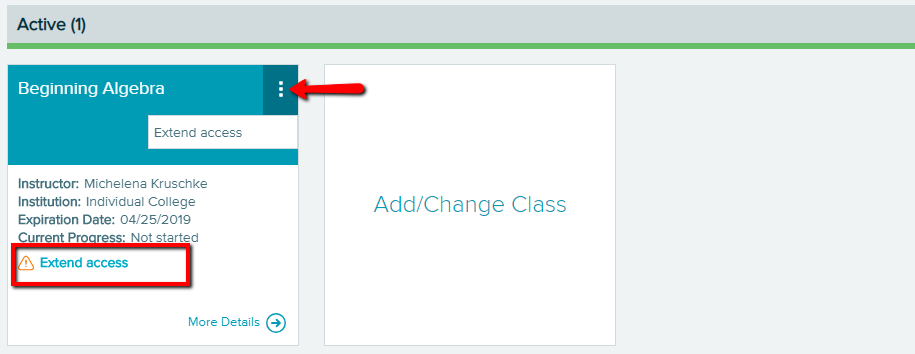
Step 2: On the course tile, click Extend Access, or next to the course title, click on the three vertical dots and click on Extend Access.
Example:
Step 3: If you do not have an access code, click on "No, I need to purchase an access code" and you will be directed to the McGraw-Hill Education website, where you will have to purchase a valid access code. If you have an access code, click on "Yes, I have an access code" and enter the access code.
If access to your class has already expired, locate the class in the Inactive section. Open the menu in the top-right corner of the class tile (by selecting the three vertical dots) and select Renew Access. Then, you can choose to enter an access code or purchase an access code.
If you do not see the option to purchase an access code online for a class you need to extend, the access code might only be available for purchase at your school's bookstore. Please contact your school's bookstore for more information or contact ALEKS Customer Support.
