
ALEKS + iPad Troubleshooting Tips
Troubleshoot common ALEKS issues on iPad, including loading, navigation, and performance problems.
Tags
- Classroom Teacher
- Higher Education
- School Parent
- Homeschooling Parent
- PreK-12
- Customer Support
- Independent Use
- Instructor
- ALEKS
- Higher Ed Student
- School Student


Troubleshooting Steps
Disable Desktop Mode
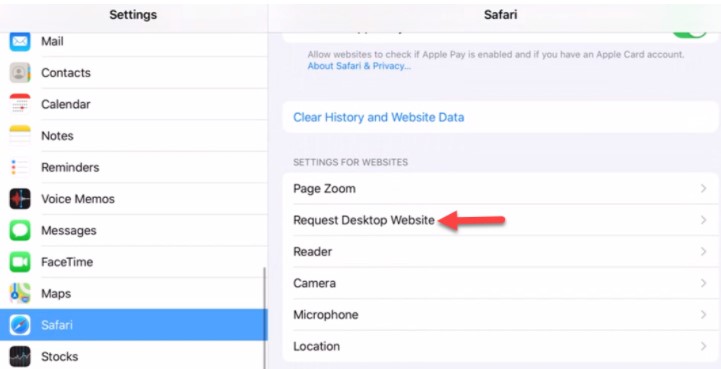
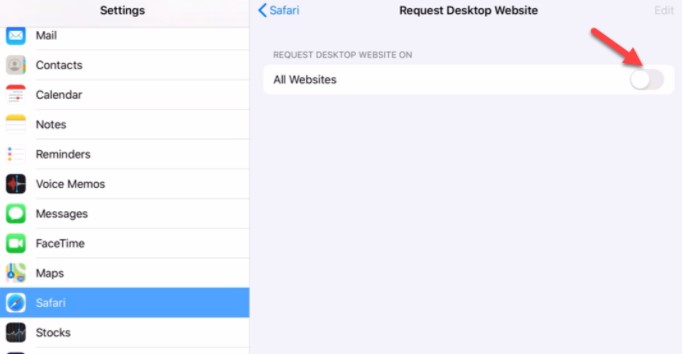
The Desktop Mode feature may prevent some ALEKS tools from functioning properly, as they are optimized for iPad use. Desktop Mode is disabled by default, but if you suspect it is enabled, follow these steps:
- Open Settings on your iPad.
- Navigate to Safari.
- Select Request Desktop Website.
- Disable All Websites.
Flush the Domain Name System (DNS)
Flushing the DNS cache can resolve connectivity issues and improve performance.
On iPhone:
- Open Settings and go to Wi-Fi.
- Tap your connected network.
- Select Renew Lease or toggle Airplane Mode on and off.
On Android:
- Open Settings and navigate to Network & Internet (or a similar option).
- Tap Wi-Fi, select your network, and choose Forget.
- Reconnect to the network or restart your device.
Reboot a Frozen iPad
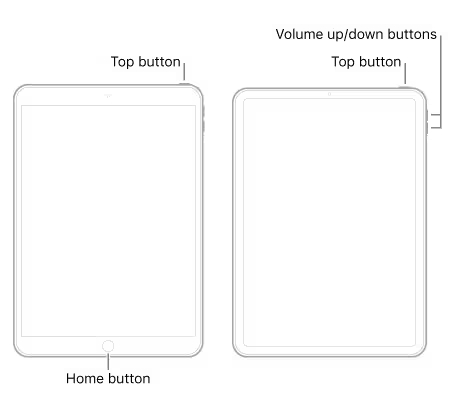
If your iPad is unresponsive or frozen, follow these steps based on your iPad model:
For iPads with a Home Button:
- Press and hold the Top Button and the Home Button simultaneously.
- Release both buttons when the Apple logo appears.
For iPads with Face ID:
- Press and quickly release the Volume Up Button.
- Press and quickly release the Volume Down Button.
- Press and hold the Top Button until the Apple logo appears, then release.
For additional details, visit Apple’s official support page: Apple Support - Restart iPad.
