View Student Binder Work in World of Wonders
Use the WOW Binder to organize World of Wonders instructional materials and resources.
- Getting Started & Orientation
- Literacy
- SSO & Manual-Rostering
- Customer Support
- World of Wonders 2017
- Direct Login & Auto-Rostering
- Core
- Direct Login & Manual-Rostering
- Classroom Teacher
- SSO & Auto-Rostering
- PreK-12
- Preschool
- Elementary School
- Grades & Assignments


Access the Binder
1. Hover over Binder in the Navigation Banner.
2. Select My Work from the menu.

My Work
Access your work for the week on the My Work tab. This includes your notes, edits you made to the Presentation eBook, or Interactive White Board lessons this week.
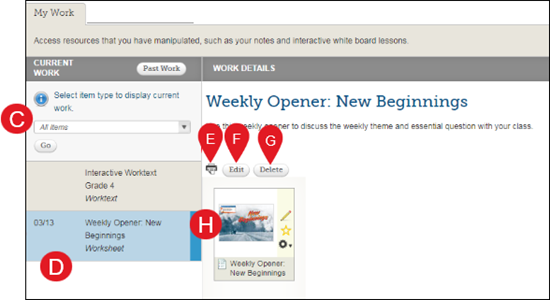
A. Your Binder resources for the current Unit and Week is displayed on the My Work tab.
B. Click Past Work to view your notes from another unit and week.
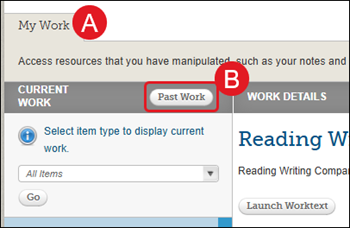
C. Filter the types of work by selecting the type of item from the drop-down list and clicking the Go button.
D. Click the item name to view the instructions and associated resources.
E. Click the print icon to print this item.
F. Click the Edit button to make changes to the item.
G. Click the Delete button to delete it.
H. Click the resources icon to view it.