
Writing & Research Projects in Wonders/Maravillas
Explore Wonders Writing and Research features that support writing instruction, inquiry, and research skills.
Tags
- Literacy
- SSO & Manual-Rostering
- Customer Support
- Direct Login & Auto-Rostering
- Wonders 2014
- School Student
- Core
- Direct Login & Manual-Rostering
- Wonders Balanced Literacy 2016
- Wonders 2023 2020 2017
- School Parent
- SSO & Auto-Rostering
- PreK-12
- Elementary School
- Kindergarten
- 1st Grade
- 2nd Grade
- 3rd Grade
- 4th Grade
- 5th Grade
- 6th Grade
- Middle School
- Student Resources


Overview
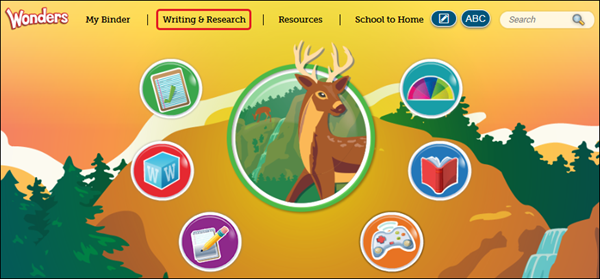
To access, click Writing & Research at the top of the page.
Talk About It
- On the Talk About It tab, current discussions are listed on the left side. The topics are arranged by date, with the latest discussion on top. Select a discussion to view it.
- The Comments icon indicates there are new comments in the discussion.
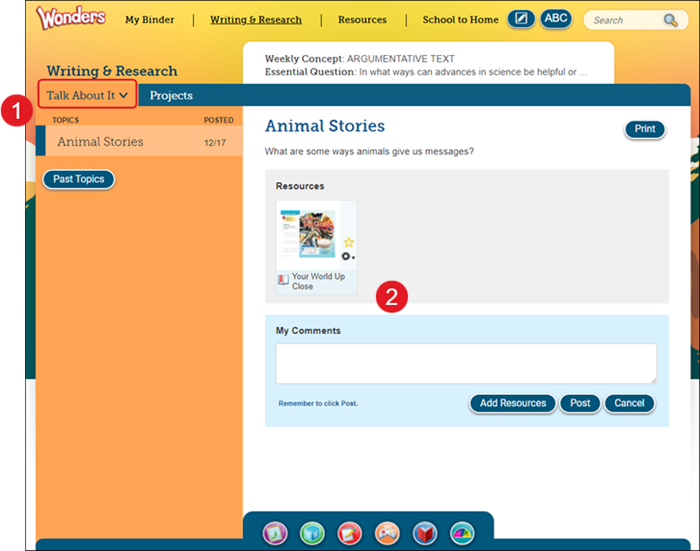
- The topic appears at the top, along with any attached resources, with the discussion located below.
- Posts are arranged by date, with the most recent on top.
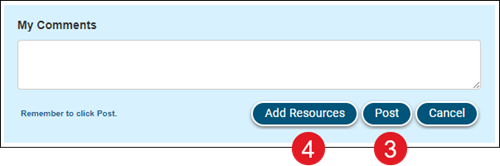
- To add a new post, type the post under My Comments and click the Post button.
- Click the Add Resources button to attach a resource to your post.
- To Comment on a specific post, click the post's Comment button.

- If your teacher is moderating the discussion, you will see Waiting for approval next to your comment until it is approved. Otherwise, your comment appears on the discussion immediately.

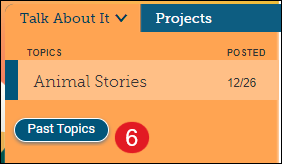
- When your teacher ends the discussion, it will no longer appear on your Talk About It tab.
Click the Past Topics button to view closed discussions.
Projects
- On the Projects tab, you see the discussions for your current group projects.
- Current projects are listed on the left side of the tab. Select a project to view it.
- The Comments icon indicates there are new comments in the discussion.
- The original project description is listed at the top, along with any resources you attached, with the discussion located below.
- Only students assigned to your project group see this discussion.
- Posts are arranged by date, with the most recent on top.
- To add a new post, type the post under My Comments and click the Post button. Your post appears on the discussion immediately.
- Click the Add Resources button to attach a resource to your post.
- To comment on a specific post, click the post's Comment button and click Submit. Your comment appears on the discussion immediately.
- You will submit your project materials on your To Do List.
- Click the My To Do List button to view your project assignment.
- When the project is complete, it will no longer appear on your Projects tab. Click the Past Projects button to see your older group projects.