Assign Writing Assignments in Wonders/Maravillas
Learn how students access Wonders 2020 writing resources and mini‑lessons to support the writing process and assignments.
- Literacy
- SSO & Manual-Rostering
- Customer Support
- Direct Login & Auto-Rostering
- Wonders 2014
- Maravillas 2020 & 2017
- Tools & Resources
- Core
- Direct Login & Manual-Rostering
- Classroom Teacher
- Wonders Balanced Literacy 2016
- Wonders 2023 2020 2017
- SSO & Auto-Rostering
- PreK-12
- Elementary School
- Grades & Assignments
- Kindergarten
- 1st Grade
- 2nd Grade
- 3rd Grade
- 4th Grade
- 5th Grade
- 6th Grade
- Middle School


Writing is a resource where students in grades K-2 can access online mini-lessons that are focused on a variety of facets of the writer’s process.
Access the Writing Resources
1. Hover over Writing & Research in the Navigation Banner and select Writing from the drop menu.
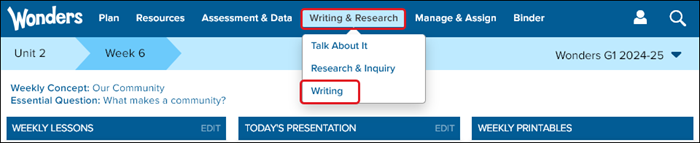
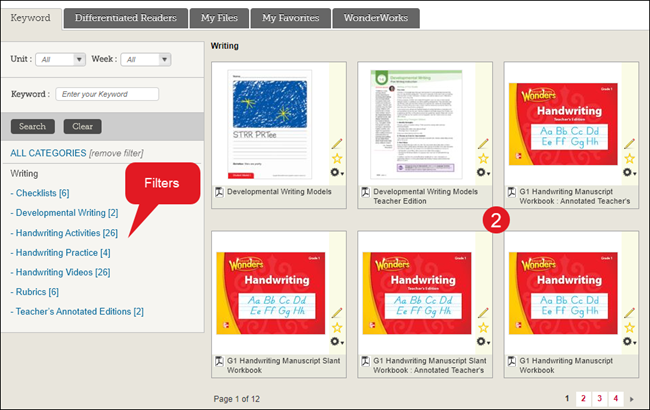
The page will automatically navigate you to the Writing resources in the Resource Library. Use the filters on the left to narrow the available resource options.
2. Click on a resource tile to open it.
Assign the Resource
For more in-depth steps on assignment management for Wonders, refer to the Wonders/Maravillas - Assignment Management document.
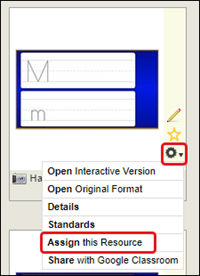
1. Click on the Tools (gear) icon and then click on Assign this Resource from the menu.
Note: Not all resources are able to be assigned to students.
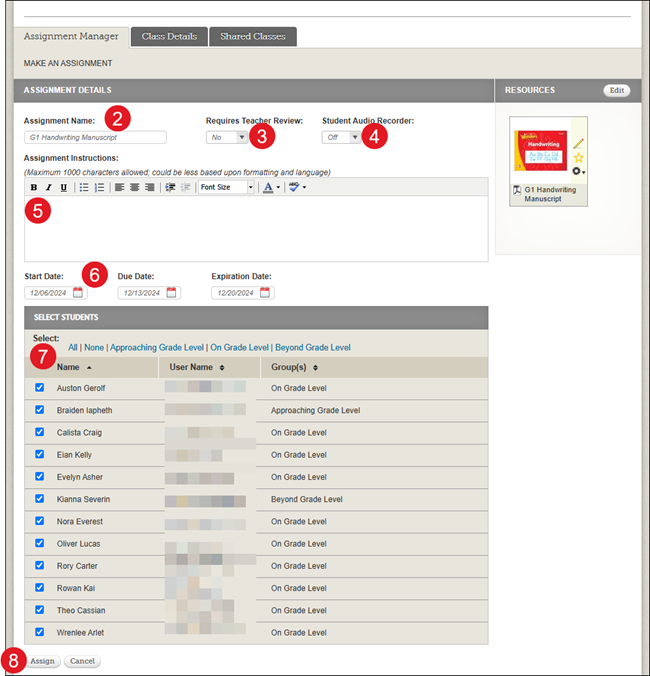
The page will automatically take you to the Assignment Management page and the resource will be attached under the Resources section.
2. Enter an Assignment Name.
3. Select if the assignment Requires Teacher Review. This defaults to No.
4. Select if you want to turn on the Student Audio Recorder. This defaults to Off.
5. Enter Assignment Instructions. This is optional.
6. Select the Start Date, Due Date, and Expiration Date.
7. Check the box next to the student(s) the assignment is for in the Select Students section.
8. Click the Assign button.