View Weekly Standards in Wonders/Maravillas
View weekly standards alignment in Wonders 2020 to support lesson planning and instruction.
- Literacy
- SSO & Manual-Rostering
- Customer Support
- Direct Login & Auto-Rostering
- Wonders 2014
- Maravillas 2020 & 2017
- Core
- Plan & Present
- Direct Login & Manual-Rostering
- Classroom Teacher
- Wonders Balanced Literacy 2016
- Wonders 2023 2020 2017
- SSO & Auto-Rostering
- PreK-12
- Elementary School
- Kindergarten
- 1st Grade
- 2nd Grade
- 3rd Grade
- 4th Grade
- 5th Grade
- 6th Grade
- Middle School


You can identify the standards covered in the program each week, as well as the lessons where they are located.
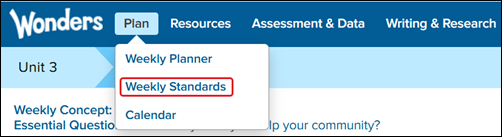
1. Hover over Plan in the Navigation Banner, and select Weekly Standards from the menu.
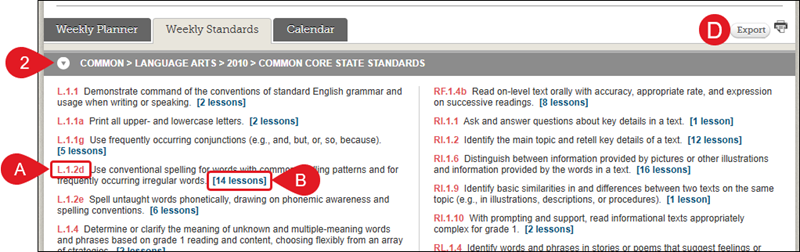
2. On the Weekly Standards tab, click the arrow to expand the Standards blade.
A. The standards covered in that week's scheduled lessons are listed by standard code.
B. To see the lessons, click the lessons link.
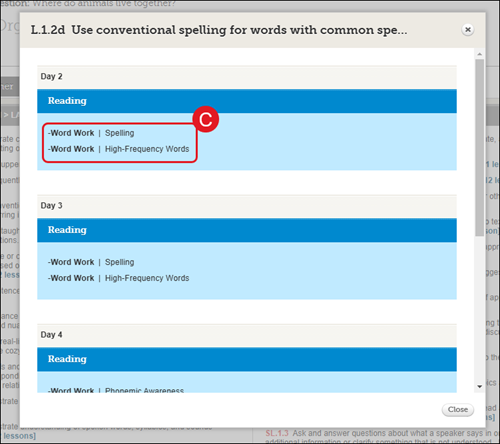
The lessons are listed by Group and by Instructional Day on the pop-up.
C. Click a lesson link to navigate to the Daily Lessons page.
D. Click the Export button to export a spreadsheet of standards covered this week, as well as the lessons where they are located.