
Wonders/Maravillas Printable Assessments
Print and use Wonders 2020 assessments for offline or in-class evaluation.
Tags
- Literacy
- SSO & Manual-Rostering
- Customer Support
- Online Assessments
- Direct Login & Auto-Rostering
- Wonders 2014
- Maravillas 2020 & 2017
- Core
- Direct Login & Manual-Rostering
- Classroom Teacher
- Wonders Balanced Literacy 2016
- Wonders 2023 2020 2017
- SSO & Auto-Rostering
- PreK-12
- Elementary School
- Kindergarten
- 1st Grade
- 2nd Grade
- 3rd Grade
- 4th Grade
- 5th Grade
- 6th Grade
- Middle School


Locate Printable Assessments
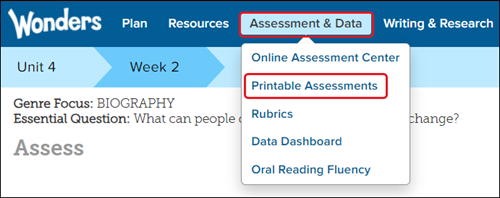
1. From the Navigation Banner, hover over Assessment & Data. Select Printable Assessments from the menu.
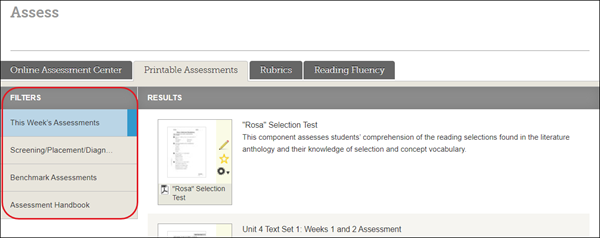
2. Select a Filter from the lefthand menu.
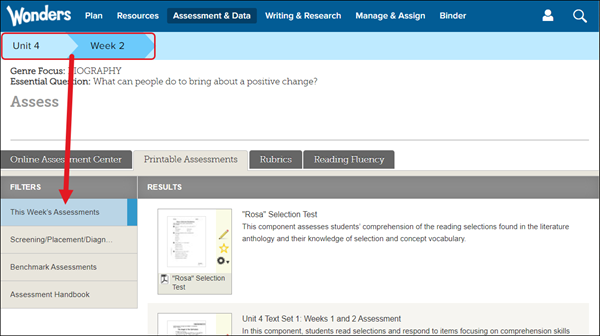
This Week's Assessments are based on the Unit and Week selected in the Navigation Menu.
Assessment Tile Options
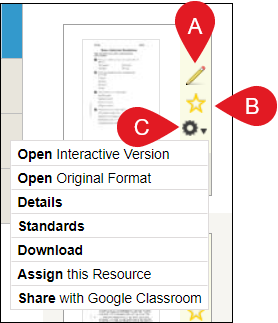
A. Notes - Click the pencil icon to add notes to the resource.
B. Favorites - Click the star icon to add the resource to your favorites.
C. Tools - Click the gear icon to access additional options for the resource.
- Open Interactive Version - opens in web player
- Open Original Format - opens in PDF format
- Details - provides the resource title, type, description, grade level, and teaching level
- Standards - lists any standards associated with the resource, if any
- Download - downloads the resource to your device
- Assign this Resource - assign the resource to the class
- For more information about creating assignments, refer to Wonders/Maravillas - Assignment Management.
- Share with Google Classroom - allows you to assign the resource through Google Classroom
- For more information about sharing resources with Google Classroom, refer to ConnectED - Share to Google Classroom.
