
Access and Navigate the StudySync Gradebook
Learn to easily navigate around the StudySync gradebook.
- Customer Support
- PreK-12
- Classroom Teacher
- Middle School
- High School
- Direct Login & Auto-Rostering
- Direct Login & Manual-Rostering
- SSO & Auto-Rostering
- SSO & Manual-Rostering
- Core
- Literacy
- StudySync
- StudySync 2021
- StudySync 2015 & 2017
- Grades & Assignments


The Gradebook is an easy-to-use feature to help teachers manage grades and provide a summary view of data already found in the StudySync Assignment Reports.
In addition to being able to edit scores through the Gradebook, teachers can also view student performance by Scores Breakout, Percentages, and Standards.
View the StudySync Gradebook Color View Guide
Article Contents
View the Gradebook by Group or Individual Student
View the Gradebook by Group or Individual Student
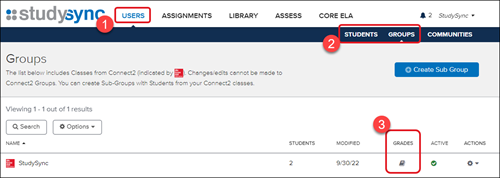
1. After launching StudySync, click on Users in the top menu bar.
2. Select Groups or Students from the second menu bar.
3. Click the book icon under the Gradebook column to the right of the group or student.
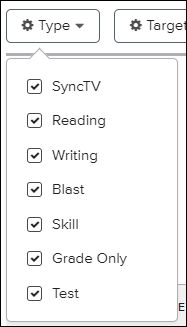
Filter Options
Type - Allows to filter down to a specific type of assignment.
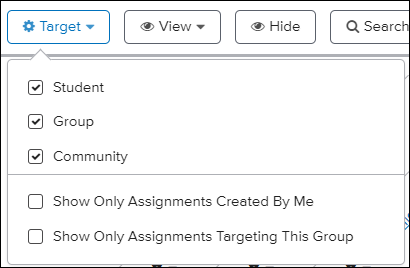
Target - Allows to filter down to a specific target such as students, groups, or .community.
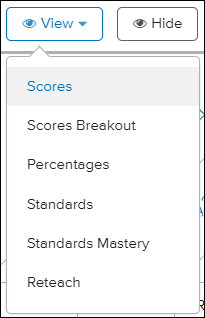
View - Allows to filter down to view by options such as Standards and Percentages.
Hide - Hides all rows that have no data associated.
Search - Allows to search by a specific student name and/or assignment.

