
View Student Gradebook For Grades 6-12
Understand how students view grades within their digital learning experience.
- McGraw Hill Social Studies
- TX Science 2025 (K-12)
- Asi se Dice 2024
- SSO & Manual-Rostering
- Inspire Science 2020
- Customer Support
- Middle School
- Direct Login & Manual-Rostering
- High School
- Glencoe Health 2022
- CA Impact 2019
- School Parent
- CA Inspire Science 2020
- SSO & Auto-Rostering
- PreK-12
- FL Science 2025 (K-12)
- World Languages
- Math
- Health
- Literacy
- Grades & Assignments
- Social Studies
- Direct Login & Auto-Rostering
- School Student
- Core
- CA Reveal Math (K-12)
- AP, Honors & Electives
- Teen Health 2021
- FL Social Studies 2024 (K-12)
- Science
- McGraw Hill Literacy
- AP Biology
- AP Chemistry
- AP History & Geography
- AP Psychology
- AP Economics
- AP African American Studies
- AP Precalculus
- AP Statistics
- AP Computer Science
- AP Language and Composition
- AP Public Speaking
- AP Music Theory
- 5 Steps to a 5 - AP Test Prep
- Arrive Math
- Building Blocks 2024
- Building Blocks PreK 2025
- Number Worlds 2024
- SRA Reading Laboratory 2025
- SRA Reading Mastery Transformations
- McGraw Hill Literacy Emerge!
- McGraw Hill Literacy Summit!
- McGraw Hill Literacy Soar!
- Open Court Reading 2025
- Illustrative Math
- Reveal Math (K-12)
- TN Science (K-12)
- Impact Social Studies
- All Sorts 2026 (K-5)
- CTE - Health Science
- CTE - Agriculture
- CTE - Computing and Technology
- CTE - Culinary Arts
- CTE - Early Childhood Education
- CTE - Business, Marketing, and Finance
- CTE - Criminal Justice


Access Grades
Students can view their assignment and assessment grades by going to Grades in their Navigation Menu.
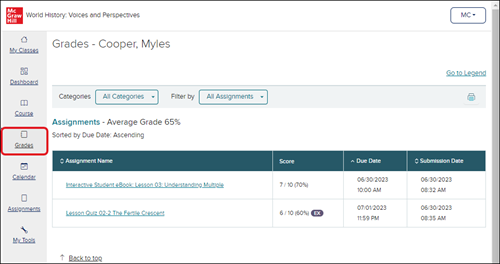
Grades Page Navigation
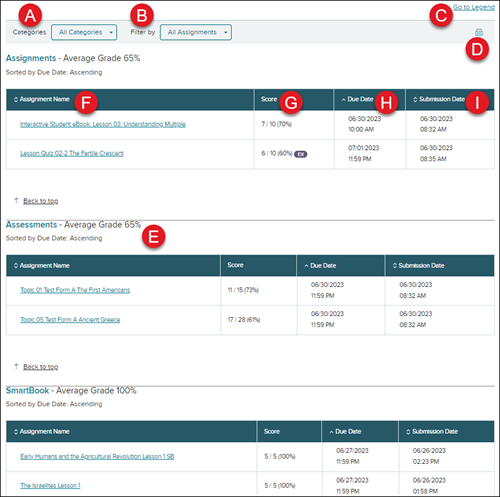
A. If your teacher has set up additional Gradebook categories, you can filter your grade view by selecting different Categories from the drop-down menu.
B. You also have the ability to filter your grade view by selecting an option from the Filter by drop-down menu.
C. Click the Go to Legend link to navigate to the bottom of the Grades page to view the Grading Legend.
D. Click the Print icon to print the Grades page.
E. If your teacher has set up additional Gradebook categories, your assignments and assessments may be separated into different sections on the Grades page.
- Each section will include the list of assignments associated with that category, as well as the Average Grade percentage for that section of assignments.
F. The first column in each section will list the Assignment Name.
G. The Score column provides both the percentage and total points possible and received for each assignment.
H. The Due Date column provides the date and time the assignment is due.
I. The Submission Date column provides the date and time you submitted the assignment.
Note: You can click on the Assignment Name, Due Date, or Submission Date headers to filter the assignment section by that column.
