SRA Reading Laboratory - Reassign Placement Test
Reassign the SRA Reading Laboratory placement test to update student placement data.
Tags
- Open Learning Platform
- Getting Started & Orientation
- Direct Instruction
- SSO & Manual-Rostering
- Customer Support
- Online Assessments
- Direct Login & Auto-Rostering
- Direct Login & Manual-Rostering
- Classroom Teacher
- SSO & Auto-Rostering
- PreK-12
- Preschool
- Elementary School


Clickable Walkthrough: SRA Reading Laboratory - Reassign Placement Test
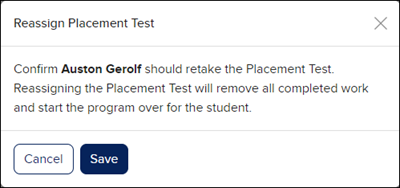
Once a student has signed in and completed their Placement Test, if you do not believe a student completed the assessment with the best of their abilities, you can reassign the test for them. Reassigning the Placement Test will remove all completed work and start the program over for the student.
1. Log into your teacher account.
2. Launch your SRA Reading Laboratory class.
3. Click on Placement Test in the navigation menu.
4. Click on the kebob icon and select Reassign Test from the menu.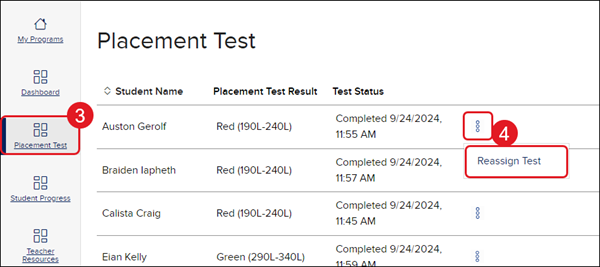
5. On the Reassign Placement Test pop-up, click Save to confirm.