
Reveal Math® Time and Money Mini Lessons
Overview of Reveal Math® Time and Money Mini Lessons
- Math
- SSO & Manual-Rostering
- Customer Support
- Direct Login & Auto-Rostering
- Core
- Plan & Present
- Direct Login & Manual-Rostering
- CA Reveal Math (K-12)
- Classroom Teacher
- SSO & Auto-Rostering
- PreK-12
- Elementary School
- Reveal Math (K-12)


This article walks teachers through viewing the Time and Money Mini Lessons for Reveal Math K-5.
For a full page view of the demo, click here.
For a Spanish version of the demo, click here.
The Time and Money mini lessons include instructional support as well as assignable digital resources, printable worksheets, and assessments. The mini lessons provided for each grade level cover concepts for multiple grades, so teachers can choose which resources best meet the needs of their students.
These resources are only available for National Reveal Math K-5. Grades K-2 share a set of mini lessons, while grades 3-5 share another set of lessons. Some are available to all K-5 courses.
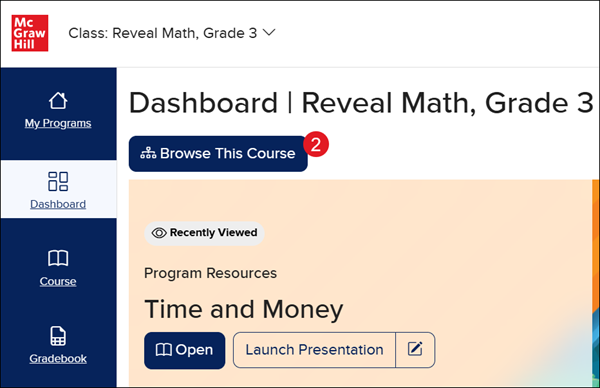
1. Launch your Reveal Math K-5 class.
2. Click on Browse This Course.
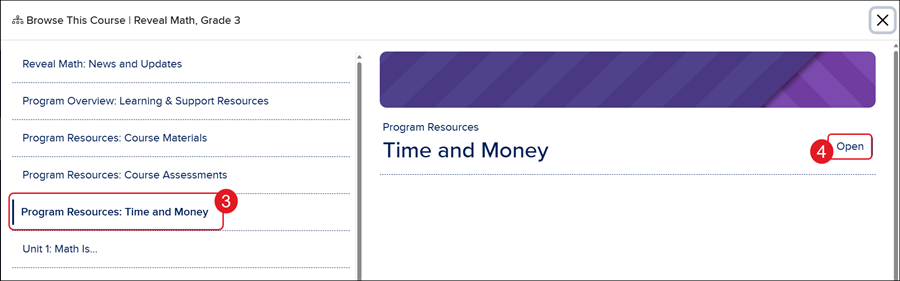
3. Select Program Resources: Time and Money from the menu.
4. Click the Open button on the right.
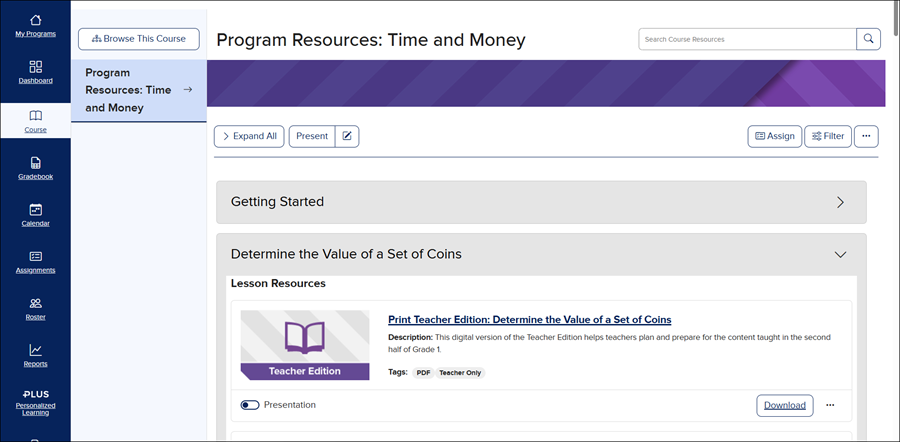
5. Click on the blade to expand the option and access the associated resources.
For additional steps on navigating the Course page, refer to the Open Learning Platform - Course Page Navigation article.
