
Redeem a ConnectED Master Code
Steps on how to redeem a Master Code to be able to access your online content.
- PreK-12
- Customer Support
- Preschool
- Elementary School
- Middle School
- High School
- Core
- Intervention
- Supplemental
- AP, Honors & Electives
- Literacy
- Math
- Science
- Social Studies
- Health
- Visual & Performing Arts
- World Languages
- Direct Login & Manual-Rostering
- SSO & Manual-Rostering
- Direct Login & Auto-Rostering
- SSO & Auto-Rostering
- Classroom Teacher
- Back-to-School Setup
- Class Management
- Dashboard & Navigation Overview


For a full page view of the demo, click here.
For a Spanish version of the demo, click here.
For steps on redeeming content from the Library, refer to the Using the Available Products Library article.
1. SSO or log into your account at my.mheducation.com.
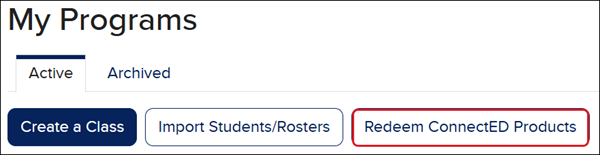
2. Click the Redeem ConnectED Products button.
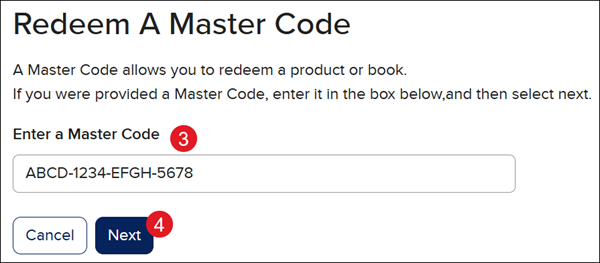
3. In the Enter a Master Code field, copy/paste or type in the 16-character Master Code.
4. Click the Next button.
Note: To have access to both the Teacher Edition and Student Edition, you will need to redeem a master code for each.
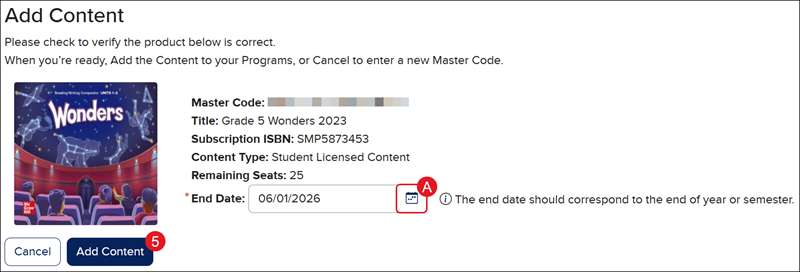
When redeeming a Student Edition, you may need to select a different Redemption Code End Date.
A. Click the Edit End Date (calendar icon) button.
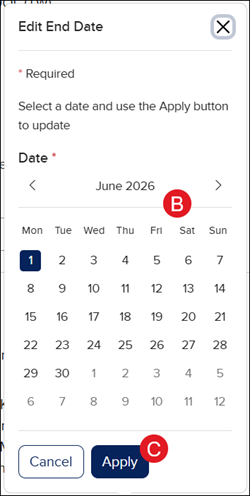
B. On the Edit End Date pop-up, select a Date.
C. Click the Apply button.
5. In the Add Content section, click the Add Content button.