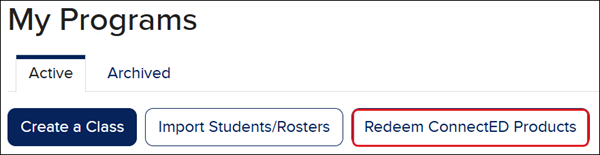
This process can be followed to redeem both teacher and student ConnectED editions, however, teachers need to make sure they create a class within their teacher editions as well to be able to gain full access to their online materials.
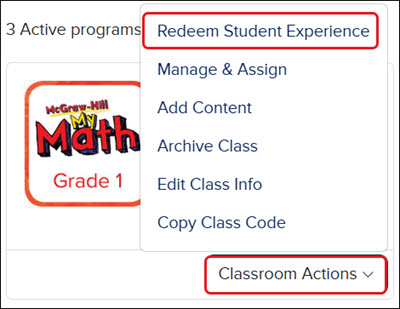
Another option to redeem the Student Edition is to click on Classroom Actions on the class card and click Redeem Student Experience from the menu.
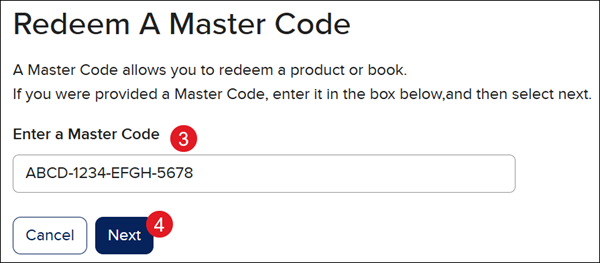
3. In the Enter a Master Code field, copy/paste or type in the 16-character Master Code.
4. Click the Next button.
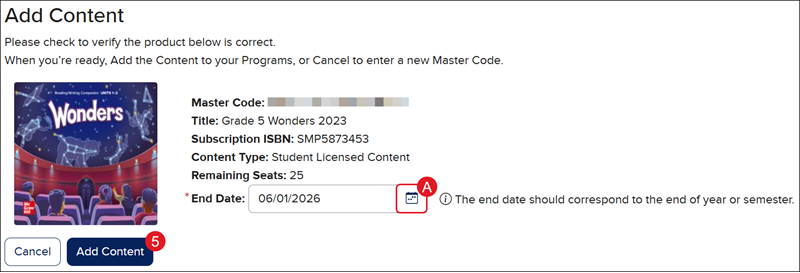
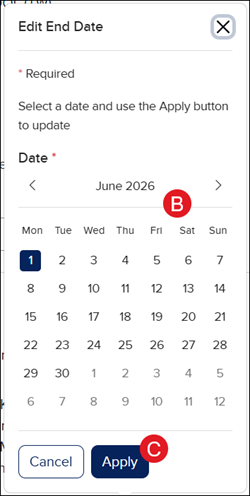
When redeeming a Student Edition, you will need to select a Redemption Code End Date:
A. Click the Edit End Date (calendar icon) button.
B. On the Edit End Date pop-up, select a Date.
C. Click the Apply button.
5. In the Add Content section, click the Add Content button.
glencoe-health
mcgraw-hill-health
2inform
building-blocks
connecting-math-concepts
number-worlds
corrective-reading
early-interventions-in-reading
spelling-mastery
wonderworks
maravillas
ocr-foundational-skills-kit
open-court-reading
studysync
wonders
wow
core-plus-math
everyday-math
glencoe-math
my-math
mcgraw-hill-pre-algebra
glencoe-science
inspire-science
iscience
networks
music-its-role
spotlight-on-music
asi-se-dice
instructor
prek-12
PreK-12, Customer Support, Classroom Teacher, Preschool, Elementary School, Middle School, High School, Direct Login & Auto-Rostering, Direct Login & Manual-Rostering, SSO & Auto-Rostering, SSO & Manual-Rostering, Core, Intervention, Supplemental, AP, Honors & Electives, Career & Technical Education, Literacy, Math, Science, Social Studies, Health, Visual & Performing Arts, World Languages, Glencoe Health 2014, McGraw Hill Health 2014, 2Inform, Building Blocks 2015, Connecting Math Concepts, Number Worlds 2015, Corrective Reading, Early Interventions in Reading, Spelling Mastery, WonderWorks 2022 & 2014, Maravillas 2020 & 2017, OCR Foundational Skills Kit, OCR Word Analysis Kit, StudySync 2015 & 2017, Wonders, Wonders 2014, Wonders 2023 2020 2017, Wonders Balanced Literacy 2016, Wonders EL 2016, World of Wonders 2017, Core Plus Math 2015, Everyday Mathematics 4 (K-6), Glencoe Algebra 1 2014, Glencoe Algebra 1 2018, Glencoe Algebra 2 2014, Glenoce Algebra 2 2018, Glencoe Math, Glencoe Geometry 2014, Glencoe Geometry 2018, Glencoe Math Course 1, Glencoe Math Course 2, Glencoe Math Course 3, Glencoe Math Accelerated, McGraw Hill My Math, McGraw Hill My Math 2013 & 2016, McGraw Hill My Math 2018, Pre-Algebra 2012, Glencoe Science, Glencoe Science 2017, Inspire Science 2017, iScience 2017, Networks, Networks 2014 (K-5), Networks 2014 & 2016, Networks 2018, Music! Its Role, Spotlight on Music, Asi se Dice 2016, Class Management, Back-to-School Setup, Getting Started & Orientation
dts
2026-05-28T12:16:25.912-04:00
View the demo in a separate tab. View the Spanish version of the demo. This process can be followed to redeem both teacher and student ConnectED editions, however, teachers need to make sure they create a class within their teacher editions as well to be able to gain full access to their online materials. For steps on redeeming content from the Product Library, refer to the Using the Available Products Library article. 1. SSO or log into your account at my.mheducation.com. 2. Click the Redeem ConnectED Products button. Another option to redeem the Student Edition is to click on Classroom Actions on the class card and click Redeem Student Experience from the menu. 3. In the Enter a Master Code field, copy/paste or type in the 16-character Master Code. 4. Click the Next button. When redeeming a Student Edition, you will need to select a Redemption Code End Date: A. Click the Edit End Date (calendar icon) button. B. On the Edit End Date pop-up, select a Date. C. Click the Apply button. 5. In the Add Content section, click the Add Content button.
Top
Regional Page Available
It looks like you're outside the United States. Do you want to see your regional version of this page?