
Question and Test Interoperability (QTI) Frequently Asked Questions (FAQ)
Find answers to frequently asked questions about QTI files and assessment imports.
- Customer Support
- Middle School
- High School
- SSO & Auto-Rostering
- PreK-12
- Supplemental
- Visual & Performing Arts
- Health
- Literacy
- Social Studies
- Core
- AP, Honors & Electives
- SSO & Manual-Rostering
- Number Worlds 2024
- Direct Login & Manual-Rostering
- Classroom Teacher
- Elementary School
- World Languages
- Math
- Intervention
- Direct Login & Auto-Rostering
- Preschool
- AP Biology
- AP Chemistry
- AP History & Geography
- AP Psychology
- AP Economics
- AP African American Studies
- AP Precalculus
- AP Statistics
- AP Computer Science
- AP Language and Composition
- AP Public Speaking
- AP Music Theory
- 5 Steps to a 5 - AP Test Prep
- Glencoe Health 2022
- Teen Health 2021
- Arrive Math
- Building Blocks 2024
- Building Blocks PreK 2025
- SRA Reading Laboratory 2025
- SRA Reading Mastery Transformations
- McGraw Hill Literacy Emerge!
- McGraw Hill Literacy Summit!
- McGraw Hill Literacy Soar!
- Open Court Reading 2025
- CA Reveal Math (K-12)
- Illustrative Math
- Reveal Math (K-12)
- Texas Math
- CA Inspire Science 2020
- FL Science 2025 (K-12)
- Inspire Science 2020
- TN Science (K-12)
- TX Science 2025 (K-12)
- CA Impact 2019
- FL Social Studies 2024 (K-12)
- Impact Social Studies
- McGraw Hill Social Studies
- All Sorts 2026 (K-5)
- Asi se Dice 2024
- CTE - Health Science
- CTE - Agriculture
- CTE - Computing and Technology
- CTE - Culinary Arts
- CTE - Early Childhood Education
- CTE - Business, Marketing, and Finance
- CTE - Criminal Justice
- Online Assessments


Q: What is QTI?
A: QTI stands for Question and Test Interoperability. McGraw Hill provides questions and test items from our assessment systems in an exported format for import into a 3rd party assessment system. Exports only include test items that are QTI compliant. All tech-enhanced or interactive questions are skipped in this process, as they are not QTI compatible. McGraw Hill will also remove any permissioned images from the export.
Q: Does the use of QTI require Single Sign-On (SSO) or Auto-Rostering?
A: No, this is not a requirement for QTI.
Q: Is QTI a Thin Common Cartridge?
A: QTI is not a Thin Common Cartridge (TCC), nor is it included in a Thin Common Cartridge export. QTI files will be delivered in the IMS Global Learning Consortium® 2.1 standard (or 1.2 for eAssessment). This provides a collection of individual assessment items to be imported and used in the district’s assessment system. This does not include any data passback; scores will only be available in the McGraw Hill system if the students take their online assessment through our platform(s).
Q: Will QTI work with my McGraw Hill product?
A: McGraw Hill products use 4 different assessment systems. The QTI request is dependent on the assessment system where the question and test currently reside. See the different assessment systems below to help determine how to make a QTI request.
eAssessment:
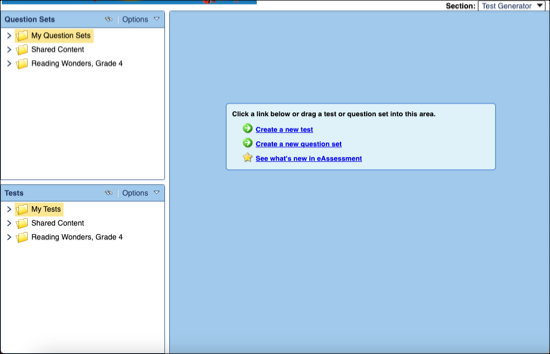
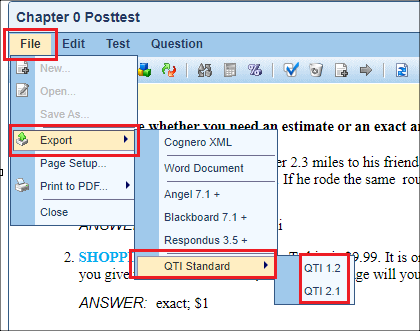
You can export by test in QTI 2.1 and 1.2 using the following instructions:
Open eAssessment.
In the Test Generator section, open the test to export.
Click File.
Hover over Export.
Hover over QTI Standard.
Select the desired QTI format. This will download a zipped file containing the data in the desired format.
Online Assessment Center (OAC):
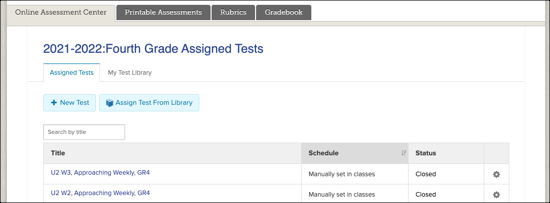
QTI files may not be available for assessment items using this platform. Reach out to your McGraw Hill Sales Representative for the availability of QTI files for any programs using the Online Assessment Center.
MH Assess:
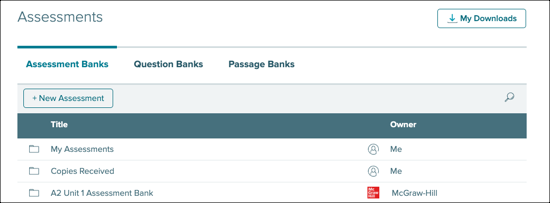
If you use this Assess platform, you will need to request an export from your McGraw Hill Sales Representative. Exports only include test items that are QTI compliant. All tech-enhanced or interactive questions are skipped in this process, as they are not QTI compatible. McGraw Hill will also remove any permissioned images from the export.
StudySync Assess:
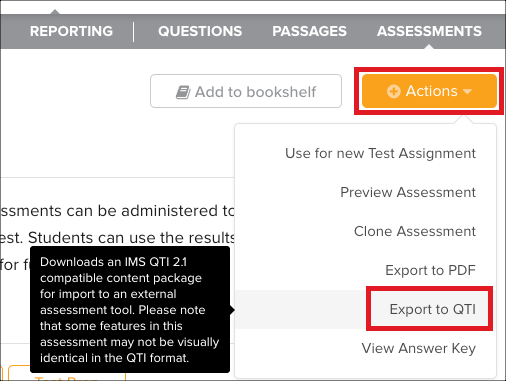
You can export QTI files in the IMS Global 2.1 standard within StudySync. On the test you wish to export, click the Actions dropdown and select Export to QTI.
Note: Some StudySync assessments like the Benchmarks and Screeners can’t be exported to QTI due to copyright permissions of the content.
