PRoPL Teacher Reports
Learn how to access and navigate reports for PRoPL as a teacher.
- Customer Support
- PreK-12
- Classroom Teacher
- Elementary School
- Middle School
- High School
- Direct Login & Auto-Rostering
- Direct Login & Manual-Rostering
- SSO & Auto-Rostering
- SSO & Manual-Rostering
- Core
- Supplemental
- Literacy
- Math
- CA Reveal Math (K-12)
- Reveal Math (K-12)
- McGraw Hill Literacy Emerge!
- McGraw Hill Literacy Summit!
- McGraw Hill Literacy Soar!
- ALEKS
- Reports & Analytics


View the demo in a separate tab.
View the Spanish version of the demo.
The Pearson Review of Progress & Learning (PRoPL) is a computer-based interim assessment intended to be administered three times throughout the school year to measure student growth. PRoPL covers a broad set of academic standards to provide information about what students know and can do.
PRoPL is designed to provide scores and performance levels for a specific content area (i.e., math or reading). In addition, PRoPL provides information by reporting category (e.g., Reading for Information or Numbers and Operations in Math) and Lexile (reading) scores. Growth in student performance from one assessment to the next within a given instructional year is shown in the reports.
Article Contents
Access PRoPL Reports
1. SSO or sign in at my.mheducation.com.
2. Launch the course.
3. Click on Reports from the navigation menu.
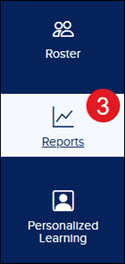
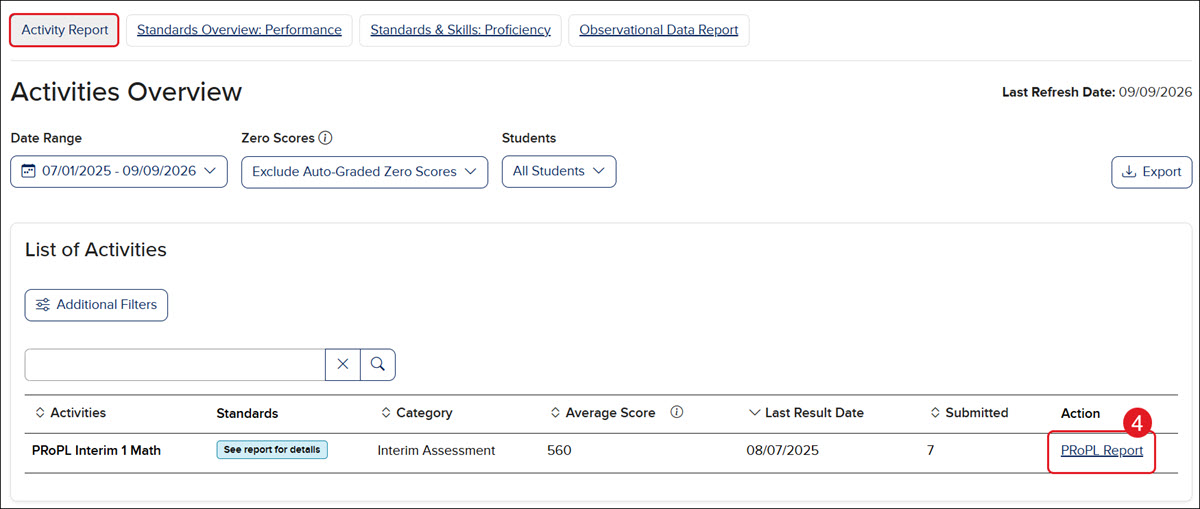
PRoPL assessment data can be found under the Activity Report.
4. Click the PRoPL Report link in the Action column to view student data.
Class Reports
After students complete testing, their performance and results will populate in the teacher reports within 24 hours.
The top section of the Reporting dashboard shows the Class Results with the Average Scale Growth and Performance Level Breakdown across the Performance Levels.
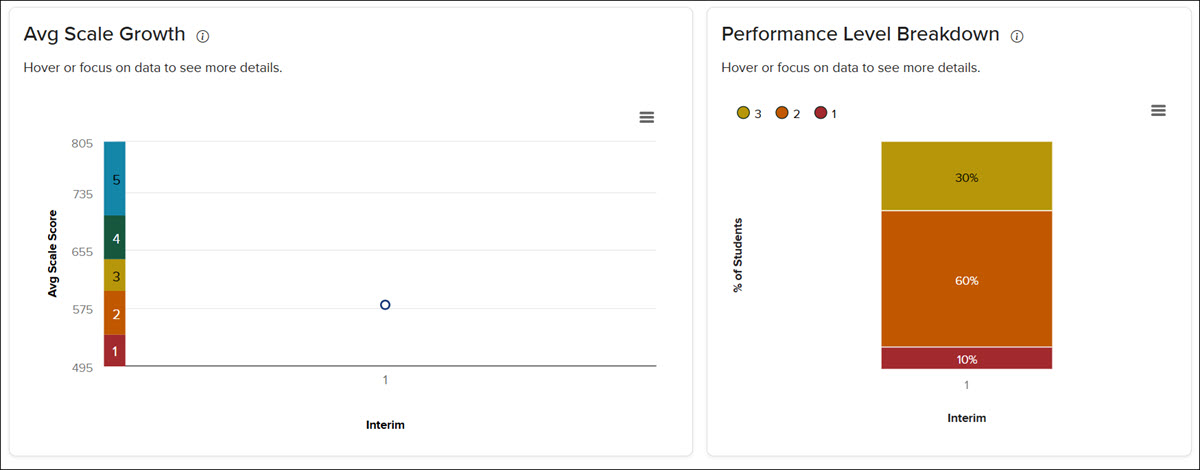
Avg Scale Growth - Use this chart to review how your class's average scale score has changed across the interims they have completed. Growth deltas show the change between consecutive interims.
Performance Level Breakdown - This displays the distribution of students across performance levels for each interim assessment period, showing the percentage of students at each level.
The lower section of the dashboard shows individual Student Results, including the Reporting Category Profile performance, Performance Level, Scale Score, and Standard Cluster Details.
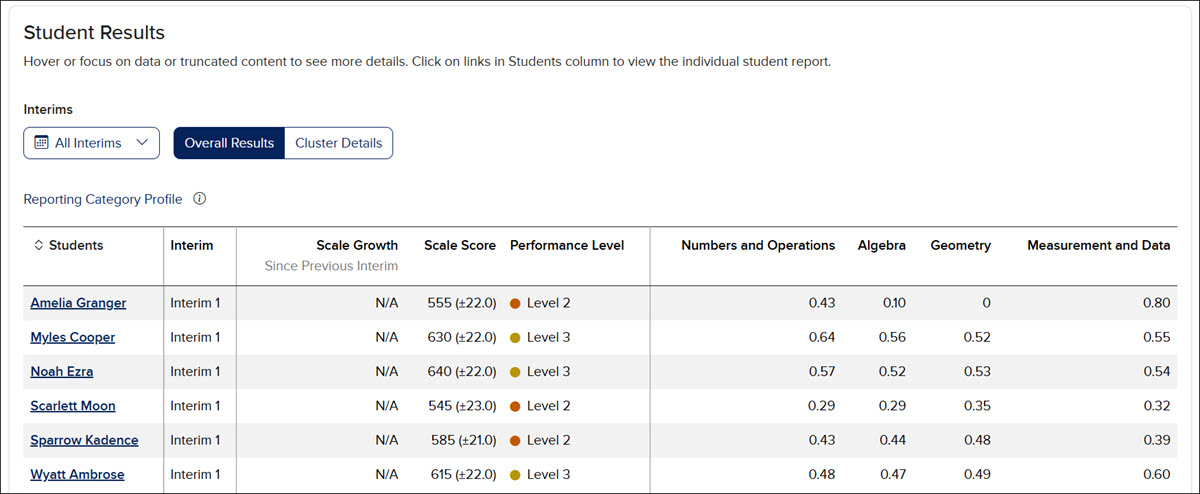
A. Teachers can download/save the data to a CSV file using the Export button in the upper right.
B. Click the Chart context menu (hamburger menu icon) to print the chart, download a PNG, JPEG, or SVG vector image, or download as a CSV.
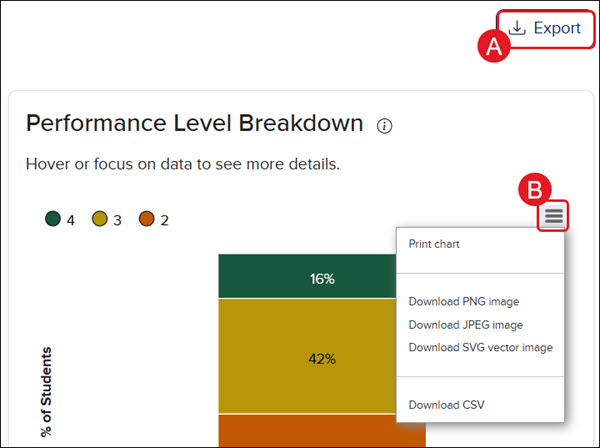
C. Toggle between viewing All interim sessions or Interim 1, Interim 2, and Interim 3 separately by checking the preferred option(s) on the Interims drop-down.
D. Toggle between viewing the Overall Results and Cluster Details.
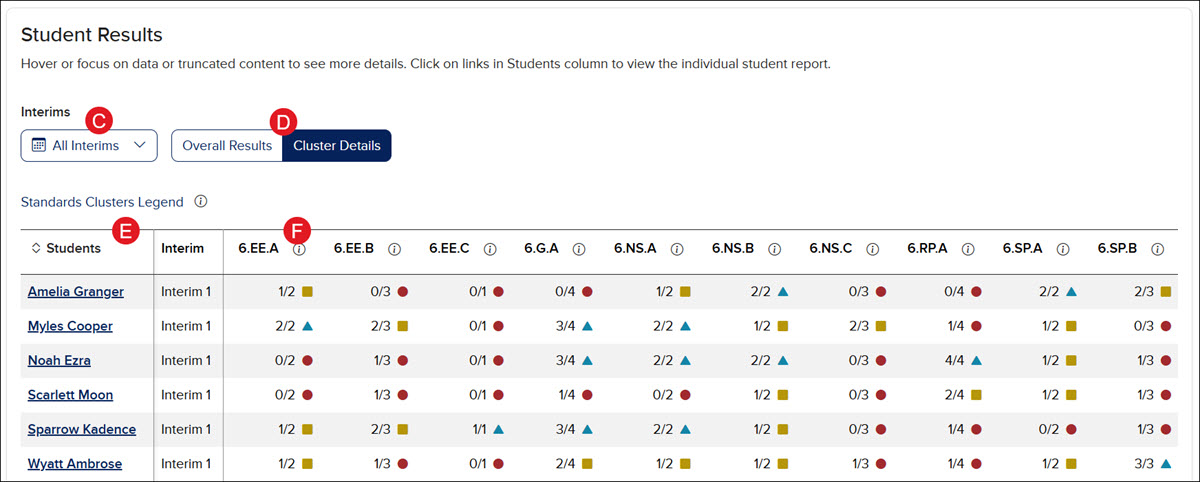
Reporting Category Profile (RCP) - This is viewable on the Overall Results view and is a probability that indicates the proportion of items out of 100 that a student would likely answer correctly, based on the correct responses at the reporting category level conditioned by the total test score. These probability values are an average of the selected students for each reporting category and can fall between 0 and 1. An RCP value in a category of 0.78 indicates that, on average, students would likely answer 78 out of 100 items similar to those on this test correctly. This data is best compared between interims (rows) and not between categories (columns).
Standards Clusters - This is viewable on the Cluster Details view and provides a table that shows how many questions students answered correctly within each cluster. Based on the number of correct answers, it will show as low, medium, or high indication. Clusters marked as high are areas of strength. Clusters marked low or medium are areas that teachers may want to focus attention. Due to the adaptive nature of this assessment, not all students receive questions in every cluster on each Interim. The full breadth of standards is assessed over the course of the year.
E. Sort the Students column by clicking on the column header.
F. Click on the information (i) icon next to a standard on the Cluster Details view to show the standard description.
Levels and Scales
For grades K-2 there are three Performance Levels, and for grades 3-8 there are five.
Scale scores are used to report test scores and aid in score interpretation. Standardized scale scores allow for the comparison of a given score with scores of other students taking the test within the same grade and subject.
PRoPL results provide visualizations indicating where average scores or a student’s score falls within the scale score range.
The scale score range for PRoPL kindergarten is 100-190, and grade 1-2 is 200-300.
Grade 1-2 Scale:

The scale score range for PRoPL grades 3-8 is on a vertical scale from 435-865. Grade level ranges are defined within each grade and intervals within that range.

Individual Student Reports
Teachers can view Individual Student Reports (ISR) by clicking on an individual student’s name from either view in the Student Results section.
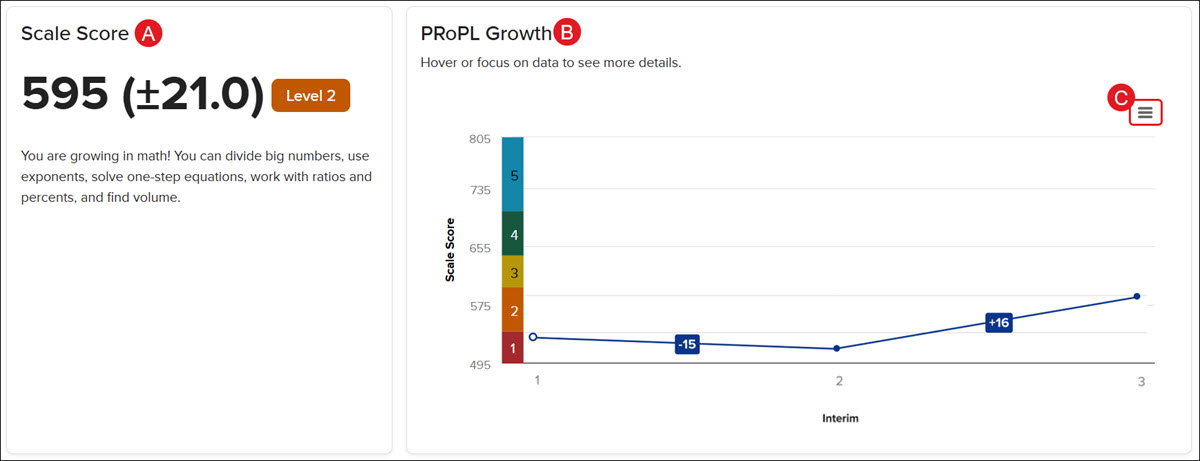
The PRoPL Individual Student Report (ISR) is divided into multiple sections that work together to paint a picture of student growth and performance over time:
A. The Scale Score widget shows the student's average score and current Performance Level based on the PRoPL assessments that have been completed.
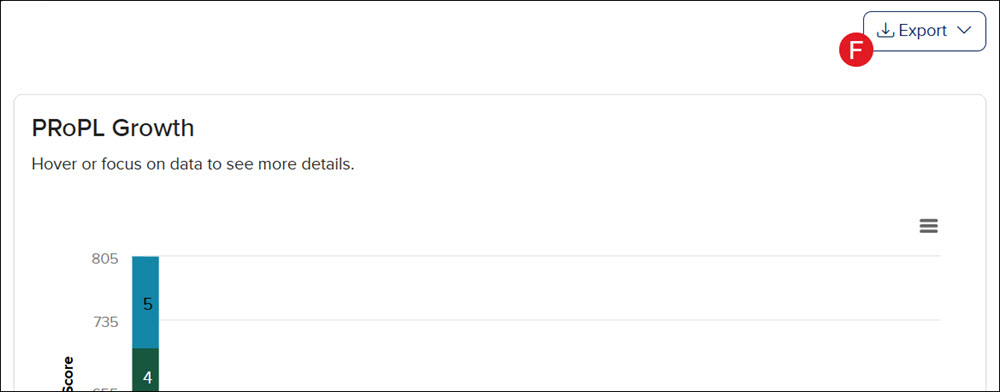
B. The PRoPL Growth line graph shows the student's progression over the course of assessments completed.
C. Click the Chart content menu icon on the PRoPL Growth widget to print the chart and/or download a PNG, JPEG, or SVG vector image of the graph.
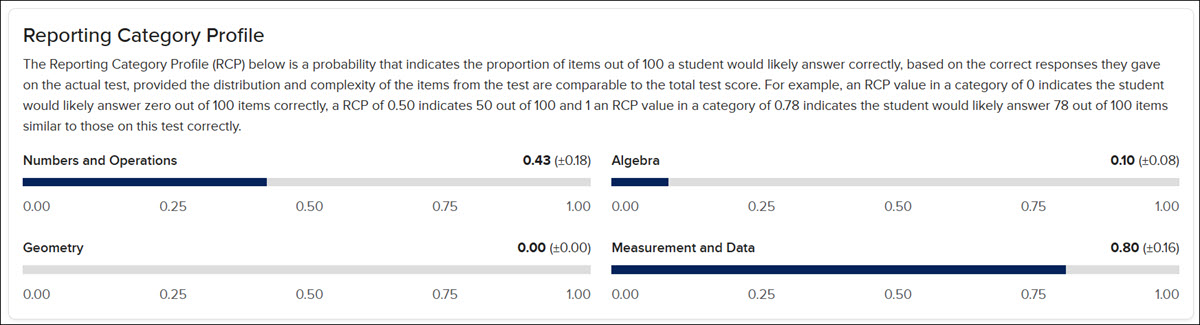
D. The Reporting Category Profile widget is a probability that indicates the proportion of items out of 100 that a student would likely answer correctly, based on the correct responses they gave on the actual test, provided the distribution and complexity of the items from the test are comparable to the total test score. For example, an RCP value in a category of 0 indicates the student would likely answer zero out of 100 items correctly; an RCP of 0.50 indicates 50 out of 100; and 1 an RCP value in a category of 0.78 indicates the student would likely answer 78 out of 100 items similar to those on this test correctly.
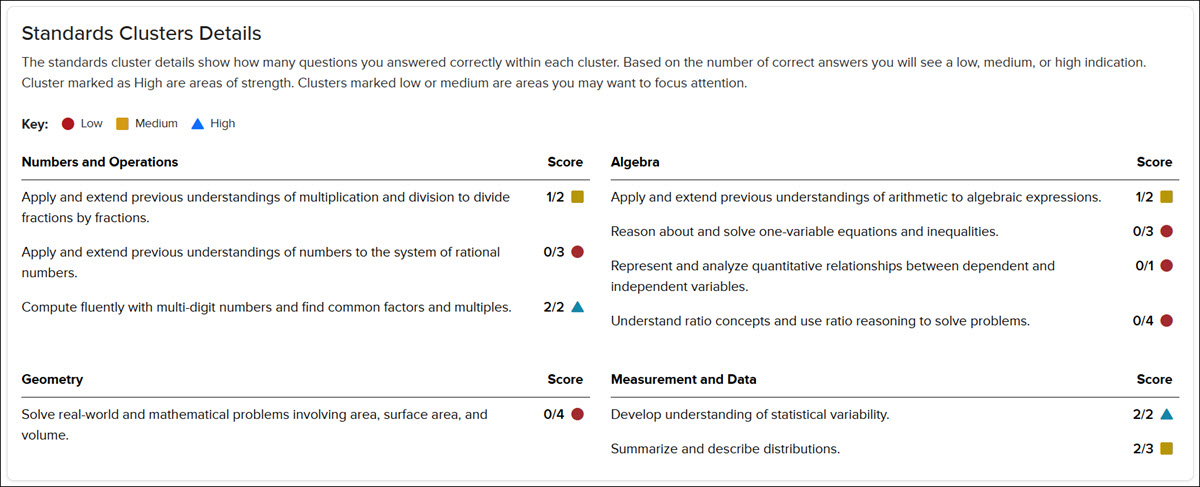
E. The Standards Clusters Details widget shows how many questions the student answered correctly within each cluster. Based on the number of correct answers, you will see a low, medium, or high indication. Clusters marked as higher are areas of strength. Clusters marked low or medium are areas the teacher may want to focus attention on.
F. Click the Export button at the top right of the Individual Student Report page to download/save the report in PDF format.