To be able to access any asset links, teachers must be signed in to their McGraw Hill account. If you are not logged into your account when you access an asset link, the link will navigate you to the my.mheducation.com login page.
For Single Sign-On (SSO) users, you will need to sign in through your district-created portal. Once you have successfully logged in and have clicked on the asset link, it will automatically open the resource for you.
The teacher accessing the copied link must also have the course content redeemed to their account in order to successfully access the resource.
Please note: This is for teacher use only. Students will not be able to access any of the linked content, even if it is a student-facing resource.
1. Launch your Open Learning course.
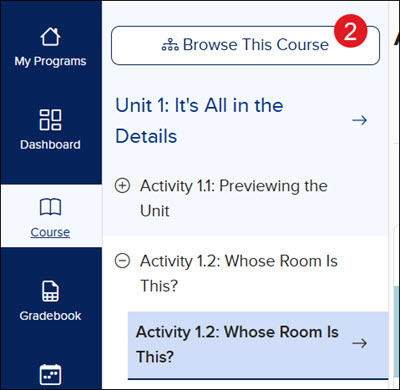
2. Click Browse This Course to select the location of the resource.
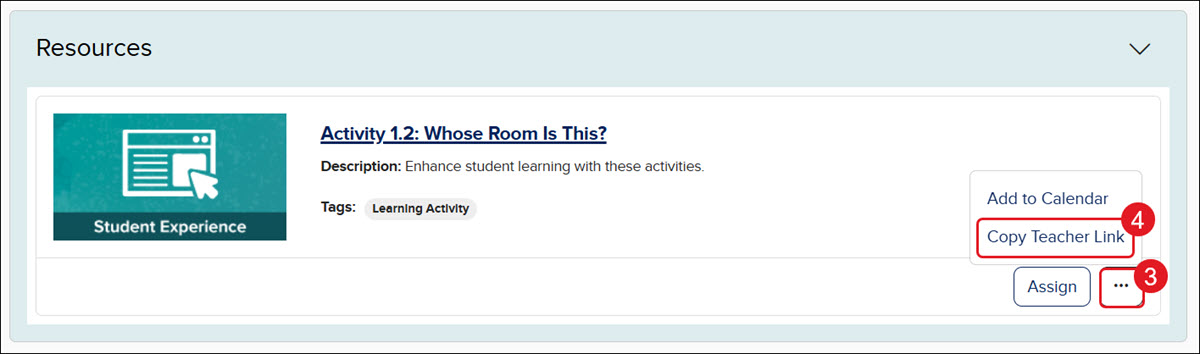
3. Click on the Options icon on the resource tile.
4. Click on Copy Teacher Link from the menu.
You can then add the copied link to a document, PowerPoint, lesson plan, etc. for you and other teachers to access the resource easily.
ap-edition
5-steps-to-a-5-test-prep
glencoe-health
teen-health
arrive-math
building-blocks
number-worlds
reading-laboratory
reading-mastery
mcgraw-hill-literacy
open-court-reading
reveal-math
illustrative-math
mcgraw-hill-math
inspire-science
mcgraw-hill-science
impact
mh-social-studies
asi-se-dice
mcgraw-hill-cte
level-up
instructor
prek-12
Customer Support, PreK-12, Classroom Teacher, Preschool, Elementary School, Middle School, High School, Direct Login & Auto-Rostering, Direct Login & Manual-Rostering, SSO & Auto-Rostering, SSO & Manual-Rostering, Core, Intervention, Supplemental, AP, Honors & Electives, Career & Technical Education, Literacy, Math, Science, Social Studies, Health, Visual & Performing Arts, World Languages, AP Biology, AP Chemistry, AP History & Geography, AP Psychology, AP Economics, AP African American Studies, AP Precalculus, AP Statistics, AP Computer Science, AP Language and Composition, AP Public Speaking, AP Music Theory, 5 Steps to a 5 - AP Test Prep, Glencoe Health 2022, Teen Health 2021, Arrive Math, Building Blocks 2024, Building Blocks PreK 2025, Number Worlds 2024, SRA Reading Laboratory 2025, SRA Reading Mastery Transformations, McGraw Hill Literacy Emerge!, McGraw Hill Literacy Summit!, McGraw Hill Literacy Soar!, Open Court Reading 2025, CA Reveal Math (K-12), Illustrative Math, Reveal Math (K-12), Texas Math, CA Inspire Science 2020, FL Science 2025 (K-12), Inspire Science 2020, TN Science (K-12), TX Science 2025 (K-12), CA Impact 2019, FL Social Studies 2024 (K-12), Impact Social Studies, McGraw Hill Social Studies, Asi se Dice 2024, CTE - Business, Marketing, and Finance, CTE - Health Science, CTE - Computing and Technology, CTE - Agriculture, CTE - Culinary Arts, CTE - Early Childhood Education, CTE - Criminal Justice, Level Up, Tools & Resources, Plan & Present
dts
2026-03-24T19:06:44.022-03:00
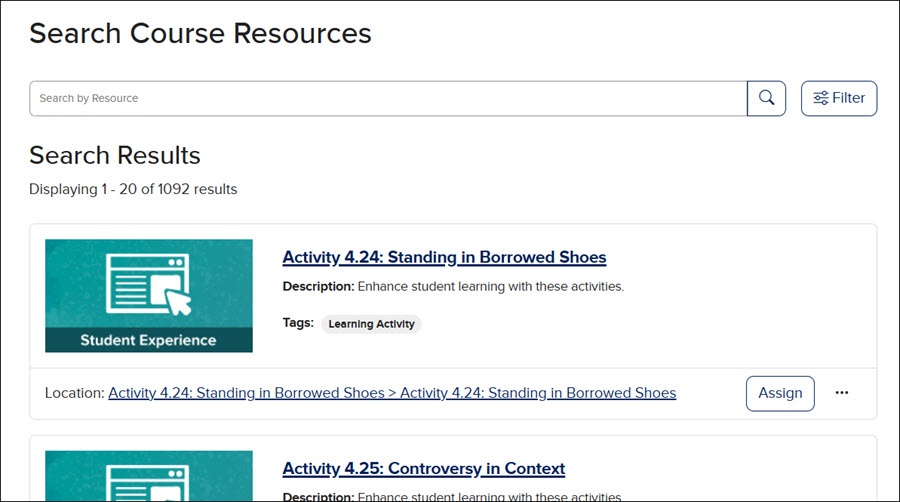
View the demo in a separate tab. View the Spanish version of the demo. To be able to access any asset links, teachers must be signed in to their McGraw Hill account. If you are not logged into your account when you access an asset link, the link will navigate you to the my.mheducation.com login page. For Single Sign-On (SSO) users, you will need to sign in through your district-created portal. Once you have successfully logged in and have clicked on the asset link, it will automatically open the resource for you. The teacher accessing the copied link must also have the course content redeemed to their account in order to successfully access the resource. Please note: This is for teacher use only. Students will not be able to access any of the linked content, even if it is a student-facing resource. 1. Launch your Open Learning course. 2. Click Browse This Course to select the location of the resource. You can also locate the resource from the Course Resources page. 3. Click on the Options icon on the resource tile. 4. Click on Copy Teacher Link from the menu. You can then add the copied link to a document, PowerPoint, lesson plan, etc. for you and other teachers to access the resource easily.
Help us improve!
Let us know how we can improve our support information by providing feedback in this short survey.
Top
Regional Page Available
It looks like you're outside the United States. Do you want to see your regional version of this page?