
Set Student Instruction Level for an Open Learning Class
How to set student instructional levels for Open Learning courses.
Tags
- McGraw Hill Social Studies
- TX Science 2025 (K-12)
- Asi se Dice 2024
- Arrive Math
- SSO & Manual-Rostering
- Inspire Science 2020
- Customer Support
- Number Worlds 2024
- Middle School
- Direct Login & Manual-Rostering
- High School
- Glencoe Health 2022
- CA Impact 2019
- Classroom Teacher
- CA Inspire Science 2020
- SSO & Auto-Rostering
- PreK-12
- Elementary School
- FL Science 2025 (K-12)
- World Languages
- Visual & Performing Arts
- Math
- Health
- Direct Instruction
- Intervention
- Literacy
- Social Studies
- Direct Login & Auto-Rostering
- Core
- Class Management
- CA Reveal Math (K-12)
- AP, Honors & Electives
- Teen Health 2021
- FL Social Studies 2024 (K-12)
- Building Blocks PreK 2025
- Building Blocks 2024
- Science
- McGraw Hill Literacy
- Preschool
- Account Management
- User Management
- Tools & Resources


This article walks teachers through setting Instructional Levels for students in their classes. This option will need to be set for each student for each course.
For a full page view of the demo, click here.
For a Spanish version of the demo, click here.
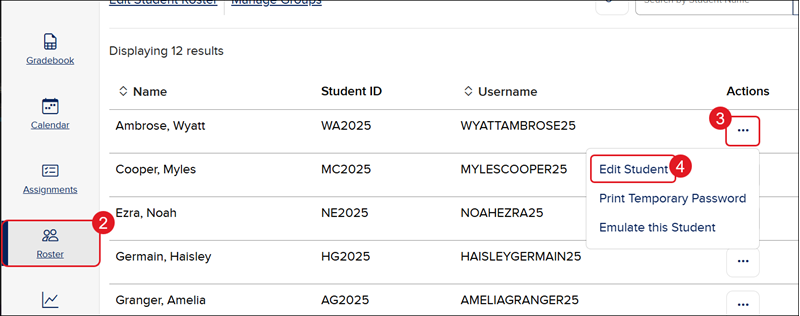
1. Launch your course.
2. Click Roster in the navigation menu.
3. Click the Options menu icon in the Actions column.
4. Click Edit Student from the menu.
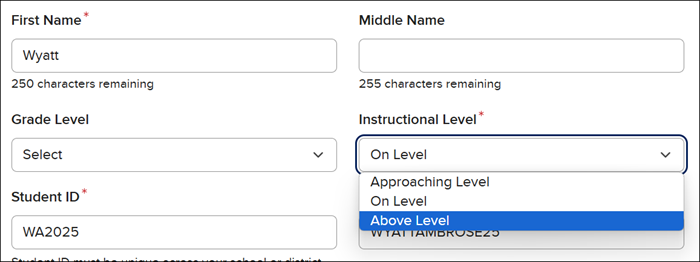
5. Click the Instructional Level drop-down to choose either Approaching Level, On Level, or Above Level.
6. Click the Update button at the bottom of the page.