Explore Classes and My Tools features in the Open Learning Platform.
Tags
McGraw Hill Social Studies
ALEKS Adventure
Asi se Dice 2024
Arrive Math
Actively Learn
Customer Support
Inspire Science 2020
Middle School
ALEKS
High School
Glencoe Health 2022
CA Impact 2019
CA Inspire Science 2020
SSO & Auto-Rostering
Impact Social Studies
PreK-12
All Sorts 2026 (K-5)
Supplemental
Health
Getting Started & Orientation
Literacy
Social Studies
Core
AP, Honors & Electives
CA Reveal Math (K-12)
Teen Health 2021
FL Social Studies 2024 (K-12)
Building Blocks PreK 2025
McGraw Hill Literacy
TX Science 2025 (K-12)
StudySync 2021
SSO & Manual-Rostering
Number Worlds 2024
Tools & Resources
Direct Login & Manual-Rostering
Classroom Teacher
Elementary School
FL Science 2025 (K-12)
World Languages
Math
Direct Instruction
Intervention
Direct Login & Auto-Rostering
Building Blocks 2024
Science
Preschool
AP Biology
AP Chemistry
AP History & Geography
AP Psychology
AP Economics
AP African American Studies
AP Precalculus
AP Statistics
AP Computer Science
AP Language and Composition
AP Public Speaking
AP Music Theory
5 Steps to a 5 - AP Test Prep
SRA Reading Laboratory 2025
SRA Reading Mastery Transformations
Achieve3000 Literacy
McGraw Hill Literacy Emerge!
McGraw Hill Literacy Summit!
McGraw Hill Literacy Soar!
Open Court Reading 2025
Redbird
Illustrative Math
Redbird Math
Reveal Math (K-12)
TN Science (K-12)
CTE - Health Science
CTE - Agriculture
CTE - Computing and Technology
CTE - Culinary Arts
CTE - Early Childhood Education
CTE - Business, Marketing, and Finance
CTE - Criminal Justice
Share:
This feature allows teachers to create links within Open Learning classes which serve as a launch point to custom class resources to share with students.
Organization Administrators have the ability to create organization-level tools for other administrators to access. If you are trying to create My Tools as an administrator, see the article: Admin Tools - My Tools.
In order to create a custom link, the content provider must be LTI® 1.1 compatible and must be a tool (tool provider) and not a platform (tool consumer).
Create a Custom Link
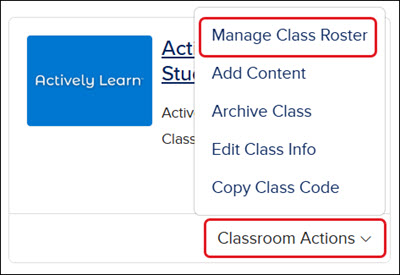
Launch your Open Learning class. For Redbird, ALEKS, and StudySync, you will need to click the kebab menu and select Manage Class Roster.
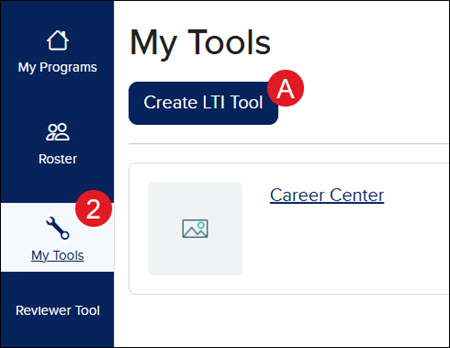
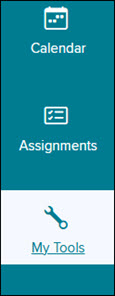
In the class menu, select My Tools.
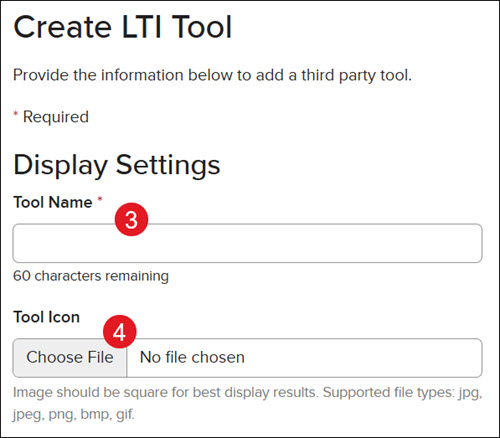
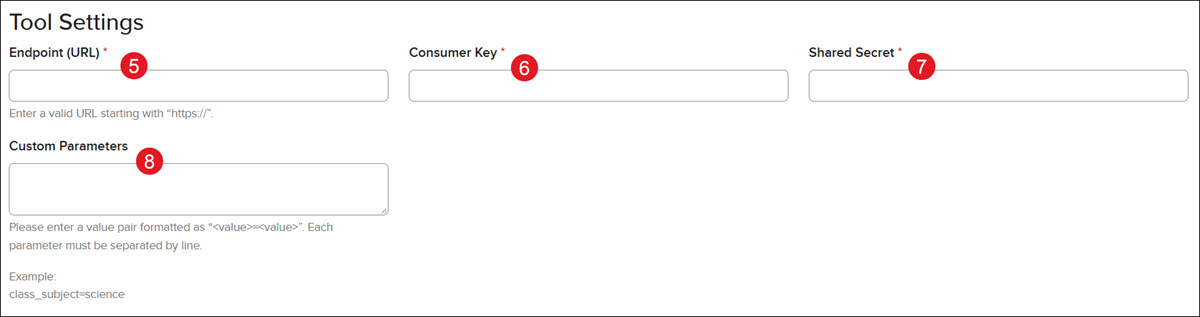
Complete the following required fields:
Name - Provide a name for your link.
Endpoint - The URL where the tool provider is launched from.
Consumer Key - You will need to obtain this from the tool provider. This is the unique identifier used to identify who is launching the tool.
Shared Secret - This value is paired with the consumer key and is used to verify the key is being used by the correct individual.
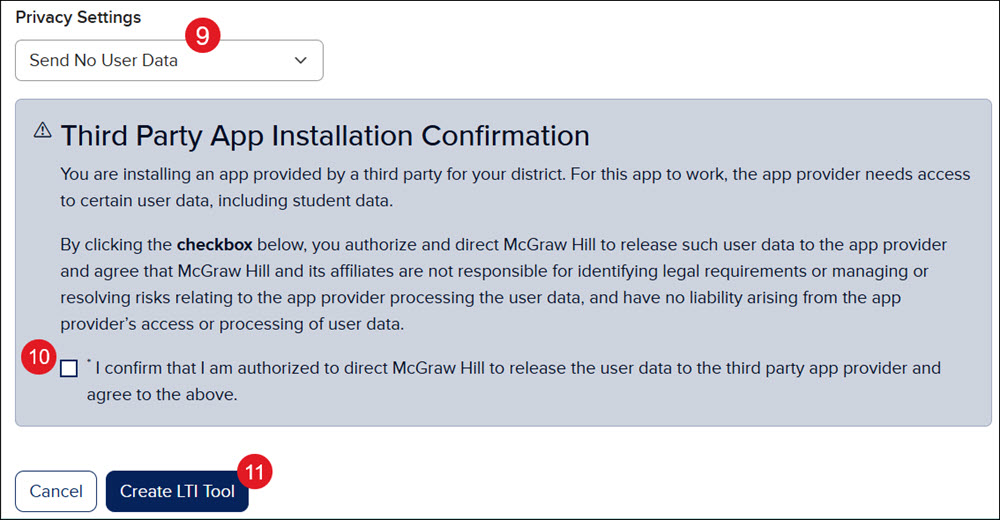
Third Party App Installation Warning – You must confirm that McGraw Hill is authorized to send user data to the app provider in order to create the link.
Select the Create LTI Tool button.
Complete any desired optional fields:
Icon - You can upload an image to identify the content provider, if desired.
Custom Parameters - These are values sent to the tool provider when the tool is launched. The tool provider may require some of these parameters in order to handle its business logic.
Privacy Settings - You can dictate what type of user data is sent to the app provider by McGraw Hill.
Click the Create button to create your custom link.
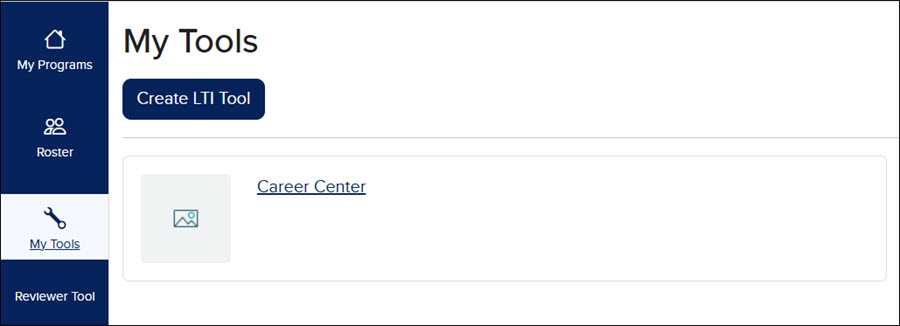
Once saved, your link will appear as a tile on the My Tools page for your Open Learning class.
Now that the link has been created, students can launch the resource by clicking on My Tools in their class menu.
You can favorite a tool by clicking the bookmark icon in the top right of the specific tool.
All favorite marked LTI Tools will show up at the bottom of the class menu, underneath My Tools, for you and your students to launch the resource directly. The tool will launch in a new tab.
Learning Tools Interoperability® (LTI®) is a trademark of IMS Global Learning Consortium, Inc. (www.imsglobal.org).
mh-social-studies
aleks-adventure
asi-se-dice
arrive-math
actively-learn
inspire-science
aleks
glencoe-health
impact
all-sorts
reveal-math
teen-health
building-blocks
mcgraw-hill-literacy
mcgraw-hill-science
studysync
number-worlds
direct-instruction
ap-edition
5-steps-to-a-5-test-prep
reading-laboratory
reading-mastery
achieve3000-literacy
open-court-reading
redbird
illustrative-math
redbird-math
mcgraw-hill-cte
instructor
prek-12
McGraw Hill Social Studies, ALEKS Adventure, Asi se Dice 2024, Arrive Math, Actively Learn, Customer Support, Inspire Science 2020, Middle School, ALEKS, High School, Glencoe Health 2022, CA Impact 2019, CA Inspire Science 2020, SSO & Auto-Rostering, Impact Social Studies, PreK-12, All Sorts 2026 (K-5), Supplemental, Health, Getting Started & Orientation, Literacy, Social Studies, Core, AP, Honors & Electives, CA Reveal Math (K-12), Teen Health 2021, FL Social Studies 2024 (K-12), Building Blocks PreK 2025, McGraw Hill Literacy, TX Science 2025 (K-12), StudySync 2021, SSO & Manual-Rostering, Number Worlds 2024, Tools & Resources, Direct Login & Manual-Rostering, Classroom Teacher, Elementary School, FL Science 2025 (K-12), World Languages, Math, Direct Instruction, Intervention, Direct Login & Auto-Rostering, Building Blocks 2024, Science, Preschool, AP Biology, AP Chemistry, AP History & Geography, AP Psychology, AP Economics, AP African American Studies, AP Precalculus, AP Statistics, AP Computer Science, AP Language and Composition, AP Public Speaking, AP Music Theory, 5 Steps to a 5 - AP Test Prep, SRA Reading Laboratory 2025, SRA Reading Mastery Transformations, Achieve3000 Literacy, McGraw Hill Literacy Emerge!, McGraw Hill Literacy Summit!, McGraw Hill Literacy Soar!, Open Court Reading 2025, Redbird, Illustrative Math, Redbird Math, Reveal Math (K-12), TN Science (K-12), CTE - Health Science, CTE - Agriculture, CTE - Computing and Technology, CTE - Culinary Arts, CTE - Early Childhood Education, CTE - Business, Marketing, and Finance, CTE - Criminal Justice
dts
2026-03-24T18:39:37.340-03:00
This feature allows teachers to create links within Open Learning classes which serve as a launch point to custom class resources to share with students. Organization Administrators have the ability to create organization-level tools for other administrators to access. If you are trying to create My Tools as an administrator, see the article: Admin Tools - My Tools. In order to create a custom link, the content provider must be LTI® 1.1 compatible and must be a tool (tool provider) and not a platform (tool consumer). Create a Custom Link Launch your Open Learning class. For Redbird, ALEKS, and StudySync, you will need to click the kebab menu and select Manage Class Roster. In the class menu, select My Tools. Complete the following required fields: Name - Provide a name for your link. Endpoint - The URL where the tool provider is launched from. Consumer Key - You will need to obtain this from the tool provider. This is the unique identifier used to identify who is launching the tool. Shared Secret - This value is paired with the consumer key and is used to verify the key is being used by the correct individual. Third Party App Installation Warning – You must confirm that McGraw Hill is authorized to send user data to the app provider in order to create the link. Select the Create LTI Tool button. Complete any desired optional fields: Icon - You can upload an image to identify the content provider, if desired. Custom Parameters - These are values sent to the tool provider when the tool is launched. The tool provider may require some of these parameters in order to handle its business logic. Privacy Settings - You can dictate what type of user data is sent to the app provider by McGraw Hill. Click the Create button to create your custom link. Once saved, your link will appear as a tile on the My Tools page for your Open Learning class. Now that the link has been created, students can launch the resource by clicking on My Tools in their class menu. You can favorite a tool by clicking the bookmark icon in the top right of the specific tool. All favorite marked LTI Tools will show up at the bottom of the class menu, underneath My Tools, for you and your students to launch the resource directly. The tool will launch in a new tab. Learning Tools Interoperability® (LTI®) is a trademark of IMS Global Learning Consortium, Inc. (www.imsglobal.org).
Top
Regional Page Available
It looks like you're outside the United States. Do you want to see your regional version of this page?