mcgraw hill social studies
ocr foundational skills kit
spotlight on music
illustrative math
5 steps to a 5 - ap test prep
impact social studies
arrive math
music! its role
open court reading
reveal math (k-12)
ap-edition
5-steps-to-a-5-test-prep
glencoe-health
teen-health
arrive-math
building-blocks
number-worlds
everyday-math
reading-laboratory
reading-mastery
mcgraw-hill-literacy
open-court-reading
reveal-math
illustrative-math
mcgraw-hill-math
inspire-science
mcgraw-hill-science
impact
mh-social-studies
asi-se-dice
wonders
maravillas
music-its-role
my-math
networks
ocr-foundational-skills-kit
spotlight-on-music
mcgraw-hill-cte
level-up
instructor
Programs & Solutions
Programs & Solutions/McGraw Hill Social Studies
Business Unit
Business Unit/PreK-12
Programs & Solutions/AP Edition
Programs & Solutions/AP Edition/AP Precalculus
Context
Context/Education Level
Context/Education Level/High School
Programs & Solutions/OCR Foundational Skills Kit
Context/Subject
Context/Subject/Science
Programs & Solutions/AP Edition/AP Music Theory
Programs & Solutions/AP Edition/AP Biology
Context/Integration Type
Context/Integration Type/Direct Login & Auto-Rostering
Context/Integration Type/SSO & Auto-Rostering
Programs & Solutions/Spotlight on Music
Programs & Solutions/Glencoe Health
Programs & Solutions/Glencoe Health/Glencoe Health 2022
Programs & Solutions/Impact Social Studies
Programs & Solutions/Impact Social Studies/CA Impact 2019
Programs & Solutions/McGraw Hill Social Studies/FL Social Studies 2024 (K-12)
Programs & Solutions/Open Court Reading
Programs & Solutions/Open Court Reading/Open Court Reading 2025
Context/Subject/World Languages
Programs & Solutions/Illustrative Math
Programs & Solutions/McGraw Hill CTE
Programs & Solutions/McGraw Hill CTE/CTE - Culinary Arts
Asset Format Type
Asset Format Type/Customer Support
Context/Curriculum Type
Context/Curriculum Type/Supplemental
Programs & Solutions/AP Edition/AP Statistics
Programs & Solutions/McGraw Hill Science
Programs & Solutions/McGraw Hill Science/TX Science 2025 (K-12)
Support Topics
Support Topics/Assessments & Reporting
Support Topics/Assessments & Reporting/Online Assessments
Programs & Solutions/Wonders
Programs & Solutions/Wonders/Wonders 2023 2020 2017
Programs & Solutions/AP Edition/AP Public Speaking
Context/Subject/Health
Programs & Solutions/Asi Se Dice
Programs & Solutions/Asi Se Dice/Asi se Dice 2024
Programs & Solutions/5 Steps to a 5 - AP Test Prep
Support Topics/Tools & Product Integrations
Support Topics/Tools & Product Integrations/Tools & Resources
Programs & Solutions/Level Up
Programs & Solutions/Level Up/Level Up 9–12
Context/Curriculum Type/Career & Technical Education
Programs & Solutions/Open Court Reading/Open Court Reading 2016, 2018, 2023
Programs & Solutions/McGraw Hill Literacy
Programs & Solutions/McGraw Hill Literacy/McGraw Hill Literacy Soar!
Programs & Solutions/McGraw Hill CTE/CTE - Agriculture
Context/Subject/Math
Programs & Solutions/McGraw Hill Math
Programs & Solutions/McGraw Hill Math/Texas Math
Programs & Solutions/AP Edition/AP Chemistry
Context/Curriculum Type/AP, Honors & Electives
Context/Curriculum Type/Intervention
Programs & Solutions/McGraw Hill CTE/CTE - Computing and Technology
Programs & Solutions/Building Blocks
Programs & Solutions/Building Blocks/Building Blocks 2024
Programs & Solutions/Arrive Math
Programs & Solutions/Everyday Mathematics
Programs & Solutions/Everyday Mathematics/Everyday Mathematics 4 (K-6)
Programs & Solutions/Open Court Reading/OCR Word Analysis Kit
Context/Curriculum Type/Core
Context/Integration Type/Direct Login & Manual-Rostering
Programs & Solutions/AP Edition/AP Language and Composition
Context/Subject/Literacy
Programs & Solutions/McGraw Hill CTE/CTE - Health Science
Programs & Solutions/AP Edition/AP History & Geography
Programs & Solutions/Inspire Science
Programs & Solutions/Inspire Science/Inspire Science 2020
Programs & Solutions/Networks
Programs & Solutions/Networks/Networks 2018
Programs & Solutions/Music! Its Role
Context/Subject/Visual & Performing Arts
Programs & Solutions/AP Edition/AP Computer Science
Programs & Solutions/McGraw Hill My Math
Programs & Solutions/McGraw Hill My Math/McGraw Hill My Math 2018
Context/Subject/Social Studies
Programs & Solutions/Reveal Math (K-12)
Programs & Solutions/Reveal Math (K-12)/CA Reveal Math (K-12)
Context/Education Level/Middle School
Programs & Solutions/McGraw Hill CTE/CTE - Early Childhood Education
Programs & Solutions/Maravillas
Programs & Solutions/Maravillas/Maravillas 2020 & 2017
Programs & Solutions/McGraw Hill Literacy/McGraw Hill Literacy Emerge!
Context/Education Level/Preschool
Personas
Personas/School Educator
Personas/School Educator/School Administrator
Programs & Solutions/AP Edition/AP African American Studies
Programs & Solutions/McGraw Hill Science/FL Science 2025 (K-12)
Programs & Solutions/McGraw Hill CTE/CTE - Business, Marketing, and Finance
Programs & Solutions/Number Worlds
Programs & Solutions/Number Worlds/Number Worlds 2024
Context/Education Level/Elementary School
Programs & Solutions/Level Up/Level Up K–5
Programs & Solutions/McGraw Hill Literacy/McGraw Hill Literacy Summit!
Personas/School Educator/Classroom Teacher
Programs & Solutions/Reading Laboratory
Programs & Solutions/Reading Laboratory/SRA Reading Laboratory 2025
Programs & Solutions/Building Blocks/Building Blocks PreK 2025
Programs & Solutions/AP Edition/AP Economics
Programs & Solutions/Wonders/Wonders Balanced Literacy 2016
Programs & Solutions/AP Edition/AP Psychology
Programs & Solutions/McGraw Hill Science/TN Science (K-12)
Programs & Solutions/McGraw Hill CTE/CTE - Criminal Justice
Programs & Solutions/Teen Health
Programs & Solutions/Teen Health/Teen Health 2021
Programs & Solutions/Inspire Science/CA Inspire Science 2020
Programs & Solutions/Reading Mastery
Programs & Solutions/Reading Mastery/SRA Reading Mastery Transformations
Programs & Solutions/Level Up/Level Up 6–8
Context/Integration Type/SSO & Manual-Rostering
prek-12
2026-03-24T18:30:31.330-03:00
<h2 class="fs-5">Article Contents</h2> <p><a href="#student_settings" target="_self">Student Settings</a></p> <p><a href="#feedback" target="_self">Feedback & Resources</a></p> <p><a href="#tools" target="_self">Student Tools</a></p> <p><a href="#display" target="_self">Display Options</a></p> <p> </p> <h3 class="fs-5"><a id="student_settings"></a>Student Settings</h3> <p>Online assessments utilize features to assist your students as they complete their test. When <a href="https://www.mheducation.com/prek-12/support/knowledge/open-learning-platform-assign-and-grade-assessments.html" target="_blank">assigning the assessment</a>, you can add and remove these features from under the <strong>Student Settings </strong>section. <strong>Keep in mind</strong>, these settings cannot be changed once the assessment is assigned. To adjust the <strong>Student Settings</strong> for the assessment, you will need to reassign the assessment.</p> <p> </p> <h3 class="fs-5"><a id="feedback"></a>Feedback & Resources</h3> <p>The Feedback & Resources section lists all the Learning Aids available for the assessment. To activate the feature, select the check box/radio button to the left of the feature. For <strong>Hints</strong>, <strong>Examples</strong>, and <strong>Explanations </strong>to be an option, these first have to be <a href="/content/mheducation/us/en/prek-12/support/knowledge/mh-assess-create-and-edit-questions.html" target="_blank">added to the questions</a> on the assessment.</p> <p> </p> <h3><span class="fs-large">Available Features:</span></h3> <p><img src="/content/dam/mhe/support/support-images/migrated/rtaImage--598852059.jpeg" data-assetref="rtaImage--598852059-1779974517549"></p> <p> </p> <p><strong>Available Learning Aids</strong> - Activates all options in the Feedback & Resources section.</p> <p> </p> <p><strong>Hints </strong>- Provides students with additional information to be able to answer the question. Students will see an option at the bottom of the question to select. It will then provide a pop-up with the hint that was entered for the question.</p> <p><img src="/content/dam/mhe/support/support-images/migrated/rtaImage--598860339.jpeg" data-assetref="rtaImage--598860339-1779974517550"></p> <p> </p> <p><strong>Examples </strong>- An example answer provided for the question.</p> <p>Students will see an option at the bottom of the question to select. It will then provide a pop-up with the example that was entered for the question.</p> <p><img src="/content/dam/mhe/support/support-images/migrated/rtaImage--598856290.jpeg" data-assetref="rtaImage--598856290-1779974517550"></p> <p> </p> <p><strong>Explanation </strong>- A reasoning for the answer given for the question. Students will be provided with an explanation of the correct answer after they answer the question in an assessment.</p> <p> </p> <p><strong>Student can check answers</strong> - Allows students to have one or three extra tries at answering the question, with the additional option of showing the student the correct answer after they have completed their maximum number of tries for the question. Students will have a <strong>Check Answers</strong> button for each question.</p> <p><img src="/content/dam/mhe/support/support-images/migrated/rtaImage--598854332.jpeg" data-assetref="rtaImage--598854332-1779974517550"></p> <p> </p> <p><strong>Additional Learning Aids</strong> - With some programs, this is an option that allows students extra resources such as videos to help them answer the question.</p> <p> </p> <h3 class="fs-5"><a id="tools"></a>Student Tools</h3> <p>The Student Tools provide students with extra features to assist with answering the questions on their assessment.</p> <p> </p> <h3><span class="fs-large">Available Tools:</span></h3> <p><img src="/content/dam/mhe/support/support-images/migrated/rtaImage--598849572.jpeg" data-assetref="rtaImage--598849572-1779974517550"></p> <p> </p> <p><strong>Text-to-Speech</strong> - Allows students to have the text on the assessment read aloud to them.</p> <p><img src="/content/dam/mhe/support/support-images/migrated/rtaImage--598849094.jpeg" data-assetref="rtaImage--598849094-1779974517551"></p> <p> </p> <p><strong>Highlighter</strong> - Provides students with a way to mark information, answers, etc. while reading passages and answering questions.</p> <p><img src="/content/dam/mhe/support/support-images/migrated/rtaImage--598848379.jpeg" data-assetref="rtaImage--598848379-1779974517551"></p> <p> </p> <p><strong>Notepad </strong>- Provides students with a note-keeping pop-up where they can enter any notes they want to keep throughout the assessment to help them answer questions.</p> <p><img src="/content/dam/mhe/support/support-images/migrated/rtaImage--598848234.jpeg" data-assetref="rtaImage--598848234-1779974517551"></p> <p> </p> <p><strong>Line Reader</strong> - Students are able to use this tool to easily read one line at a time throughout the assessment.</p> <p><img src="/content/dam/mhe/support/support-images/migrated/rtaImage--598849497.jpeg" data-assetref="rtaImage--598849497-1779974517551"></p> <p> </p> <p><strong>Protractor </strong>- Provides students with a protractor to answer certain types of questions.</p> <p><img src="/content/dam/mhe/support/support-images/migrated/rtaImage--598848014.jpeg" data-assetref="rtaImage--598848014-1779974517551"></p> <p> </p> <p><strong>Calculator </strong>- Provides students with a Simple, Scientific, or Graphing calculator.</p> <p><img src="/content/dam/mhe/support/support-images/migrated/rtaImage--598848159.jpeg" data-assetref="rtaImage--598848159-1779974517551"></p> <p> </p> <p><strong>Reference Sheet</strong> - Allows you to add additional documents, links, etc. to assist students with answering their assessment questions.</p> <p><img src="/content/dam/mhe/support/support-images/migrated/rtaImage--598849251.jpeg" data-assetref="rtaImage--598849251-1779974517551"></p> <p> </p> <h3 class="fs-5"><a id="display"></a>Display Options</h3> <p>The Display Options give additional options while the students complete their assessment.</p> <p> </p> <h3><span class="fs-large">Available Options:</span></h3> <p><img src="/content/dam/mhe/support/support-images/migrated/rtaImage--598859135.jpeg" data-assetref="rtaImage--598859135-1779974517551"></p> <p> </p> <p><strong>Allow students to cross out answers</strong> - Provides the option for students to cross out answer choices to help eliminate options to choose from.</p> <p><img src="/content/dam/mhe/support/support-images/migrated/rtaImage--598873866.jpeg" width="189" height="201" data-assetref="rtaImage--598873866-1779974517551"></p> <p> </p> <p><strong>Hide question navigation bar</strong> - Removes the ability to navigate back and forth between questions.</p> <p><img src="/content/dam/mhe/support/support-images/migrated/rtaImage--598849733.jpeg" width="341" height="168" data-assetref="rtaImage--598849733-1779974517551"></p> <p> </p> <p><strong>Hide answer choice letters</strong> - Removes the answer choice letters for multiple-choice questions.</p> <p><img src="/content/dam/mhe/support/support-images/migrated/rtaImage--598847242.jpeg" width="452" height="202" data-assetref="rtaImage--598847242-1779974517551"></p> <p> </p> <p><strong>Randomize question order</strong> - Reorganizes the questions within the assessment so they are in a different order for each student.</p> <p> </p> <p><strong>Allow students to access available rubrics</strong> - If a rubric is attached to the assessment, students are able to access it, which allows them to view the scoring available for the question.</p> <p><img src="/content/dam/mhe/support/support-images/migrated/rtaImage--598846155.jpeg" width="253" height="184" data-assetref="rtaImage--598846155-1779974517552"></p> dts Explore how to make changes to online test features, including navigation, tools, and scoresheet options. 2026-10-27 Manage Student Settings for a McGraw Hill Assessment Explore how to make changes to online test features, including navigation, tools, and scoresheet options. Explore how to make changes to online test features, including navigation, tools, and scoresheet options.
Explore how to make changes to online test features, including navigation, tools, and scoresheet options.
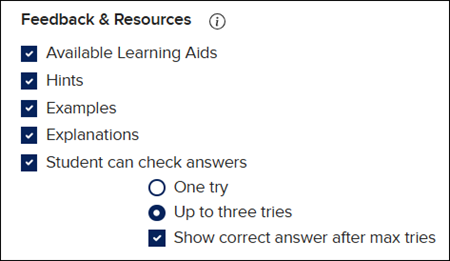
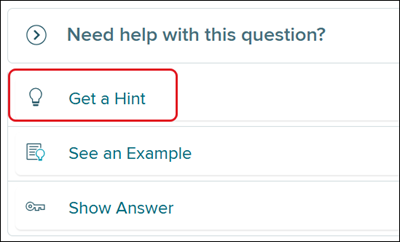
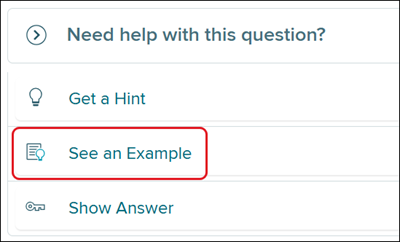
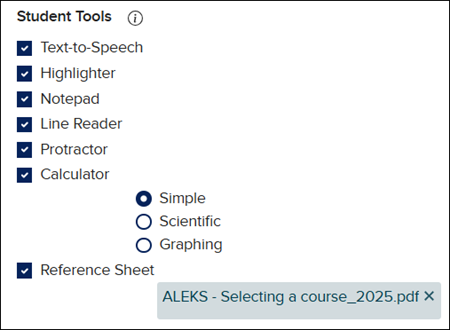
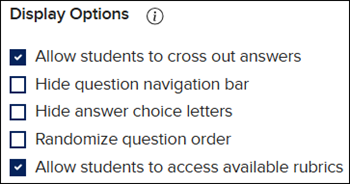
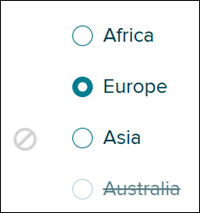
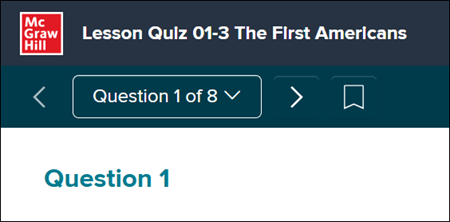
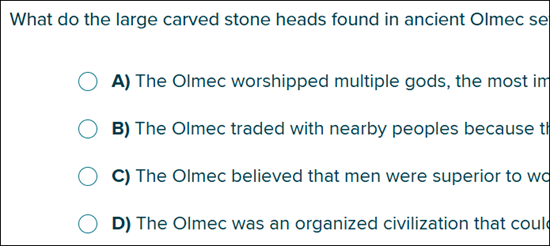
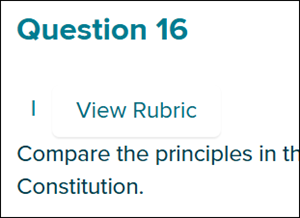
Article Contents Student Settings Feedback & Resources Student Tools Display Options Student Settings Online assessments utilize features to assist your students as they complete their test. When assigning the assessment, you can add and remove these features from under the Student Settings section. Keep in mind, these settings cannot be changed once the assessment is assigned. To adjust the Student Settings for the assessment, you will need to reassign the assessment. Feedback & Resources The Feedback & Resources section lists all the Learning Aids available for the assessment. To activate the feature, select the check box/radio button to the left of the feature. For Hints, Examples, and Explanations to be an option, these first have to be added to the questions on the assessment. Available Features: Available Learning Aids - Activates all options in the Feedback & Resources section. Hints - Provides students with additional information to be able to answer the question. Students will see an option at the bottom of the question to select. It will then provide a pop-up with the hint that was entered for the question. Examples - An example answer provided for the question. Students will see an option at the bottom of the question to select. It will then provide a pop-up with the example that was entered for the question. Explanation - A reasoning for the answer given for the question. Students will be provided with an explanation of the correct answer after they answer the question in an assessment. Student can check answers - Allows students to have one or three extra tries at answering the question, with the additional option of showing the student the correct answer after they have completed their maximum number of tries for the question. Students will have a Check Answers button for each question. Additional Learning Aids - With some programs, this is an option that allows students extra resources such as videos to help them answer the question. Student Tools The Student Tools provide students with extra features to assist with answering the questions on their assessment. Available Tools: Text-to-Speech - Allows students to have the text on the assessment read aloud to them. Highlighter - Provides students with a way to mark information, answers, etc. while reading passages and answering questions. Notepad - Provides students with a note-keeping pop-up where they can enter any notes they want to keep throughout the assessment to help them answer questions. Line Reader - Students are able to use this tool to easily read one line at a time throughout the assessment. Protractor - Provides students with a protractor to answer certain types of questions. Calculator - Provides students with a Simple, Scientific, or Graphing calculator. Reference Sheet - Allows you to add additional documents, links, etc. to assist students with answering their assessment questions. Display Options The Display Options give additional options while the students complete their assessment. Available Options: Allow students to cross out answers - Provides the option for students to cross out answer choices to help eliminate options to choose from. Hide question navigation bar - Removes the ability to navigate back and forth between questions. Hide answer choice letters - Removes the answer choice letters for multiple-choice questions. Randomize question order - Reorganizes the questions within the assessment so they are in a different order for each student. Allow students to access available rubrics - If a rubric is attached to the assessment, students are able to access it, which allows them to view the scoring available for the question.
dts
Customer Support, PreK-12, Classroom Teacher, School Administrator, Preschool, Elementary School, Middle School, High School, Direct Login & Auto-Rostering, Direct Login & Manual-Rostering, SSO & Auto-Rostering, SSO & Manual-Rostering, Core, Intervention, Supplemental, AP, Honors & Electives, Career & Technical Education, Literacy, Math, Science, Social Studies, Health, Visual & Performing Arts, World Languages, AP Biology, AP Chemistry, AP History & Geography, AP Psychology, AP Economics, AP African American Studies, AP Precalculus, AP Statistics, AP Computer Science, AP Language and Composition, AP Public Speaking, AP Music Theory, 5 Steps to a 5 - AP Test Prep, Glencoe Health 2022, Teen Health 2021, Arrive Math, Building Blocks 2024, Building Blocks PreK 2025, Number Worlds 2024, Everyday Mathematics 4 (K-6), SRA Reading Laboratory 2025, SRA Reading Mastery Transformations, McGraw Hill Literacy Emerge!, McGraw Hill Literacy Summit!, McGraw Hill Literacy Soar!, Open Court Reading, Open Court Reading 2016, 2018, 2023, Open Court Reading 2025, CA Reveal Math (K-12), Illustrative Math, Reveal Math (K-12), Texas Math, CA Inspire Science 2020, FL Science 2025 (K-12), Inspire Science 2020, TN Science (K-12), TX Science 2025 (K-12), CA Impact 2019, FL Social Studies 2024 (K-12), Impact Social Studies, McGraw Hill Social Studies, Asi se Dice 2024, Wonders Balanced Literacy 2016, Maravillas 2020 & 2017, Music! Its Role, McGraw Hill My Math 2018, Networks 2018, OCR Foundational Skills Kit, OCR Word Analysis Kit, Spotlight on Music, Wonders 2023 2020 2017, CTE - Business, Marketing, and Finance, CTE - Health Science, CTE - Computing and Technology, CTE - Agriculture, CTE - Culinary Arts, CTE - Early Childhood Education, CTE - Criminal Justice, Level Up K–5, Level Up 6–8, Level Up 9–12, Online Assessments, Tools & Resources