
New ALEKS Adventure Fact Fluency Report
Access the Fact Fluency reports in the new ALEKS interface to view student progress.
- Customer Support
- PreK-12
- Classroom Teacher
- Elementary School
- Direct Login & Auto-Rostering
- Direct Login & Manual-Rostering
- SSO & Auto-Rostering
- SSO & Manual-Rostering
- Supplemental
- Math
- ALEKS Adventure
- Reports & Analytics


View the demo in a separate tab.
View the Spanish version of the demo.
Article Contents
Fact Fluency - Time spent in QuickTables or ALEKS Adventure fact fluency games is counted toward "Fact Fluency."
Access Fact Fluency Report
1. SSO or log in at my.mheducation.com.
2. Launch ALEKS Adventure.
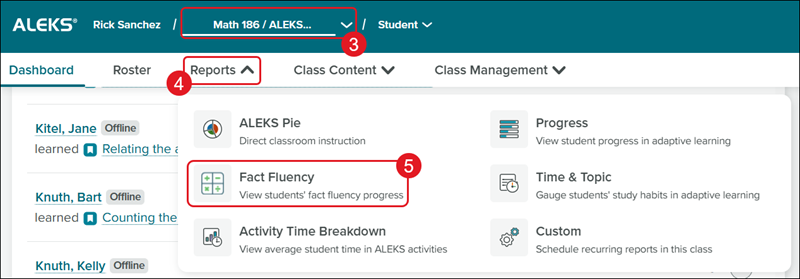
3. Select a Class from the drop-down.
4. Click on Reports.
5. Click on Time & Topic from the menu.
Fact Fluency Report
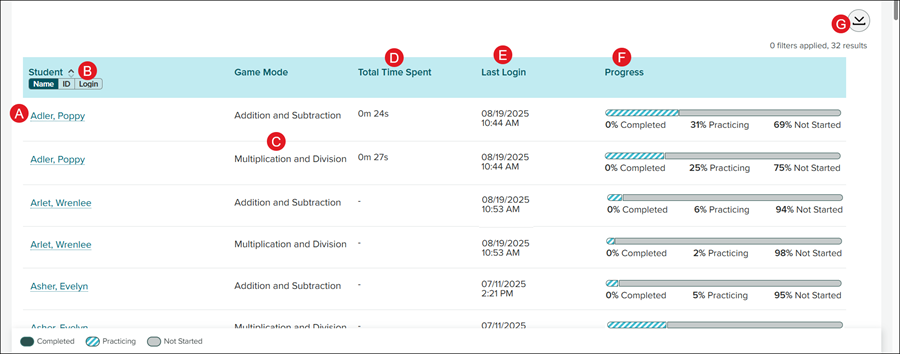
A. Each student with an active account will show in the Student list.
B. Click to view the Student list by Name, ID, or Login.
C. The Game Mode column will show two rows for each student: one for Addition and Subtraction and another for Multiplication and Division.
D. The Total Time Spent column shows the number of minutes and seconds the student spent in the game.
E. The Last Login provides the date and time the student last accessed the games.
F. The Progress bar shows if the student has not yet started any of the games or the percentage of completion.
G. Click the Download button to download a .xlsx file of the report.
