Copy Assignments in the New ALEKS View from Another Class
Learn how to copy assignments in the new ALEKS view from one class to another.
Tags
- Customer Support
- PreK-12
- Classroom Teacher
- Elementary School
- Middle School
- High School
- Direct Login & Auto-Rostering
- Direct Login & Manual-Rostering
- SSO & Auto-Rostering
- SSO & Manual-Rostering
- Supplemental
- Math
- ALEKS
- Grades & Assignments


View the demo in a separate tab.
View the Spanish version of the demo.
1. SSO or log in at my.mheducation.com.
2. Launch your ALEKS course.
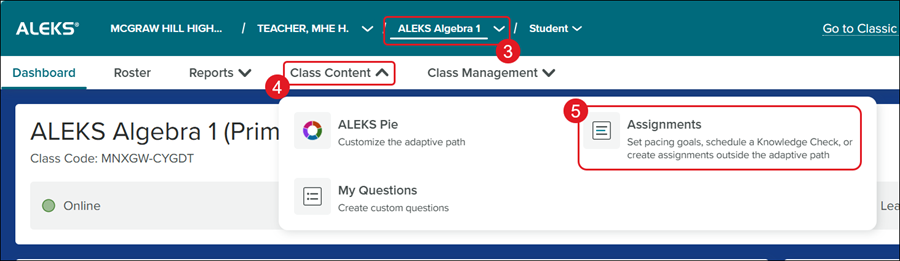
3. Select the Class from the drop-down.
4. Click on Class Content.
5. Click Assignments from the menu.
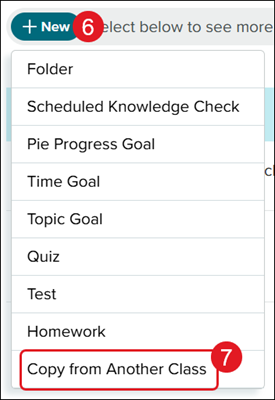
6. Click the +New button.
7. Click Copy from Another Class from the menu.
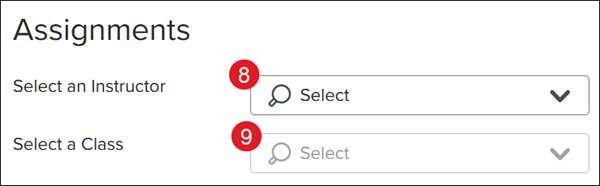
8. Select an Instructor from the drop-down.
9. Select a Class from the drop-down.
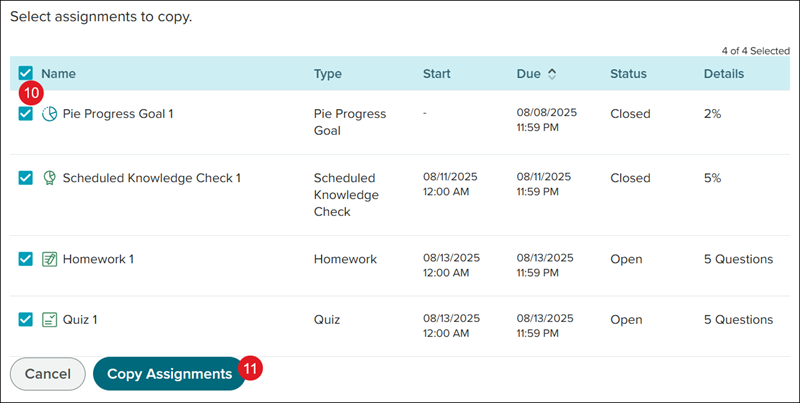
10. Check the assignments you want to copy.
11. Click the Copy Assignments button.
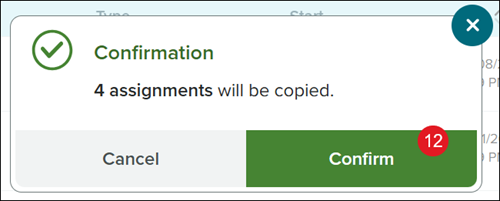
12. On the Confirmation pop-up, click the Confirm button.