Manage New ALEKS Class Duplication Settings
Configure class duplication settings in New ALEKS to control what content copies to new classes.
- Customer Support
- PreK-12
- Classroom Teacher
- Elementary School
- Middle School
- High School
- Direct Login & Auto-Rostering
- Direct Login & Manual-Rostering
- SSO & Auto-Rostering
- SSO & Manual-Rostering
- Supplemental
- Math
- ALEKS
- ALEKS Adventure
- Class Management
- Getting Started & Orientation
- Back-to-School Setup


View the demo in a separate tab.
View the Spanish version of the demo.
The Class Duplicate Settings option within ALEKS allows other teachers to duplicate your class settings to use when setting up their own class. This option is turned set to Private by default. Once you have made your class Public, teachers will be able to follow the steps in the create sub-class article to copy the class into their own.
1. SSO or log in at my.mheducation.com.
2. Launch ALEKS.
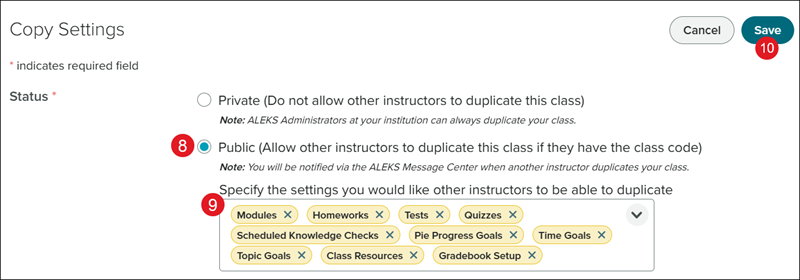
3. Select the Class from the drop-down.
4. Click on Class Management from the navigation menu.
5. Select Settings from the menu.
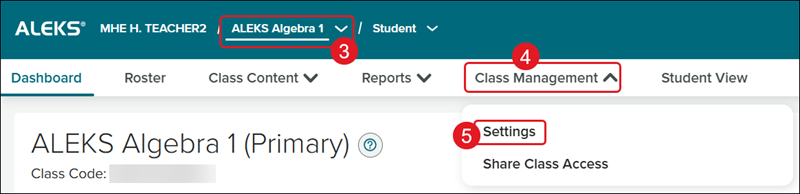
6. Click on Copy Settings from the left-hand menu or scroll to the bottom of the page.
7. Click the Edit (pencil) button.
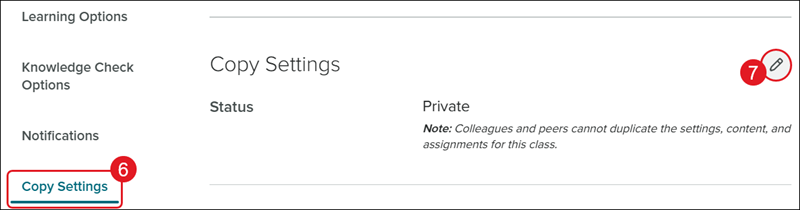
8. Select the Public radio button.
9. Click the settings drop-down and check the options you want to share with other teachers.
10. Click the Save button.