
Navigating the Networks 2014/2016 Student Dashboard
Learn how to easily navigate around the Networks student dashboard to access assignments, assessments, and student resources.
- Getting Started & Orientation
- Dashboard & Navigation Overview
- SSO & Manual-Rostering
- Customer Support
- Social Studies
- Direct Login & Auto-Rostering
- School Student
- Middle School
- Core
- Direct Login & Manual-Rostering
- High School
- School Parent
- SSO & Auto-Rostering
- PreK-12
- Networks 2014 & 2016


Overview
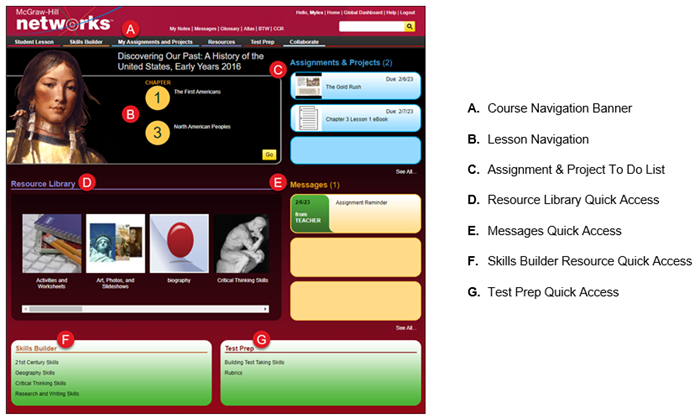
Navigation Banner

1. Click the program title in the upper left corner of the page to return to the Student Center Dashboard.
2. Click the links at the top of the page to directly access specific course pages.
- My Notes – Access any notes that you have taken through the course.
- Messages – Send and receive messages to and from your teacher.
- Glossary – Access the course glossary, in both English and Spanish.
- Atlas – Access the maps for the course.
3. Click the Home link to return to the Student Center Dashboard.
4. Click the Global Dashboard link to return to your My Classes page.
5. Click the Help link to access any help documents in the Resource library for the course.
6. Use the Search field to search the course for specific resources.
7. Click the tabs at the top of the page to quickly access the program pages.
• Student Edition – Access the Student Edition of the selected lesson.
• Skills Builder – Access all the Skills Builder resources available in the Resource Library.
• My Assignments and Projects – Access all your current and submitted assignments.
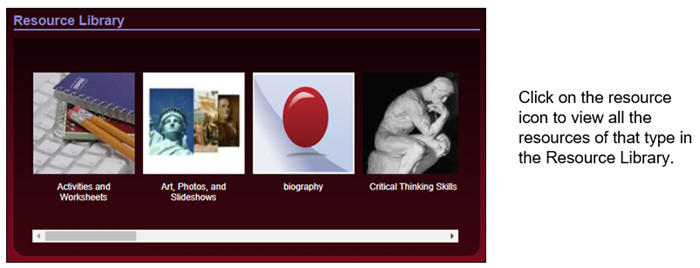
• Resources – Access the Resource Library, including all the online resources for the course.
• Test Prep – Access all the Test study help resources available in the Resource Library.
• Collaborate – Send and receive messages to and from your teacher.
Lesson Overview
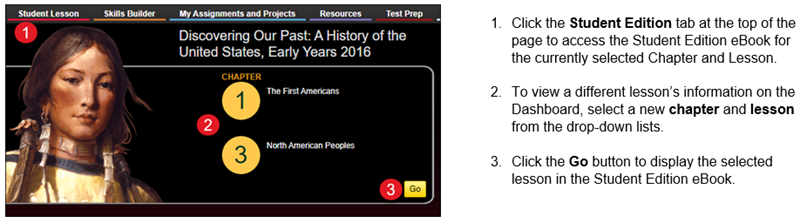
Resource Library
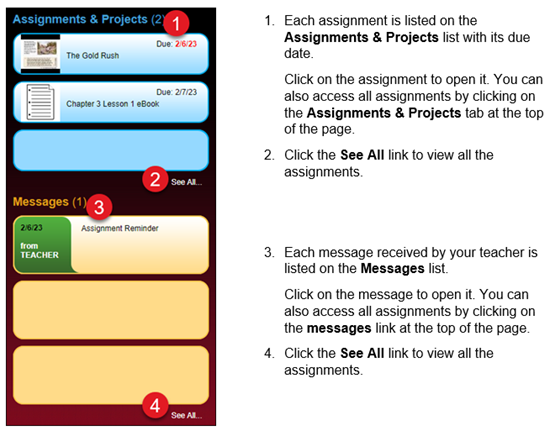
Assignments & Projects/Messages
Skills Builder and Test Prep

Skills Builder Resources Quick Access – Click on the available links to access resources to help build study skills for the course.
Test Prep Resources Quick Access – Click on the available links to access resources to help build test-taking skills for the course.
